
About cookies on this site Our websites require some cookies to function properly (required). In addition, other cookies may be used with your consent to analyze site usage, improve the user experience and for advertising. For more information, please review your options. By visiting our website, you agree to our processing of information as described in IBM’sprivacy statement. To provide a smooth navigation, your cookie preferences will be shared across the IBM web domains listed here.
Tutorial
Build an AI‑driven supply chain workflow using IBM Sterling OMS and watsonx Orchestrate
A hands‑on guide that shows OMS users how to build multi‑agent automation with watsonx Orchestrate to monitor orders, detect disruptions, and enable proactive, AI‑powered supply chain decisions
Supply chains are increasingly complex, fast‑moving, and sensitive to disruption. Weather events, political activity, and global logistics delays can slow down shipments and impact customer commitments. For developers building modern supply chain applications, manual monitoring is not sustainable. Automated, AI‑driven decision systems are becoming essential.
In this tutorial, learn how to build an agentic workflow that uses IBM watsonx Orchestrate and IBM Sterling Order Management to detect supply chain risks in real time. You create a multi‑agent system that retrieves order data, checks weather conditions, scans news signals, evaluates risk, and reports actionable insights back to the user.
By the end of this tutorial, you will have a working AI‑driven orchestration flow that monitors active orders, identifies at‑risk shipments, and supports proactive supply chain decisions, within watsonx Orchestrate.
Architecture of an AI-driven supply chain workflow
The following architecture used in this tutorial shows how the agentic workflow retrieves order data, collects external signals, evaluates risk, and generates a final summary in watsonx Orchestrate.

- The user interacts with the watsonx Orchestrate UI to start the workflow.
- The Supply Chain Orchestrator Agent manages the full workflow and handles routing, reasoning, planning, and tool calls.
- The Supply Chain Orchestrator Agent sends a request to the Sterling OMS Domain Agent to retrieve order details from the Sterling OMS system by using the available Sterling OMS tools.
- The Weather Agent collects weather information for each destination by using the weather retriever tool.
- The News Agent checks external events and risk signals for the same destinations.
- The Disruption Detector Agent analyzes inputs from both the Weather Agent and the News Agent to identify possible delivery risks.
- The Orchestrator Agent compiles the results and provides a clear summary to the user in the watsonx Orchestrate UI.
Prerequisites
- Access to a watsonx Orchestrate–enabled environment in either a cloud deployment or an on-premises deployment.
You can provision a free trial instance of watsonx Orchestrate on IBM Cloud or AWS:
- A running local environment of the watsonx Orchestrate Agent Development Kit (ADK). If you do not have an active ADK instance, review the getting started with ADK tutorial. This tutorial has been tested and validated with ADK versions 1.13.0 and 1.
- Clone the code base from our GitHub repo. Open the code in VSCode or an editor of your choice and then navigate to the
sterling-oms-smart-supply-chain-agentdirectory. Set thesterling-oms-smart-supply-chain-agentdirectory as your current working directory. - Access to a Sterling OMS system and credentials set up in the watsonx Orchestrate Connections page within the watsonx Orchestrate UI. For instructions, see Connecting to IBM Sterling Order Management System.
Step 1. Import the tools and agentic workflow into watsonx Orchestrate
Import the weather tool into watsonx Orchestrate by using the watsonx Orchestrate ADK command‑line interface (CLI).
orchestrate tools import –k python –f “tools/weather_retriever_tool/weather_tool.py

This command registers weather_tool in the watsonx Orchestrate user interface (UI). The workflow can now be used by agents.
Step 2. Import the Sterling OMS agents into watsonx Orchestrate
Import the supervisory agent, which serves as the Supply Chain Agent, by running the following command:
orchestrate agents import -f agents/supply_chain_agent.yamlImport the Sterling OMS agent into your watsonx Orchestrate environment:
bash import --manager sterling-order-management-agent/collaborator_agents/supply_chain/sterling_order_management_agent.yamlNow import the weather agent, news agent, and the disruption detector agent by running the following command:
orchestrate agents import -f agents/weather_agent.yamlorchestrate agents import -f agents/news_agent.yamlorchestrate agents import -f agents/disruption_detector_agent.yaml
Step 3: Verify the Agents in the watsonx Orchestrate UI
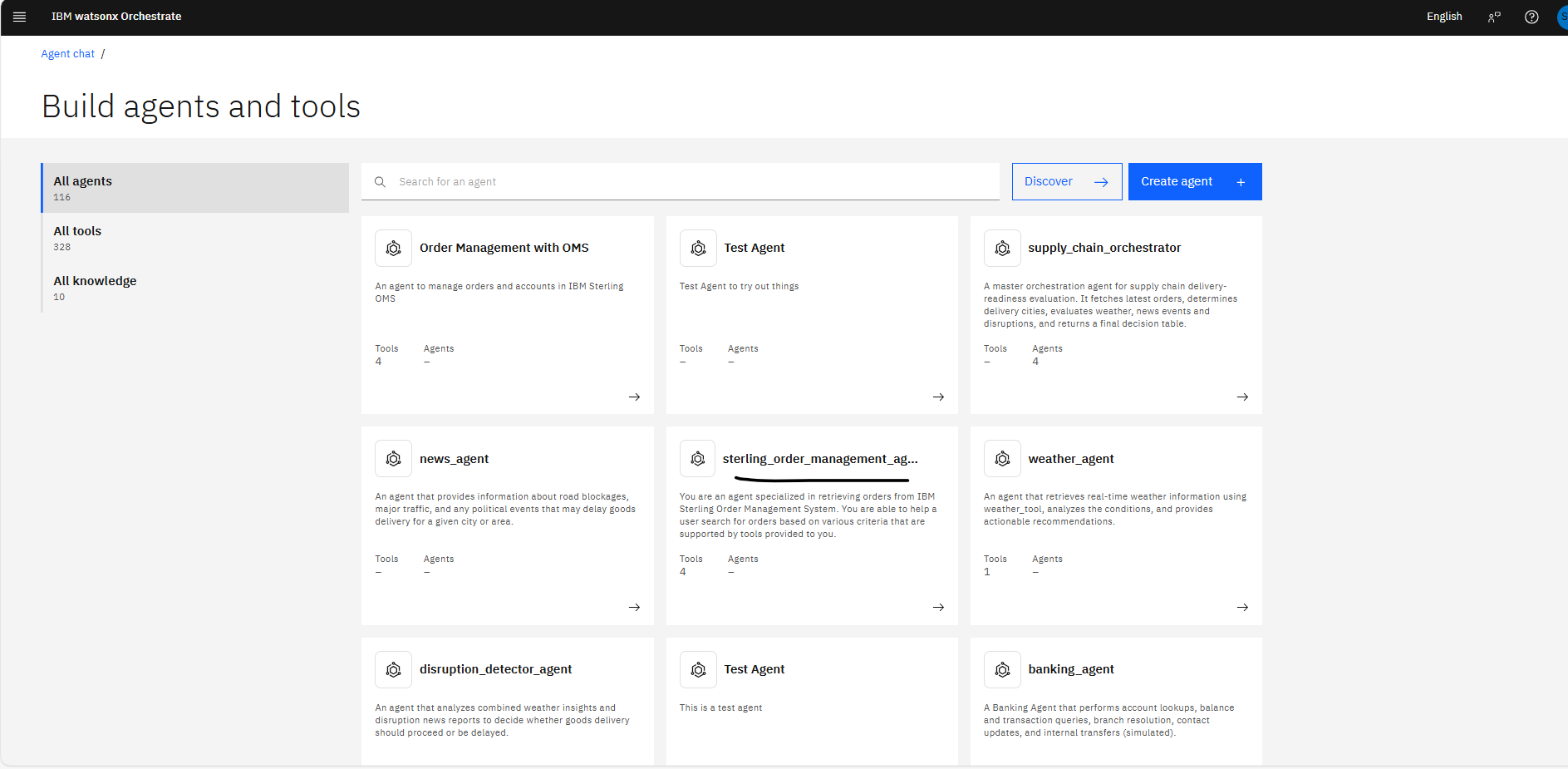
Open the watsonx Orchestrate UI and go to Manage Agents. Confirm that all imported agents appear in the list.
You should see the following agents:
news_agentweather_agentdisruption_detector_agentsupply_chain_orchestrator_agentsterling_order_management_agent
Step 4. Validate the agents in the watsonx Orchestrate UI
Open the watsonx Orchestrate environment, go to Manage Agents, and search for the sterling_order_management_agent.
Test the agent by submitting a query. For example, get the latest 5 orders for Aurora Enterprise

Test the weather agent by submitting a query. For example, What's the weather at Woodstock right now?


Test the news agent by submitting a query. For example, Is there any major road blockage or political event at woodstock city today?


Test the disruption_detector_agent.

Test the supply_chain_orchestrator agent.


Summary and next steps
In this tutorial, you built and deployed an agentic workflow that connects the IBM Sterling Order Management System with IBM watsonx Orchestrate. This workflow monitors order fulfillment risks and helps the user take early action. You completed the following tasks:
- Connected to Sterling OMS to retrieve active customer orders and shipment information.
- Built agents that analyze order status, delivery timelines, and risk signals across the supply chain.
- Added decision logic to detect possible delays before they affect the customer.
- Generated clear summaries that highlight at‑risk orders and explain the reasons for delay.
You now have an AI‑driven order monitoring system that checks Sterling OMS data continuously, identifies at‑risk orders in real time, and provides contextual summaries through watsonx Orchestrate.
This setup also creates a strong foundation for future automation, such as rerouting shipments, reprioritizing orders, or updating fulfillment plans, while already improving decision‑making speed and reducing manual effort.
Acknowledgments
The authors deeply appreciate the support of Ahmed Azraq, Moises Dominguez Garcia, and Bindu Umesh for the guidance and expertise on reviewing and contributing to this tutorial.
This tutorial was produced as part of the IBM Open Innovation Community initiative: Agentic AI (AI for Developers and Ecosystem).