
About cookies on this site Our websites require some cookies to function properly (required). In addition, other cookies may be used with your consent to analyze site usage, improve the user experience and for advertising. For more information, please review your options. By visiting our website, you agree to our processing of information as described in IBM’sprivacy statement. To provide a smooth navigation, your cookie preferences will be shared across the IBM web domains listed here.
Tutorial
Build an AI-powered document assistant with Quarkus and LangChain4j
Cloud-native AI for enterprise Java: RAG, embeddings, and native compilation
Enterprise Java developers are familiar with building robust, scalable applications using frameworks like Spring Boot. However, integrating AI capabilities into these applications often involves complex orchestration, high memory usage, and slow startup times.
In this tutorial, you'll discover how Quarkus combined with LangChain4j provides a seamless way to build AI-powered applications that start in milliseconds and consume minimal resources. Quarkus is a Kubernetes-native Java stack tailored for GraalVM and OpenJDK HotSpot. Quarkus offers incredibly fast boot times, low RSS memory consumption, and a fantastic developer experience with features like live coding.
In this tutorial, you'll build a smart document assistant that can ingest PDF documents, create embeddings, and answer questions about the content using retrieval augmented generation (RAG). The application will demonstrate enterprise-grade features like dependency injection, health checks, metrics, and hot reload development, all while integrating cutting-edge AI capabilities.
RAG and why you need it
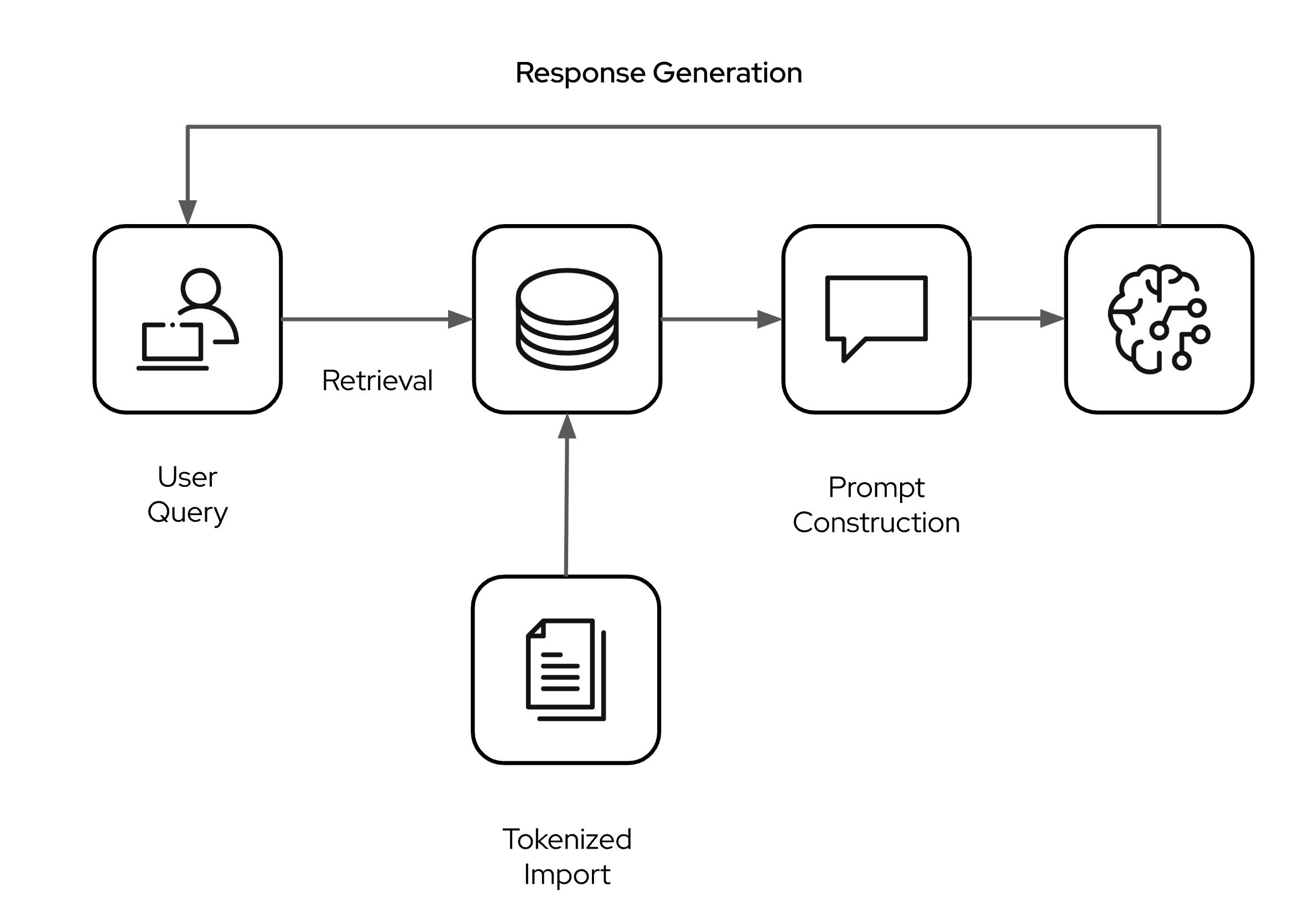
The retrieval augmented generation (RAG) pattern is a way to extend the knowledge of an LLM used in your applications. While models are pre-trained on large data sets, they have static and general knowledge with a specific knowledge cut-off date. They don't "know" anything beyond that date and also do not contain any company or domain specific data you might want to use in your applications. The RAG pattern allows you to infuse knowledge via the context window of your models and bridges this gab.
There's some steps that need to happen. First, the domain specific knowledge from documents (txt, PDF, and so on) is parsed and tokenized with a so called embedding generation model. The generated vectors are stored in a vector database. When a user queries the LLM, the vector store is searched with a similarity algorithm and relevant content is added as context to the user prompt before it is passed on to the LLM. The LLM then generates the answer based on the foundational knowledge and the additional context which was augumented from the vector search. A high level overview is shown in the following figure.
Learning objectives
By the end of this tutorial, you'll be able to:
- Set up a Quarkus project with LangChain4j for AI integration
- Create declarative AI services using CDI and annotations
- Implement document ingestion and vector embeddings
- Build a RAG (Retrieval Augmented Generation) question-answering system
- Experience Quarkus development mode with instant hot reload
- Deploy as a native executable with sub-second startup times
- Monitor AI operations with built-in observability features
Setting up your environment
We'll use standard macOS tools and package managers where possible. These are the essential tools you'll need to complete this tutorial:
- Java 17 or later installed
- Maven 3.8.1 or later
- Basic knowledge of Java and REST APIs
- Familiarity with dependency injection concepts
- (Optionally) a native Ollama installation
- An IDE or text editor of your choice
Set up Podman for container management
Quarkus integrates seamlessly with containers, especially for development services like databases and other sytems. Podman is a daemonless container engine alternative to Docker.
On Mac, each Podman machine is backed by a virtual machine. Once installed, the podman command can be run directly from the Unix shell in Terminal, where it remotely communicates with the podman service running in the Machine VM. It is almost transparent in usage to Docker and easy to use for development.
Install Podman. Find the latest Podman release on the GitHub Release page, and download the binary for your system architecture. At the time of writing, the latest release was v5.4.1. Install either the unversal pkg installer or the arm or amd version.
Initialize and start your Podman Machine. Podman on macOS runs containers within a lightweight Linux VM. Initialize and start it:
podman machine init podman machine startKeep this machine running whenever you need container support (like running the PostgreSQL database later). You can check its status with
podman machine list.Stop your Podman Machine by using this command:
podman machine stop
Step 1: Create the Quarkus application
Let's start by creating a new Quarkus project with the necessary extensions for AI integration.
Use the Quarkus Maven plugin to generate a new project:
mvn io.quarkus.platform:quarkus-maven-plugin:create \
    -DprojectGroupId=com.ibm.developer \
    -DprojectArtifactId=ai-document-assistant \
    -Dextensions="rest-jackson,langchain4j-ollama, langchain4j-pgvector,smallrye-health,quarkus-smallrye-metrics"
Let's briefly look at the Quarkus extensions we are using in this example.
- rest-jackson, which enables building REST APIs that automatically convert Java objects to/from JSON format.
- langchain4j-ollama, which integrates with Ollama to run AI language models locally without requiring external API keys.
- langchain4j-pgvector, which allows you to use PostgreSQL as a vector database for Retrieval-Augmented Generation (RAG) with Quarkus LangChain4j.
- smallrye-health, which provides health check endpoints to monitor if your application is running properly.
- quarkus-smallrye-metrics, which allows applications to gather metrics and statistics that provide insights into what is happening inside an application.
Together, these extensions give you a complete foundation for building a monitored, AI-powered REST service that can run entirely on your local machine.
Step 2: Configure the application and services
Change the application configuration in src/main/resources/application.properties:
# Ollama Granite models: https://ollama.com/search?q=granite
quarkus.langchain4j.ollama.chat-model.model-id=granite3.3
quarkus.langchain4j.ollama.embedding-model.model-name=granite-embedding:latest
# Optional but reccomended: Set a timeout
quarkus.langchain4j.ollama.timeout=120s
# uncomment to enable logging of requests and responses
#quarkus.langchain4j.ollama.log-requests=true
# PGvector configuration. The value must be the size of the vectors generated by the embedding model.
quarkus.langchain4j.pgvector.dimension=384
# Location of the RAG data
rag.location=src/main/resources/rag
We're using a local model served via Ollama. If you have Ollama installed nativley, Quarkus will discover it and use it. If not, it will try to spin up Dev Services container and serve it for you. No heavy lifting. No configuration necessary. The same is true for the PostgreSQL database with PGvector extension we are using here. You can spin it up separately or use the Quarkus dev service.
Step 3: Create the document ingestion service
First, let's create a startup service to handle Text document ingestion and embedding creation when the application starts:
package com.ibm.developer.service;

import static dev.langchain4j.data.document.splitter.DocumentSplitters.recursive;

import java.nio.file.Path;
import java.util.List;

import org.eclipse.microprofile.config.inject.ConfigProperty;

import dev.langchain4j.data.document.Document;
import dev.langchain4j.data.document.loader.FileSystemDocumentLoader;
import dev.langchain4j.model.embedding.EmbeddingModel;
import dev.langchain4j.store.embedding.Embeddingstore;
import dev.langchain4j.store.embedding.EmbeddingstoreIngestor;
import io.quarkus.logging.Log;
import io.quarkus.runtime.StartupEvent;
import jakarta.enterprise.context.ApplicationScoped;
import jakarta.enterprise.event.Observes;


@ApplicationScoped
public class DocumentIngestionService {

    public void ingest(@Observes StartupEvent ev,
                       Embeddingstore store, EmbeddingModel embeddingModel,
                       @ConfigProperty(name = "rag.location") Path documents) {
        store.removeAll(); // cleanup the store to start fresh (just for demo purposes)
        List<Document> list = FileSystemDocumentLoader.loadDocumentsRecursively(documents);
        EmbeddingstoreIngestor ingestor = EmbeddingstoreIngestor.builder()
                .embeddingstore(store)
                .embeddingModel(embeddingModel)
                .documentSplitter(recursive(100, 25))
                .build();
        ingestor.ingest(list);
        Log.info("Documents ingested successfully");
    }
}
This class, is a Quarkus application-scoped service that listens for the application startup event (similar to a Spring @EventListener(ApplicationReadyEvent.class)). When the app starts, it loads documents from a configured file system location (that we configured in application.properties), splits them, generates embeddings using a provided model, and stores them in an embedding store.
Note: Chunking or document splitting is a critical step that affects both the quality and performance of retrieval. The above example uses a "fixed size" chunking strategy which works best for technical logs or structured formats. Learn more about chunking strategies.
Now that we have our documents ingested into the vector store, we need to implement both the retriever and the augumenter.
Step 4: Add the augumentation features
The retriever is responsible for finding the most relevant segments for a given query. The augmentor is responsible for extending the prompt with the retrieved segments. We are using a naive (or sometimes called Frozen or Static) RAG approach here which consists of a single retriever and a basic injector. The retriever fetches N relevant content pieces and the injector appends them to the user message.
package com.ibm.developer.service;

import dev.langchain4j.model.embedding.EmbeddingModel;
import dev.langchain4j.rag.DefaultRetrievalAugmentor;
import dev.langchain4j.rag.RetrievalAugmentor;
import dev.langchain4j.rag.content.retriever.EmbeddingstoreContentRetriever;
import dev.langchain4j.store.embedding.Embeddingstore;
import jakarta.enterprise.context.ApplicationScoped;
import jakarta.enterprise.inject.Produces;
public class RetrievalAugmentorExample  {

    @Produces
    @ApplicationScoped
    public RetrievalAugmentor create(Embeddingstore store, EmbeddingModel model) {
        var contentRetriever = EmbeddingstoreContentRetriever.builder()
                .embeddingModel(model)
                .embeddingstore(store)
                .maxResults(3)
                .build();

        return DefaultRetrievalAugmentor.builder()
                .contentRetriever(contentRetriever)
                .build();
    }

}
The RetrievalAugmentorExample class is a Quarkus application-scoped bean that provides a configured RetrievalAugmentor for use in Retrieval-Augmented Generation (RAG) scenarios. It uses dependency injection to receive an Embeddingstore and EmbeddingModel, sets up a content retriever to fetch the top 3 relevant results, and builds a RetrievalAugmentor instance. More complex scenarios are called "Contextual RAG" and may use query transformations, multiple receivers, routing, or ranking mechanisms. You can learn more about that in the official Quarkus Langchain4j documentation.
Step 5: Create the AIService
Let's start wiring the pieces together. We need a way to talk to our model. Let's create an AIService and give it some instructons:
package com.ibm.developer.service;

import dev.langchain4j.service.SystemMessage;
import dev.langchain4j.service.UserMessage;
import io.quarkiverse.langchain4j.RegisterAiService;

@RegisterAiService
public interface DocumentAssistant {

    @SystemMessage("""
        You are a helpful document assistant. Answer questions based on the provided context.
        If you cannot find the answer in the context, politely say so.
        Always be accurate and concise in your responses.
        """)
    String answerQuestion(@UserMessage String question);
}
This interface defines an AI-powered service using Quarkus and the LangChain4j extension. The @RegisterAiService annotation tells Quarkus to generate an implementation that interacts with an AI model. The RetrievalAgumentor is automatically wired into it.
The @SystemMessage annotation sets the system prompt (instructions for the AI), and the @UserMessage annotation marks the method parameter as the user's input. When answerQuestion is called, the AI model receives both the system prompt and the user's question, and returns a generated answer.
Quarkus LangChain4j automatically wires a RetrievalAugmentor into any AI service if a corresponding bean is available in the CDI context (which we do with the Producer). This makes it easy to enable RAG for any AI service.
Step 6: Create the REST endpoints
Time to wire it all together and create a REST endpoint that we can ask some questions.
package com.ibm.developer;

import java.util.Map;

import org.eclipse.microprofile.metrics.MetricUnits;
import org.eclipse.microprofile.metrics.annotation.Counted;
import org.eclipse.microprofile.metrics.annotation.Timed;

import com.ibm.developer.service.DocumentAssistant;

import io.quarkus.logging.Log;
import jakarta.inject.Inject;
import jakarta.ws.rs.Consumes;
import jakarta.ws.rs.GET;
import jakarta.ws.rs.POST;
import jakarta.ws.rs.Path;
import jakarta.ws.rs.Produces;
import jakarta.ws.rs.core.MediaType;
import jakarta.ws.rs.core.Response;

@Path("/api/assistant")
@Produces(MediaType.APPLICATION_JSON)
@Consumes(MediaType.APPLICATION_JSON)
public class DocumentAssistantResource {

    @Inject
    DocumentAssistant documentAssistant;

    @POST
    @Path("/ask")
    @Counted(name = "questions_asked", description = "Number of questions asked")
    @Timed(name = "question_response_time", description = "Question response time", unit = MetricUnits.SECONDS)
    public Response askQuestion(Map<String, String> request) {
        String question = request.get("question");

        if (question == null || question.trim().isEmpty()) {
            return Response.status(Response.Status.BAD_REQUEST)
                .entity(Map.of("error", "question is required"))
                .build();
        }

        try {
            String answer = documentAssistant.answerQuestion(question);
            return Response.ok(Map.of(
                "question", question,
                "answer", answer
            )).build();
        } catch (Exception e) {
            Log.error("Error processing question: " + e.getMessage());
            return Response.status(Response.Status.INTERNAL_SERVER_ERROR)
                .entity(Map.of("error", "Failed to process question: " + e.getMessage()))
                .build();
        }
    }

    @GET
    @Path("/health")
    public Response health() {
        return Response.ok(Map.of(
            "status", "healthy",
            "service", "Document Assistant",
            "timestamp", System.currentTimeMillis()
        )).build();
    }
}
Notice how the code includes enterprise-grade features like metrics, proper error handling, and health checks - all seamlessly integrated.
Step 7: Add health checks
Create a custom health check to monitor the AI service:
package com.ibm.developer;

import org.eclipse.microprofile.health.HealthCheck;
import org.eclipse.microprofile.health.HealthCheckResponse;
import org.eclipse.microprofile.health.Readiness;

import com.ibm.developer.service.DocumentAssistant;

import jakarta.enterprise.context.ApplicationScoped;
import jakarta.inject.Inject;

@Readiness
@ApplicationScoped
public class DocumentAssistantHealthCheck implements HealthCheck {

    @Inject
    DocumentAssistant documentAssistant;

    @Override
    public HealthCheckResponse call() {
        try {
            // Test the AI service with a simple question
            String response = documentAssistant.answerQuestion("Hello, are you working?");

            return HealthCheckResponse.named("document-assistant")
                    .status(response != null && !response.trim().isEmpty())
                    .withData("last-check", System.currentTimeMillis())
                    .build();

        } catch (Exception e) {
            return HealthCheckResponse.named("document-assistant")
                    .down()
                    .withData("error", e.getMessage())
                    .build();
        }
    }
}
Step 8: Running and testing the application
To run and test the application, we'll add some documents and test with some question answering.
Add some example text documents
The example repository contains five character-based documents from the original Mad Max movie (1979) with unique made-up facts that will be perfect for testing RAG retrieval.
- Max Rockatansky - His police badge number 4073 kept in his left boot for luck
- Toecutter - His morning ritual of polishing chrome with eucalyptus oil at 6:47 AM
- Jessie Rockatansky - Her secret correspondence courses in marine biology and sea turtle research dreams
- Jim Goose - His collection of 23 vintage harmonica blues songs
- Fifi Macaffee - His 47-page coded psychological analysis of Max
These made-up facts are specific enough to be easily queryable ("What time did Toecutter polish his motorcycle?", "How many harmonica songs could Goose play?", "What was Max's badge number?") but obscure enough that a standard LLM wouldn't know them. They're woven naturally into the character descriptions alongside accurate information from the film. Let's test the system.
Start the development server
One of Quarkus's most impressive features is its development mode. Start your application:
mvn quarkus:dev
If you are starting Quarkus for the first time, you will have to wait a little longer though as the relevant models are being downloaded from the container registry. Won't happen the second time you do it.
You'll see output similar to:
Quarkus 3.24.1 on JVM started in 1.234s. Listening on: http://localhost:8080
Profile dev activated. Live Coding activated.
The application starts in just over a second, compared to typical Spring Boot applications that take 10-30 seconds.
Test question answering
The documents are ingested at application start, so now we can test the Q&A functionality:
curl -X POST http://localhost:8080/api/assistant/ask \
  -H "Content-Type: application/json" \
  -d "{\"question\": \"Tell me a 1979 movie.\"}"
The LLM answers with some basic facts about Mad Max.
Test one of our uniqe facts:
curl -X POST http://localhost:8080/api/assistant/ask \
  -H "Content-Type: application/json" \
  -d "{\"question\": \"What was Max's badge number??\"}"
Experience hot reload
While the application is running, make a change to the system message in the DocumentAssistant interface. Save the file and immediately test the /ask endpoint again. The changes take effect instantly without restarting the application, which is something that would require a full restart cycle in traditional Spring applications.
Step 9: Monitor your AI application
Finally, let's look at some metrics for our AI application.
Check health endpoints
Visit the health check UI at http://localhost:8080/q/health-ui to see your custom AI health check alongside Quarkus's built-in health checks.
View metrics
Access metrics at http://localhost:8080/q/metrics to see detailed metrics about your AI operations, including:
- Number of documents ingested
- Question processing times
- HTTP request metrics
- JVM metrics
- and some more
Summary
In this tutorial, you've built a complete AI-powered document assistant that showcases several significant advantages over traditional applications:
Performance Benefits:
- Sub-second startup times
- Minimal memory footprint (20-50MB )
Developer Experience:
- Instant hot reload during development
- Declarative AI services with simple annotations
- Seamless CDI integration for enterprise patterns
Enterprise Features:
- Built-in health checks and metrics
- Production-ready observability
AI Capabilities:
- Document ingestion and vector embeddings
- Retrieval Augmented Generation (RAG)
- Natural language querying of documents
- Extensible for additional AI features
The combination of Quarkus and LangChain4j provides enterprise Java developers with a powerful toolkit for building AI-powered applications that are both performant and maintainable. The declarative programming model will feel familiar to Spring developers, while the performance characteristics and native compilation capabilities open up new deployment possibilities.
Next steps
To further enhance your AI-powered applications, consider exploring:
- Multi-modal AI: Add image and audio processing capabilities.
- Advanced RAG: Implement hybrid search combining vector and keyword search.
- AI agents: Create more sophisticated AI agents with tool integration.
- Kubernetes deployment: Deploy your native executable to Kubernetes for ultimate scalability.
- OpenShift integration: Leverage Red Hat OpenShift for enterprise-grade AI deployments.
The future of enterprise Java development is here, and it's AI-powered, cloud-native, and lightning-fast.