
About cookies on this site Our websites require some cookies to function properly (required). In addition, other cookies may be used with your consent to analyze site usage, improve the user experience and for advertising. For more information, please review your options. By visiting our website, you agree to our processing of information as described in IBM’sprivacy statement. To provide a smooth navigation, your cookie preferences will be shared across the IBM web domains listed here.
Tutorial
Build smart AI agents by integrating CrewAI and watsonx
Generate research proposals using smart AI agents
An exciting frontier in artificial intelligence is the development of collaborative AI agents powered by large language models. By integrating CrewAI with IBM watsonx, we can create sophisticated systems where AI agents work together to accomplish complex, multi-step tasks across various domains.
This tutorial explores how CrewAI and IBM watsonx can be used to create collaborative AI agents, using research proposal generation as a practical example.
CrewAI is a framework that facilitates collaboration between multiple AI agents, each with specific roles and expertise, to achieve complex goals. IBM watsonx is a platform to readily build custom AI applications for business, manage all data sources, and accelerate responsible AI workflows—all on one platform.
By combining CrewAI's agent-based framework with watsonx's powerful large language models, users can create AI systems that operate independently or collaboratively to execute intricate tasks.
Leveraging CrewAI and IBM watsonx to create AI agents enables organizations to:
- Automate complex tasks: Streamline workflows that require coordination and iterative refinement.
- Use specialized agents: Each agent can focus on a unique part of a larger problem.
- Scale easily: Add or modify agents to suit additional tasks or new workflows.
- Maintain customizability: Tailor agent configurations and tasks for specific needs, like research or content generation.
Prerequisites
You need an IBM Cloud account to create a watsonx.ai project.
You'll also need a Tavily account.
Lastly, Python 3.10 or higher needs to be installed on your system.
Set up the environment
To set up your environment, you will need to create a watsonx.ai project, obtain a Tavily API key, and then set up your Python environment and configure some environment variables.
Setting up your watsonx project
Log in to your IBM Cloud account.
To create an API key, navigate to Manage > Access (IAM) > API Keys. Generate a new API key and save it. This will be your
WATSONX_APIKEY.Go to watsonx.ai and log in with your IBM Cloud account.
Create a watsonx.ai project by following these instructions in the documentation.
To retrieve your project ID, open your watsonx.ai project. Navigate to the Manage tab. Then, under General Option, copy the Project ID. This will be your
WATSONX_PROJECT_ID.
Obtain Tavily API key
Log in to your Tavily account.
Generate an API key. Create a new API key. This will be your
TAVILY_API_KEY.
Set up your Python environment and Configure Environment Variables
Ensure Python 3.10 or higher is installed on your system. You can check your version using this command:
python --versionCreate a Python virtual environment using this command:
python -m venv crewai_watsonx_venvDepending on your operating system, activate the virtual environment using one of these commands:
Windows:
crewai_watsonx_venv\Scripts\activateLinux and macOS:
source crewai_watsonx_venv/bin/activate
Install all required dependencies using this command:
pip install crewai==0.75.0 langchain==0.3.4 langchain-community==0.3.3 litellm==1.50.2 python-dotenv==1.0.1Configure the environment variables. Create an
.envfile in your project directory and add the following:WATSONX_APIKEY=<Watsonx API Key> WATSONX_PROJECT_ID=<Watsonx Project Id> WATSONX_URL=https://us-south.ml.cloud.ibm.com TAVILY_API_KEY=<Tavily API Key>
This setup will allow CrewAI agents to access the watsonx models and integrate additional tools as required.
Architecture of a CrewAI and IBM watsonx agent system
The system architecture comprises CrewAI as the orchestrating framework for the agents and IBM watsonx as the large language model that powers these agents' interactions. CrewAI organizes the agents to act in a workflow, where each agent has a dedicated role and leverages Watsonx to process inputs and generate outputs effectively.
In this example, we illustrate how CrewAI and watsonx can enable agents to generate a research proposal, which is a use case that highlights the potential of this architecture for more general, complex tasks.
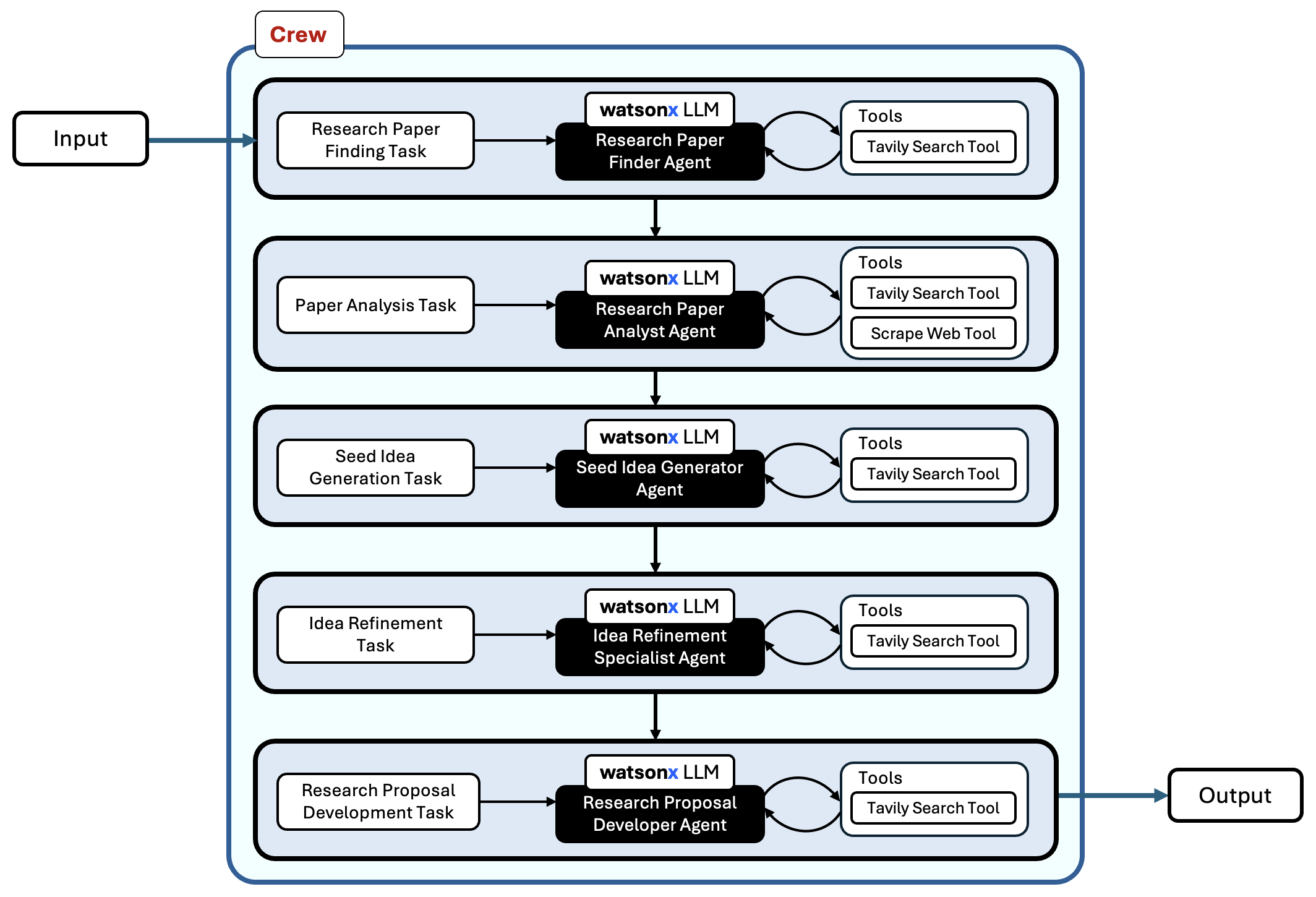
The entire code for this application can be found in this Github repository.
Tools and components in the agent system
For this system, we use two primary tools to help agents gather and process data:
- TavilySearchResults: Allows agents to search for scientific papers and information using web-based queries.
- ScrapeWebsiteTool: Helps agents extract specific information from web pages.
The following code sets up these tools, making them accessible to the agents in our system:
from dotenv import load_dotenv
from crewai_tools import ScrapeWebsiteTool
from langchain_community.tools.tavily_search import TavilySearchResults
from crewai import Agent, Task, Crew, Process

load_dotenv()

search_tool = TavilySearchResults(max_results=5)
scrape_tool = ScrapeWebsiteTool()
Configuring the watsonx large language model
The agents use IBM watsonx's large language model to interpret and generate text. This example uses the Mistral-Large model, configured for tool calling.
from crewai import LLM

llm = LLM(
    model="watsonx/mistralai/mistral-large",
    max_tokens=1000,
    temperature=0
)
Defining agents in CrewAI
Each agent in CrewAI is designed with a specific role and backstory, guiding its actions in the workflow. These agents can specialize in finding research papers, analyzing content, generating new ideas, and refining those ideas.
Here's an example of the agents defined in this system:
Research Paper Finder: Finds relevant research papers based on a topic.
paper_finder = Agent( role='Research Paper Finder', goal='Find relevant scientific papers related to the input paper', backstory=("You are an expert at finding relevant scientific papers " "and research works. You use web search to discover papers that are closely " "related to a given research topic."), tools=[search_tool], llm=llm, verbose=True, allow_delegation=True )Research Paper Analyst: Analyzes and extracts insights and limitations from research papers.
analyzer = Agent( role='Research Paper Analyst', goal='Analyze scientific papers to extract key knowledge and limitations', backstory=("You are an expert at analyzing scientific papers to identify " "key findings, methodologies, and limitations."), tools=[scrape_tool, search_tool], llm=llm, verbose=True, allow_delegation=True )Seed Idea Generator: Uses insights to develop initial research ideas.
seed_idea_generator = Agent( role='Seed Idea Generator', goal='Generate initial research ideas by combining knowledge from related papers', backstory=("You specialize in combining knowledge from multiple " "sources to generate novel research ideas."), tools=[search_tool], llm=llm, verbose=True, allow_delegation=True )Idea Refinement Specialist: Refines and enhances the generated research ideas.
idea_iterator = Agent( role='Idea Refinement Specialist', goal='Iterate and improve upon seed ideas', backstory=("You excel at taking initial research ideas and " "developing them through iteration and improvement."), tools=[search_tool], llm=llm, verbose=True, allow_delegation=True )Research Proposal Developer: Develops comprehensive proposals from refined ideas.
completion_specialist = Agent(
     role='Research Proposal Developer',
     goal='Transform ideas into complete research proposals',
     backstory=("You are skilled at developing comprehensive research "
     "proposals with clear methodologies and experiment plans."),
     tools=[search_tool],
     llm=llm,
     verbose=True,
     allow_delegation=True
 )
Building a collaborative workflow
The CrewAI system defines a workflow where each agent performs a specific task, from searching for papers to producing a final proposal. Below, we outline each step in this process:
Research Paper Finding Task: Uses the Research Paper Finder to locate related scientific papers.
paper_finding_task = Task( description="Find related scientific papers for '{input_paper}' using web search.", expected_output="A JSON list of papers including title, authors, url and summary.", agent=paper_finder )Paper Analysis Task: Engages the Research Paper Analyst to summarize findings and gaps.
analyze_papers_task = Task( description="Analyze the related papers to identify key knowledge and limitations.", expected_output="A JSON object summarizing key knowledge and limitations from the related papers.", agent=analyzer )Seed Idea Generation Task: Creates preliminary research ideas based on analysis.
seed_idea_generation_task = Task( description="Generate initial research ideas based on the knowledge and limitations provided in the analysis.", expected_output="A JSON list of research ideas including idea_title, description, and rationale.", agent=seed_idea_generator )Idea Refinement Task: Enhances and details the generated ideas.
idea_iteration_task = Task( description="Refine the generated seed ideas by expanding and identifying key improvements.", expected_output="A JSON list of refined ideas including refined_idea_title, description, and improvements.", agent=idea_iterator )Research Proposal Development Task: Converts refined ideas into structured proposals.
completion_task = Task(
     description="Develop a complete research proposal based on the refined research ideas.",
     expected_output="A JSON list of research proposals including proposal_title, methodology, and experiment_plan.",
     agent=completion_specialist
 )
Executing the workflow
The CrewAI system uses a sequential process to organize tasks, where each agent performs its designated task in the research proposal pipeline. This setup is ready to execute with an example input paper title.
scientific_crew = Crew(
    agents=[
        paper_finder,
        analyzer,
        seed_idea_generator,
        idea_iterator,
        completion_specialist
    ],
    tasks=[
        paper_finding_task,
        analyze_papers_task,
        seed_idea_generation_task,
        idea_iteration_task,
        completion_task
    ],
    process=Process.sequential
)

# Input and Execution
inputs = {
    'input_paper': 'Advanced Machine Learning Techniques for Scientific Discovery'
}

result = scientific_crew.kickoff(inputs)
print(result)
Conclusion
The integration of CrewAI and IBM watsonx for creating collaborative AI agents represents a powerful advancement in automation and AI-driven workflows. By enabling multiple AI agents to work together, organizations can tackle complex tasks with efficiency and insight, paving the way for more sophisticated AI applications across domains.
While this example focuses on research proposal generation, the system can support other applications:
- Market Research: Collect and analyze market data to generate actionable insights.
- Financial Analysis: Build AI-driven systems that analyze financial data and create reports.
- Risk Assessment: Assess risk factors using AI agents for in-depth analysis and reporting.
- Content Curation: Automate content creation for articles, white papers, or social media summaries.