
About cookies on this site Our websites require some cookies to function properly (required). In addition, other cookies may be used with your consent to analyze site usage, improve the user experience and for advertising. For more information, please review your options. By visiting our website, you agree to our processing of information as described in IBM’sprivacy statement. To provide a smooth navigation, your cookie preferences will be shared across the IBM web domains listed here.
Article
Creating cloud-native applications: 12-factor applications
Cloud-native apps that are portable, scalable, and reliable
On this page
Created in 2012, the 12-factor app methodology was designed to provide a set of guidelines for helping developers and organizations to design and build cloud-native applications. We’ll explore how you can take advantage of each of these 12 factors to create applications, utilizing open source technologies, that thrive in the cloud.
Throughout this article, we provide links to many of the Open Liberty interactive guides that you can try for yourself to help you learn (in a practical way) how to use the tools and technologies that enable each factor within this methodology. If you are unfamiliar with Open Liberty and its many benefits, check out our articles detailing why cloud-native Java developers love Liberty and why WebSphere and Open Liberty are ideal for cloud-native Java applications.
What is a 12-factor application and why should you care?
The 12-factor app is a methodology defined by the developers at Heroku for building cloud-native applications that (quoting from 12factor.net):
- Use declarative formats for setup automation, which minimizes time and cost for new developers joining the project
- Have a clean contract with the underlying operating system, offering maximum portability between execution environments
- Are suitable for deployment on modern cloud platforms
- Minimize divergence between development and production, enabling continuous deployment for maximum agility
- Can scale up without significant changes to tooling, architecture, or development practices
The original 12 factors from this methodology are:
- Codebase – One codebase tracked in revision control, many deploys
- Dependencies – Explicitly declare and isolate dependencies
- Configuration – Store configuration in the environment
- Backing services – Treat backing services as attached resources
- Build, release, run – Strictly separate build and run stages
- Processes – Execute the app as one or more stateless processes
- Port binding – Export services via port binding
- Concurrency – Scale-out via the process model
- Disposability – Maximize robustness with fast start-up and graceful shutdown
- Dev/prod parity – Keep development, staging, and production as similar as possible
- Logs – Treat logs as event streams
- Admin processes – Run admin/management tasks as one-off processes
Factor 1 – Codebase
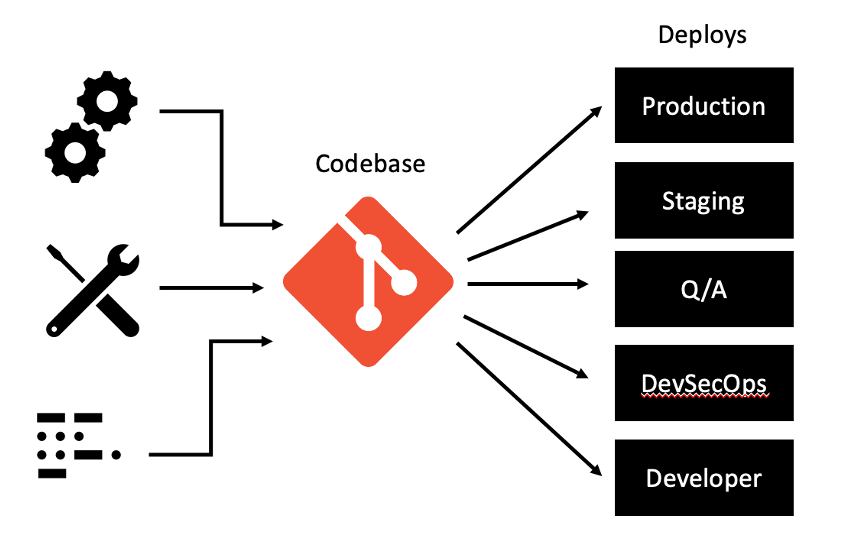
Cloud-native applications must always consist of a single codebase that is tracked in a version-control system. A codebase is a source-code repository or a set of repositories that share a common root and is used to produce any number of immutable releases. There should be a 1:1 relationship between an application and a codebase, but a one-to-many relationship between the codebase and deployments of an application. This single codebase helps to support collaboration between development teams and helps to enable proper versioning of applications.
This codebase could be a Git repository (including GitHub, GitHub Enterprise, GitLab, etc). Git is a revision control tool to allow more than one person to develop a project at once and ensure that all the code is safe. Alternatively, you could make use of other tools like BitBucket, SourceForge, cloud specific source repositories, etc.
Factor 2 – Dependencies
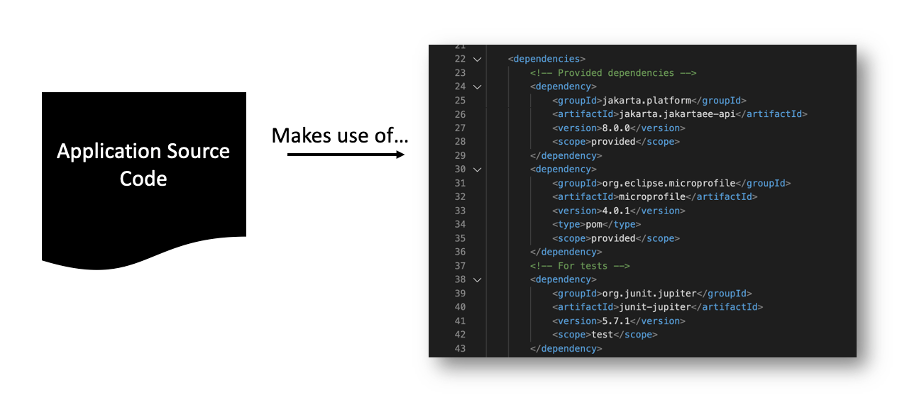
Most applications require the use of external dependencies. These dependencies must be pulled down during the build process, as it cannot be guaranteed that the specific dependencies your application relies on already exist in the system/runtime. A cloud-native application can never rely on the implicit existence of system-wide packages. This is what this factor focuses on – encouraging the explicit declaration and isolation of application dependencies. This helps to provide consistency between development and production environments, simplifies the setup for developers new to the application, and supports portability between cloud platforms.
The first step to achieving this factor is to identify, declare, and isolate any external dependencies within your application. Most contemporary programming languages have tools or facilities for managing these dependencies. In Java, two of the most popular tools for dependency management are Maven and Gradle. These tools help simplify the complexity that is inherent to dependency management, thereby enabling developers to declare their dependencies and then let the tool be responsible for actually ensuring that those dependencies are satisfied. So, instead of packaging the third-party libraries inside your microservice, you can specify all dependencies in a Maven pom.xml file or a Gradle settings.gradle file. This enables you to freely move up to newer versions and allows responsibility for ensuring the dependencies are satisfied to be given to the build tool rather than the developer.
You can use either Maven or Gradle with Open Liberty applications. When using Maven, you must declare the dependencies in a build file (pom.xml for Maven) and the required packages are downloaded from the Maven Central Repository at build time to compile the code. The packaging step uses the Maven or Gradle Liberty plug-ins to pull down a Liberty runtime from the repository and produce a packaged Liberty server containing the server configuration and a WAR file with the compiled application code. As a result, the application does not have any dependencies that it assumes will already exist on the system.
Try these out:
- Building a web application with Maven
- Building a web application with Gradle
- Injecting dependencies into microservices
Factor 3 – Configuration
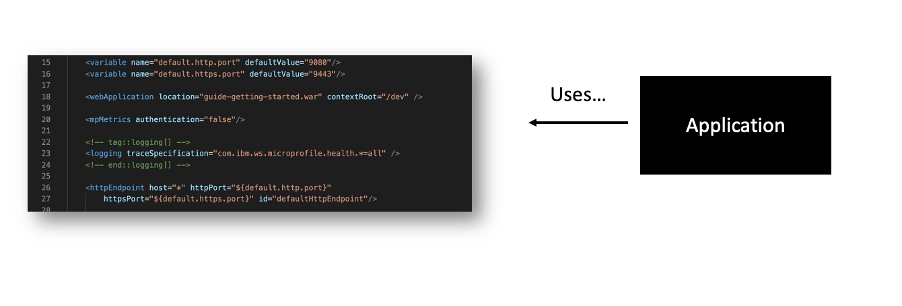
Configuration refers to any value that can vary across deployments (e.g., developer workstation, QA, and production). This could include:
- URLs and other information about backing services, such as web services, and SMTP servers
- Information necessary to locate and connect to databases
- Credentials to third-party services such as Amazon AWS or APIs like Google Maps, X (formally known as Twitter), and Facebook
- Information that might normally be bundled in properties files or configuration XML, or YML
It is important that configuration and credentials are separated from the application code. Credentials are highly sensitive pieces of information and should never be shipped within application code as it runs the risk of exposing your application’s backing services, internal URLs, the resources and services your application relies on, etc. Externalizing configuration is also important as it enables us to deploy our applications to multiple environments regardless of which cloud runtime we’re using. In other words, the application shouldn’t care what environment it is running in, and we shouldn’t need to change the app to run it in a different environment. Storing these configuration values in environment variables is considered best practice for externalizing this configuration. This approach helps to simplify application deployment to multiple environments, reduces the risk of leaking credentials and passwords, and enables more effective release management.
Utilizing tools like MicroProfile Config can help you to externalize your configuration by placing configuration in properties files that can be easily updated without recompiling your microservices. This ensures that our configuration is stored in the environment and accessed at runtime rather than ingrained in the code itself. It also enables the ability to dynamically change configuration values easily.
IBM Enterprise Application Service for Java Tools (EASeJ Tools) helps build, deploy, and run enterprise Java applications in the cloud. EASeJ Tools offers assistance with configuring your applications with EASeJ environment configuration YAML files.
Liberty Tools in the IDE provides Liberty Configuration editing assistance for configuration files via the Liberty Config Language Server. It offers diagnostics, code completion, and quick fixes, in Liberty bootstrap.properties, server.xml, and server.env files.
Try these out:
- Configuring microservices
- Separating configuration from code in microservices
- Configuring microservices running in Kubernetes
Factor 4 – Backing services
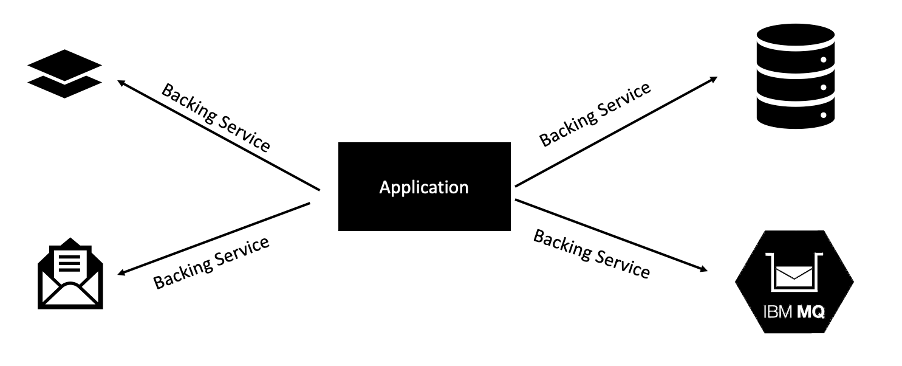
A backing service is any service on which your application relies for its functionality. Some of the most common types of backing services include data stores, messaging systems, caching systems, and any number of other types of service, including services that perform line-of-business functionality or security.
This factor focuses on treating these backing services as bound resources. A bound resource is just a means of connecting your application to a backing service. A resource binding for a database might include a username, a password, and a URL that allows your application to consume that resource. An application should declare its need for a given backing service but allow the cloud environment to perform the actual resource binding. The binding of an application to its backing services should be done via external configuration. It should be possible to attach and detach backing services from an application at will, without re-deploying the application. There should never be a line of code in your application that tightly couples the application to a specific backing service.
Embracing backing services as bound resources enables cloud-native applications to have greater flexibility and resilience, enabling loose-coupling between services and deployment (e.g., an administrator who notices that the database is failing can bring up a fresh instance of that database and then change the binding of their application to point to this new database).
Try these out:
- Caching HTTP session data using JCache and Hazelcast
- Persisting data with MongoDB
- Accessing and persisting data in microservices using Java Persistence API (JPA)
Factor 5 – Build, release, and run
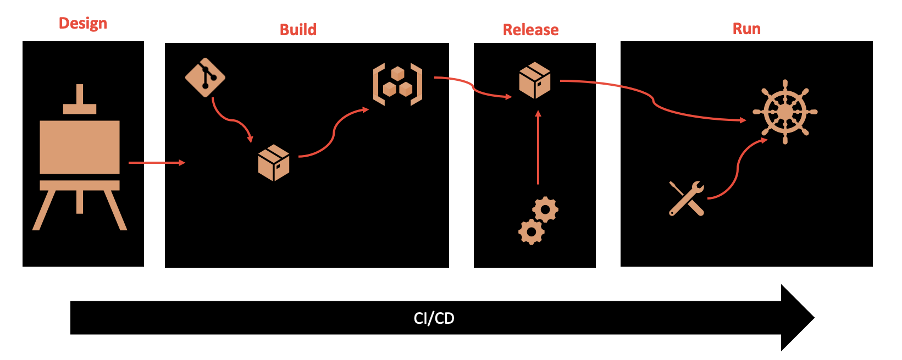
This factor focuses on getting a clearly defined process with no cycles and calls for strict separation of each of these deployment stages. Essentially, a single codebase is taken through the build process to produce a compiled artifact, which is then merged with configuration information that is external to the application to produce an immutable release, which is then delivered to a cloud environment (development, QA, production, etc) and run. The key takeaway is that each of the deployment stages is isolated and occurs separately.
The build stage focuses on building everything needed for our application; there should be no additional build steps when packaging a build with configuration to form a release artifact nor when running the application. It is within this stage that the dependencies declared during the design phase are gathered and bundled into the build artifact (e.g. a WAR or JAR file). The output of a build is a packaged server containing all of the environment-agnostic configuration required to run the application. This is especially important for cloud-native applications that need to be able to be deployed to multiple different environments.
The release stage focuses on combining the output of the build stage with configuration values (both environmental and app-specific) to produce another a release. By labeling these releases with unique IDs, it enables greater capacity for rolling back to previous versions if anything goes from and historical auditing.
The run stage, which occurs on the cloud provider, usually uses tooling like containers and processes to launch the application. Once that operation is running, the cloud runtime is responsible for its maintenance, health, and dynamic scaling.
GitOps provides a way to manage infrastructure and uses Git repositories as a single source of truth. It delivers Infrastructure as Code (IaC) which means infrastructure is created and managed through code.
A declarative description of the system’s desired state is provided to GitOps. This operational framework leverages version control, CI/CD, and collaboration to ensure consistent deployments. GitOps configuration files provision the same infrastructure every time to automate deployments. Learn more about GitOps.
Likewise, IBM Enterprise Application Service for Java (EASeJ) offers pre-configured managed CI/CD pipelines that ensure streamlined delivery to build, deploy, and run Java applications at scale. Learn more about how EASeJ works. EASeJ is integrated with 99.95% SLA across three cloud availability zones to ensure high availability and reliability. This fully managed service is available on both IBM Cloud and AWS and includes automating key migration steps to the cloud.
Factor 6 – Processes
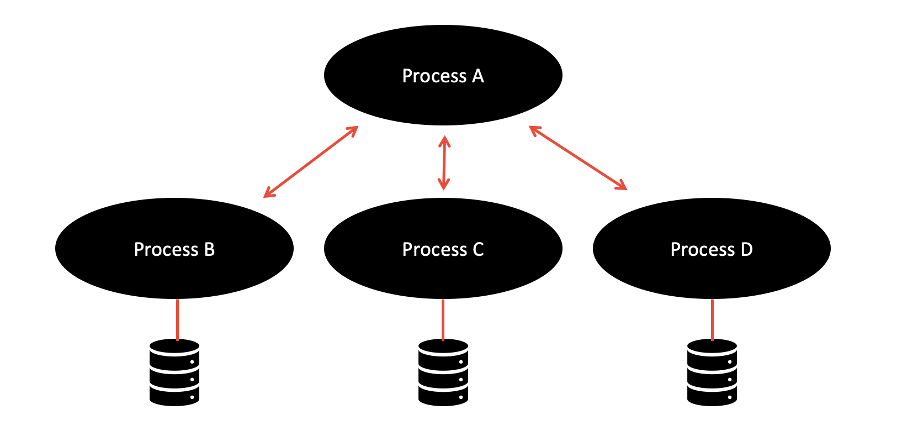
The processes factor enforces the notion that applications should execute as a single, stateless process. In other words, all long-lasting states should be external to the application, provided by backing services. State should not be maintained within your application. This is a useful factor as it means that if one instance of your application goes down, you don’t lose the current state. It also simplifies workload balancing as your application doesn’t have an affinity to any particular instance of a service.
REST is a widely adopted transport protocol, and JAX-RS can be used to achieve a RESTful architecture. Systems that utilize the REST paradigm are stateless. In this way, underlying infrastructure can destroy or create new microservices without losing any information. Jakarta RESTful Web Services and MicroProfile Rest Client are useful APIs for writing and consuming RESTful services.
Try these out:
Factor 7 – Port binding
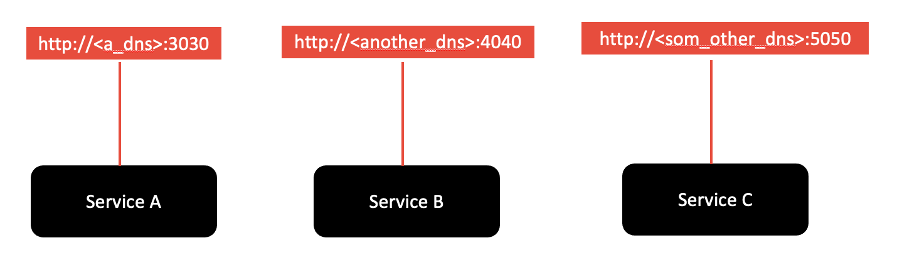
The port-binding factor states that cloud-native applications should export services using port binding. In other words, the host and port used to access the service should be provided by the environment, not baked into the application, so that you aren’t relying on pre-existing or separately configured services for that endpoint. Your cloud provider should be managing the port assignment for you because it is likely also managing routing, scaling, high availability, and fault tolerance, all of which require the cloud provider to manage certain aspects of the network, including routing host names to ports and mapping. Web applications, especially those already running within an enterprise, are often executed within some kind of server container -- Open Liberty, Liberty, WebSphere, etc. In a non-cloud environment, web applications are deployed to these containers, and the container is then responsible for assigning ports for applications when they start up.
When deploying them in the cloud, the ports need to have the ability to be able to change, so it is important to have a way to rebind the port. MicroProfile Config can be a useful tool to help with this. You can specify the new port in a Kubernetes ConfigMap, and MicroProfile Config automatically picks up the value to give the correct information to the deployed microservices. MicroProfile Rest Client is another useful tool. It helps create client code to connect from one microservice to another.
The Open Liberty Operator can also be another useful tool for facilitating the behaviours encouraged by this factor by enabling automated service binding. The operator automates updates of binding information among applications, meaning that it connects applications and maintains information about whether a particular application produces or consumes a service. With this information, the operator automatically handles Kubernetes-level details, including creating and injecting Kubernetes Secrets, so that your applications can connect to required services without interruption.
Try this out:
Factor 8 – Concurrency
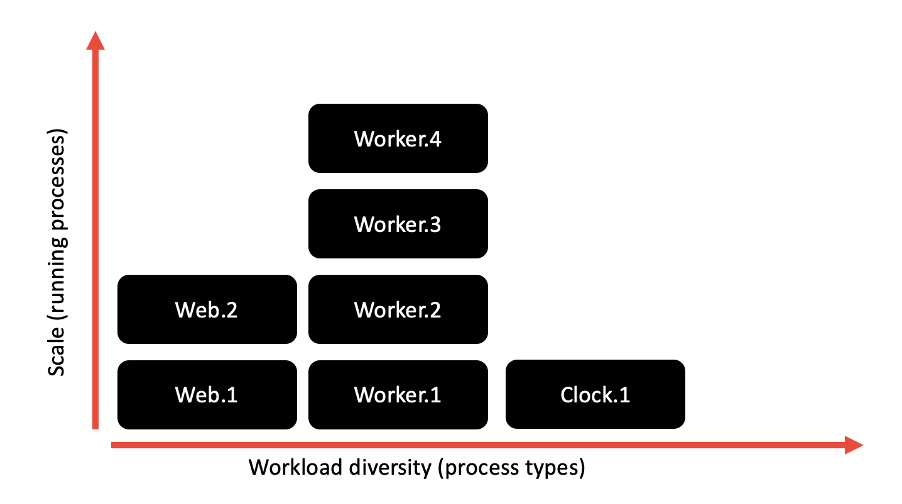
The concurrency factor stresses that microservices should be able to be scaled up or down, elastically, depending on their workload. Previously, when many applications were designed as monoliths and were run locally, this scaling was achieved through vertical scaling (i.e., adding CPUs, RAM, and other resources, virtual or physical). However, now that our applications are more fine-grained and running in the cloud, a more modern approach, one ideal for the kind of elastic scalability that the cloud supports, is to scale out, or horizontally. Rather than making a single big process even larger, you create multiple processes, and distribute the load of your application among those processes.
The Kubernetes auto-scaler tool can help with this. The Horizontal Pod Autoscaler automatically scales the number of pods in a replication controller, deployment, replica set, or stateful set based on observed CPU utilization (or, with custom metrics support, on some other application-provided metrics). It is implemented as a Kubernetes API resource and a controller. The resource determines the behavior of the controller. The controller periodically adjusts the number of replicas in a replication controller or deployment to match the observed average CPU utilization to the target specified by user.
Another useful tool, especially when deploying to OpenShift is the Open Liberty Operator. You can configure horizontal auto-scaling to create and delete instances of your application based on resource consumption. This ability to run multiple instances of your application and auto-scale them means that your application is made highly available.
Try these out:
- Deploying microservices to Kubernetes
- Deploying microservices to OpenShift by using Kubernetes Operators
Factor 9 – Disposability
On a cloud instance, an application’s life is as transient as the infrastructure that supports it. A cloud-native application’s processes must be disposable, which means they can be started or stopped rapidly. An application cannot scale, deploy, release, or recover rapidly if it cannot start rapidly and shut down gracefully. This is especially important in cloud-native applications because, if you are bringing up an application and it takes minutes to get into a steady state, in today’s world of high traffic that could mean hundreds or thousands of requests get denied while the application is starting. Additionally, depending on the platform on which your application is deployed, such a slow start-up time might trigger alerts or warnings as the application fails its health check.
Extremely slow start-up times can prevent your app from starting at all in the cloud. If your application is under increasing load, and you need to rapidly bring up more instances to handle that load, any delay during start-up can hinder its ability to handle that load. If the app does not shut down quickly and gracefully, that can also impede the ability to bring it back up again after failure. The inability to shut down quickly enough can also run the risk of failing to dispose of resources, which could corrupt data.
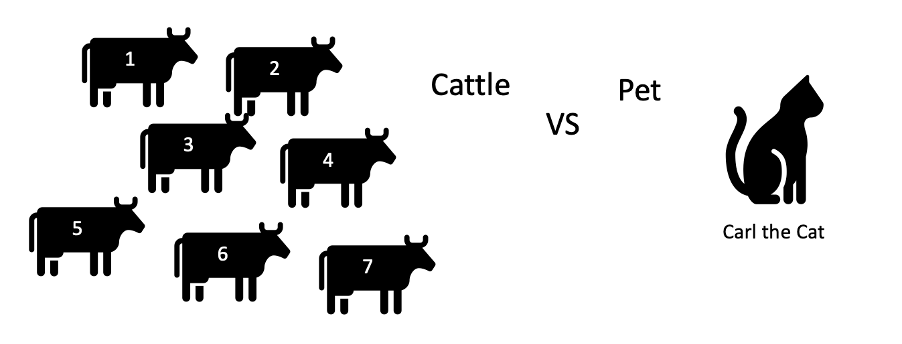
One way of looking at this is the cattle vs. pet model. Our application instances should be treated more as cattle (that is, no emotional attachment to them, fairly easy to replace, numbered not named, and so on), rather than pets (that is, there is an emotional attachment, nurse back to health rather than replace, named, and so on).
A great feature of Open Liberty is its rapid server start-up and shutdown times which helps to support the purpose of this factor. Learn more in Achieve high performance Java applications with IBM Semeru Runtimes and Open Liberty and performance benefits of the Eclipse OpenJ9 JVM.
Additionally, implementing fault-tolerant behaviors can enable this disposable behavior, helping to implement graceful shutdowns of any failing or unhealthy microservices. MicroProfile Fault Tolerance can help with this.
Try these out:
- Adding health reports to microservices
- Checking the health of microservices on Kubernetes
- Building fault-tolerant microservices with the @Fallback annotation
- Failing fast and recovering from errors
Factor 10 – Dev/Prod parity
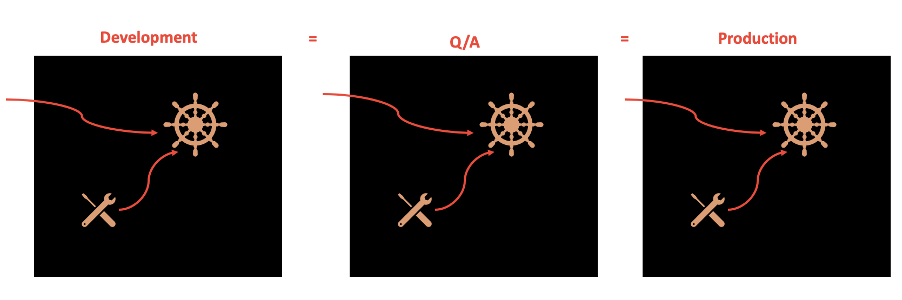
The dev/prod parity factor focuses on the importance of keeping development, staging, and production environments as similar as possible. This is important so that you can ensure that all potential bugs/failures can be identified in development and testing instead of when the application is put into production. This helps to eliminate the stereotypical development statement, “It runs on my laptop." With many applications now running in the cloud, interacting with many other services in a large ecosystem of services, it is important that we replicate this environment when developing and testing our applications.
Tools like Docker can help enable this dev/test/prod parity. The benefit of a container is that it provides an absolutely uniform environment for running code. This environment is trivial to "throw away" and recreate. The ease of locking down every detail of the environment is an important factor for this goal of eliminating the differences between the development, testing, and prod environments. Containers enable the creation and use of the same image in development, staging, and production. It also helps to ensure that the same backing services are used in every environment. Utilizing this concept of containerization, testing tools like TestContainers enable us to ensure that the testing environment is as close to production as possible, too.
Taking this one step further, in many cloud platforms there is the opportunity to develop, test, and run applications directly on/within the cloud environment -- for example, the Red Hat OpenShift Do (ODO) tool. Check out Develop cloud-native Java applications directly in OpenShift with Open Liberty and ODO to see how you could utilize Open Liberty and the ODO tool to develop directly in the cloud.
Try these out:
Factor 11 – Logs
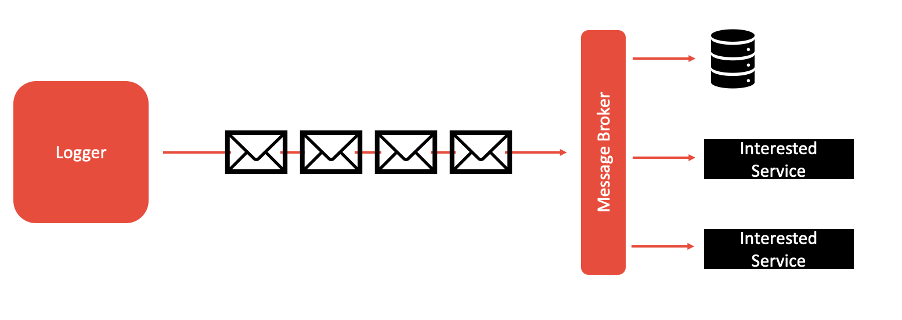
The logs factor highlights the importance of ensuring that your application doesn’t concern itself with routing, storage, or analysis of its output stream (such as logs). In cloud-native applications, the aggregation, processing, and storage of these logs is the responsibility of the cloud provider or other tool suites (for example, ELK stack, Splunk, Sumologic, and so on.) running alongside the cloud platform being used. This is especially important in cloud-native applications due to the elastic scaling capabilities they have, such as when your application dynamically changes from 1 to over 100 instances, it can be hard to know where those instances are running and keep track of and organize all of the logs. By simplifying your application’s part in this log aggregation and analysis, an application’s codebase can be simplified and focus more on business logic. This factor helps to improve flexibility for introspecting behavior over time and enables real-time metrics to be collected and analyzed effectively over time.
In order to enact this factor, logs should be treated as event streams: You should stream out logs in real time so that killing an instance does not cause logs to go missing. All of the log entries should be logged to stdout and stderr only.
Open Liberty has a unified logging component that handles messages that are written by applications and the runtime and provides First Failure Data Capture (FFDC) capability. Logging data that is written by applications by using the System.out, System.err, or java.util.logging.Logger streams is combined into the server logs.
In addition to Open Liberty’s unified logging component, Liberty also integrates with MicroProfile Telemetry to help capture logs and other data points such as metrics and traces.”
Try these out:
Factor 12 – Administrative processes
This factor discourages putting one-off admin or management tasks inside your microservices. Examples given on 12factor.net include migrating databases and running one-time scripts to do clean-up. Instead, these should be run as one-off process and they can be run as Kubernetes tasks. In this way, your microservices can focus on business logic. It also enables safe debugging and admin of production applications and enables greater resiliency for cloud-native applications.
Summary and next steps
We hope this article has helped you to put these cloud native factors into context, understand how they apply to real-life applications, and understand what tools are available to help you when you are developing your application.
If you'd like to take this learning further, take a look at our article: Beyond the 12 factors: 15-factor cloud-native Java applications.
Learn more about Open Liberty and check out the blogs, guides, and documentation.