
About cookies on this site Our websites require some cookies to function properly (required). In addition, other cookies may be used with your consent to analyze site usage, improve the user experience and for advertising. For more information, please review your options. By visiting our website, you agree to our processing of information as described in IBM’sprivacy statement. To provide a smooth navigation, your cookie preferences will be shared across the IBM web domains listed here.
Tutorial
User authentication and authorization in Apache Kafka
Learn how to configure authentication and authorization in an Apache Kafka cluster
Two built-in security features of Apache Kafka are user access control and data encryption. While a production Kafka cluster normally provides both of these features, they are not necessarily required in development, test, or experimental environments. In fact, some production environments don't need these features, such as when the cluster is behind a firewall. The cluster implementation environment and other considerations play a role when deciding which security features need to be implemented in a Kafka cluster.
In this tutorial, you learn the ways user authentication and authorization can be implemented. If data encryption is also required, it can be configured on top of the user access control configurations explained here, but this is not covered in this tutorial.
This tutorial is intended for those who have a basic understanding of Apache Kafka concepts, know how to set up a Kafka cluster, and work with its basic tools.
Terminology
Kafka provides authentication and authorization using Kafka Access Control Lists (ACLs) and through several interfaces (command line, API, etc.) Each Kafka ACL is a statement in this format:
Principal P is [Allowed/Denied] Operation O From Host H On Resource R.
In this statement,
- Principal is a Kafka user.
- Operation is one of
Read,Write,Create,Describe,Alter,Delete,DescribeConfigs,AlterConfigs,ClusterAction,IdempotentWrite,All. - Host is a network address (IP) from which a Kafka client connects to the broker.
- Resource is one of these Kafka resources:
Topic,Group,Cluster,TransactionalId. These can be matched using wildcards.
Not all operations apply to every resource. The current list of operations per resource are in the table below. All associations can be found in the Kafka documentation:
| Resource | Operations |
|---|---|
| Topic | Read, Write, Describe, Delete, DescribeConfigs, AlterConfigs, All |
| Group | Read, Describe, All |
| Cluster | Create, ClusterAction, DescribeConfigs, AlterConfigs, IdempotentWrite, Alter, Describe, All |
| TransactionalId | Describe, Write, All |
Background
This article aims at demonstrating authentication and authorizations capabilities of Kafka. It is not a guide how to configure Kafka for production environments.
In particular, it does not cover encryption which is usually a requirement in secured environments. We'll demonstrate how to perform authentication using the SASL_PLAINTEXT security protocol which transmits all data, including passwords, as plain text. SASL_SSL enables encrypting data over the wire and should be used for production use cases. All information included here also apply to environments using SASL_SSL.
Authentication
Kafka uses SASL to perform authentication. It currently supports many mechanisms including PLAIN, SCRAM, OAUTH and GSSAPI and it allows administrator to plug custom implementations. Authentication can be enabled between brokers, between clients and brokers and between brokers and ZooKeeper. It allows restricting access to only parties that have the required secrets.
Authorization
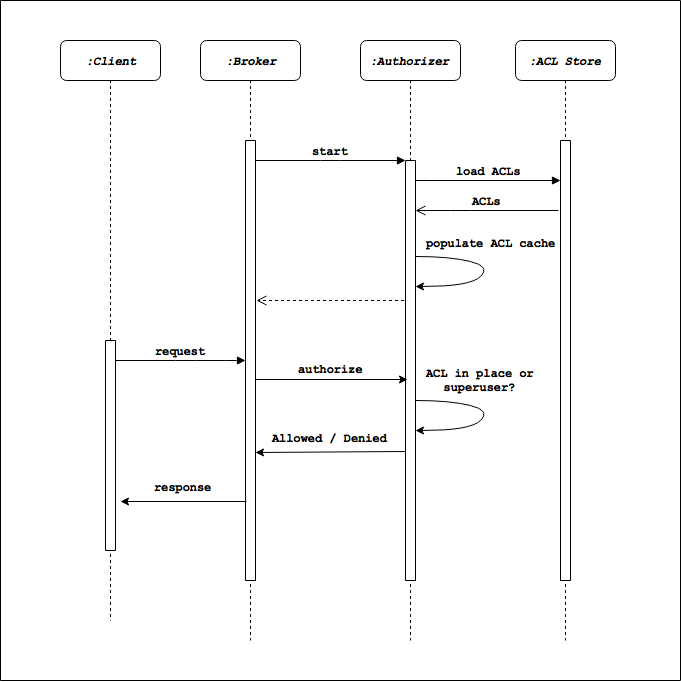
Kafka manages and enforces authorization via ACLs through an authorizer. An authorizer implements a specific interface, and is pluggable. Kafka provides a default authorizer implementation StandardAuthorizer. The authorizer class name is provided via the broker configuration authorizer.class.name. If no such configuration exists, then everyone is authorized to access any resource.
The typical workflow around Kafka authorization is depicted below. At startup, the Kafka broker initiates an ACL load. The populated ACL cache is maintained and used for authorization purposes whenever an API request comes through.
Setting it up
In order to enable authentication and authorizations of clients in a Kafka cluster, both brokers and clients need to be properly configured. Brokers need to know valid credentials, and clients need to provide valid credentials in order to properly execute the underlying commands. The following sections describe these configurations using examples.
Broker-side configuration
To enable authentication and authorization on the broker side, you need to perform two steps on each broker:
- Configure valid credentials
- Configure the proper security protocol and authorizer implementation
Set up broker-side credentials
Configure the broker with its user credentials and authorize the client's user credentials. These credentials along with the login module specification, are stored in a JAAS login configuration file.
This is the JAAS file used to run the use cases in this article:
KafkaServer {
    org.apache.kafka.common.security.plain.PlainLoginModule required
    username="admin"
    password="admin"
    user_admin="admin"
    user_alice="alice"
    user_bob="bob"
    user_charlie="charlie";
};
This example defines the following for the KafkaServer entity:
- The custom login module that is used for user authentication,
admin/adminis the username and password for inter-broker communication (i.e. the credentials the broker uses to connect to other brokers in the cluster),admin/admin,alice/alice,bob/bob, andcharlie/charlieas client user credentials. Note that the valid username and password is provided in this format:user_username="password". If the lineuser_admin="admin"is removed from this file, the broker is not able to authenticate and authorize anadminuser. Only theadminuser can to connect to other brokers in this case.
Pass in this file as a JVM configuration option when running the broker, using -Djava.security.auth.login.config=[path_to_jaas_file]. [path_to_jaas_file] can be something like: config/jaas-kafka-server.conf. This can be done by setting the KAFKA_OPTS environment variable, for example:
export KAFKA_OPTS="-Djava.security.auth.login.config=<path-to-jaas-file>/jaas-kafka-server.conf"
The default login module for the PLAIN mechanism should not be used in production environments as it requires storing all credentials in a JAAS file that is stored in plain text. In real environment, you should provide your own authentication callbacks via sasl.server.callback.handler.class.
Configure broker-side settings
Define the accepted protocol and the ACL authorizer used by the broker by adding the following configuration to the broker properties file (server.properties):
authorizer.class.name=kafka.server.authorizer
listeners=SASL_PLAINTEXT://:9092
security.inter.broker.protocol= SASL_PLAINTEXT
sasl.mechanism.inter.broker.protocol=PLAIN
sasl.enabled.mechanisms=PLAIN
The other configuration that can be added is for Kafka super users: users with full access to all APIs. This configuration reduces the overhead of defining per-API ACLs for the user who is meant to have full API access. From our list of users, let's make admin a super user with the following configuration:
super.users=User:admin
This modified properties file is named sasl-server.properties.
When the broker runs with this security configuration (bin/kafka-server-start.sh config/sasl-server.properties), only authenticated and authorized clients are able to connect to and use it.
Once you complete steps 1 and 2, the Kafka brokers are prepared to authenticate and authorize clients. In the next section, you'll learn how to enable Kafka clients for authentication.
Client-side configuration
In the previous section, you defined a set of user credentials that are authenticated by the Kafka broker. In this section, you'll learn how Kafka's command line tools can be authenticated against the secured broker via a simple use case. The use case involves users alice, bob, and charlie where:
alicecreates and produces to topictest.bobconsumes from topictestin consumer groupbob-group.charliequeries the groupbob-groupto retrieve the group offsets.
So far, the broker is configured for authenticated access. Running a Kafka console producer or consumer not configured for authenticated and authorized access fails with messages like the following (assuming auto.create.topics.enable is true):
$ bin/kafka-console-consumer.sh --bootstrap-server localhost:9092 --topic test
[2017-10-24 15:44:56,426] WARN [Consumer clientId=consumer-1, groupId=console-consumer-7511] Bootstrap broker localhost:9092 (id: -1 rack: null) disconnected (org.apache.kafka.clients.NetworkClient)
...
Let's now look at the required configurations on the client side.
Configure client-side settings
Specify the broker protocol as well as the credentials to use on the client side. The following configuration is placed inside the corresponding configuration file (alice.properties) provided to the particular client:
security.protocol=SASL_PLAINTEXT
sasl.mechanism=PLAIN
sasl.jaas.config=org.apache.kafka.common.security.plain.PlainLoginModule required username="alice" password="alice";
For example:
bin/kafka-console-producer.sh --bootstrap-server localhost:9092 --topic test --producer.config config/alice.properties
bin/kafka-console-consumer.sh --bootstrap-server localhost:9092 --topic test --group bob-group --consumer.config config/bob.properties
bin/kafka-consumer-groups.sh --bootstrap-server localhost:9092 --describe --group bob-group --command-config config/charlie.properties
Note that the files config/bob.properties, config/charlie.properties, and config/admin.properties have the same configurations as config/alice.properties with their respective credentials.
If you run these commands with the configuration so far, you'll notice they don't work as expected. For example:
$ bin/kafka-console-producer.sh --bootstrap-server localhost:9092 --topic test --producer.config config/alice.properties
>message1
[2017-10-24 16:20:52,259] WARN [Producer clientId=console-producer] Error while fetching metadata with correlation id 1 : {test=TOPIC_AUTHORIZATION_FAILED} (org.apache.kafka.clients.NetworkClient)
[2017-10-24 16:20:52,260] ERROR Error when sending message to topic test with key: null, value: 1 bytes with error: (org.apache.kafka.clients.producer.internals.ErrorLoggingCallback)
org.apache.kafka.common.errors.TopicAuthorizationException: Not authorized to access topics: [test]
>
Or, for example:
$ bin/kafka-console-consumer.sh --bootstrap-server localhost:9092 --topic test --group bob-group --consumer.config config/bob.properties
[2017-10-24 16:27:01,431] WARN [Consumer clientId=consumer-1, groupId=bob-group] Error while fetching metadata with correlation id 2 : {test=TOPIC_AUTHORIZATION_FAILED} (org.apache.kafka.clients.NetworkClient)
[2017-10-24 16:27:01,435] ERROR Unknown error when running consumer:  (kafka.tools.ConsoleConsumer$)
org.apache.kafka.common.errors.TopicAuthorizationException: Not authorized to access topics: [test]
Or, for example:
$ bin/kafka-consumer-groups.sh --bootstrap-server localhost:9092 --describe --group bob-group --command-config config/charlie.properties

Error: Executing consumer group command failed due to Not authorized to access group: Group authorization failed.
The security configuration still does not give specific permissions to our Kafka users (except for admin who is a super user). These permissions are defined using the ACL command (bin/kafka-acls.sh). To verify existing ACLs run:
./bin/kafka-acls.sh --bootstrap-server localhost:9092 --command-config ./config/admin.properties --list
This returns no ACL definitions. Note that only admin can run this command, as only admin has the permissions to list and edit ACLs.
You have handled authentication, but have not provided any authorization rules to define the users able run specific APIs and access certain Kafka resources. This is covered in the next section.
Producing to topics
Start with user alice. Alice needs to be able to create and produce to topic test. For this exercise, users can connect to the broker from any host. If necessary, host restrictions can also be embedded into the Kafka ACLs discussed in this section. For this use case, the corresponding Kafka ACLs are:
Principal alice is Allowed Operation Write From Host * On Topic test.
Principal alice is Allowed Operation Create From Host * On Topic test.
To create them, run:
./bin/kafka-acls.sh --bootstrap-server localhost:9092 --command-config ./config/admin.properties --add --allow-principal User:alice --operation Write --operation Create --topic test
The expected output is:
Adding ACLs for resource `ResourcePattern(resourceType=TOPIC, name=test, patternType=LITERAL)`:
     (principal=User:alice, host=*, operation=WRITE, permissionType=ALLOW)
    (principal=User:alice, host=*, operation=CREATE, permissionType=ALLOW)

Current ACLs for resource `ResourcePattern(resourceType=TOPIC, name=test, patternType=LITERAL)`:
     (principal=User:alice, host=*, operation=CREATE, permissionType=ALLOW)
    (principal=User:alice, host=*, operation=WRITE, permissionType=ALLOW)
As a result of granting her this permission, Alice can now create the topic test:
$ bin/kafka-topics.sh --bootstrap-server localhost:9092 --command-config ./config/alice.properties --create --topic test --partitions 1 --replication-factor 1
And also produce messages to it:
$ bin/kafka-console-producer.sh --bootstrap-server localhost:9092 --topic test --producer.config config/alice.properties
>message1
>message2
>message3
...
Consuming from Topics
Next, you need to let user bob consume from topic test, as a member of the bob-group consumer group. Bob's ACL for fetching from topic test is:
Principal bob is Allowed Operation Read From Host * On Topic test.
To create the ACL, run:
$ bin/kafka-acls.sh --bootstrap-server localhost:9092 --command-config ./config/admin.properties --add --allow-principal User:bob --operation Read --topic test
The output should look like:
Adding ACLs for resource `ResourcePattern(resourceType=TOPIC, name=test, patternType=LITERAL)`:
     (principal=User:bob, host=*, operation=READ, permissionType=ALLOW)

Current ACLs for resource `ResourcePattern(resourceType=TOPIC, name=test, patternType=LITERAL)`:
     (principal=User:bob, host=*, operation=READ, permissionType=ALLOW)
    (principal=User:alice, host=*, operation=CREATE, permissionType=ALLOW)
    (principal=User:alice, host=*, operation=WRITE, permissionType=ALLOW)
Bob needs a second ACL for committing offsets to group bob-group (using the OffsetCommit API):
Principal bob is Allowed Operation Read From Host * On Group bob-group.
To create the ACL, run:
$ bin/kafka-acls.sh --bootstrap-server localhost:9092 --command-config ./config/admin.properties --add --allow-principal User:bob --operation Read --group bob-group
The output should be:
Adding ACLs for resource `ResourcePattern(resourceType=GROUP, name=bob-group, patternType=LITERAL)`:
     (principal=User:bob, host=*, operation=READ, permissionType=ALLOW)

Current ACLs for resource `ResourcePattern(resourceType=GROUP, name=bob-group, patternType=LITERAL)`:
     (principal=User:bob, host=*, operation=READ, permissionType=ALLOW)
By granting these permissions to Bob, he can now consume messages from topic test as a member of bob-group.
$ bin/kafka-console-consumer.sh --bootstrap-server localhost:9092 --topic test --group bob-group --consumer.config config/bob.properties --from-beginning
message3
message1
message2
...
Describing consumer groups
Lastly, user charlie needs permission to retrieve committed offsets from group bob-group (using the OffsetFetch API). According to the table above, Charlie's first ACL for fetching offsets from this consumer group is:
Principal charlie is Allowed Operation Describe From Host * On Group bob-group.
To create the ACL, run:
$ bin/kafka-acls.sh --bootstrap-server localhost:9092 --command-config ./config/admin.properties --add --allow-principal User:charlie --operation Read --group bob-group
The output should be:
Adding ACLs for resource `ResourcePattern(resourceType=GROUP, name=bob-group, patternType=LITERAL)`:
     (principal=User:charlie, host=*, operation=READ, permissionType=ALLOW)

Current ACLs for resource `ResourcePattern(resourceType=GROUP, name=bob-group, patternType=LITERAL)`:
     (principal=User:bob, host=*, operation=READ, permissionType=ALLOW)
    (principal=User:charlie, host=*, operation=READ, permissionType=ALLOW)
This permission alone is not enough to meet the use case. If Charlie runs the consumer group command, he isn't able to see any rows in the output. Charlie needs to read (fetch) offsets of topics in the consumer group. To do this, he must have Describe access to all topics in the group. According to the table above, this second ACL is:
Principal charlie is Allowed Operation Describe From Host * On Topic test.
To create the ACL, run:
$ bin/kafka-acls.sh --bootstrap-server localhost:9092 --command-config ./config/admin.properties --add --allow-principal User:charlie --operation Describe --topic test
The output should be:
Adding ACLs for resource `ResourcePattern(resourceType=TOPIC, name=test, patternType=LITERAL)`:
     (principal=User:charlie, host=*, operation=DESCRIBE, permissionType=ALLOW)

Current ACLs for resource `ResourcePattern(resourceType=TOPIC, name=test, patternType=LITERAL)`:
     (principal=User:charlie, host=*, operation=DESCRIBE, permissionType=ALLOW)
    (principal=User:bob, host=*, operation=READ, permissionType=ALLOW)
    (principal=User:alice, host=*, operation=CREATE, permissionType=ALLOW)
    (principal=User:alice, host=*, operation=WRITE, permissionType=ALLOW)
Now Charlie is able to get the proper listing of offsets in the group:
$ bin/kafka-consumer-groups.sh --bootstrap-server localhost:9092 --describe --group bob-group --command-config config/charlie.properties

Consumer group 'bob-group' has no active members.

TOPIC          PARTITION  CURRENT-OFFSET  LOG-END-OFFSET  LAG    CONSUMER-ID          HOST           CLIENT-ID
test           1          1               1               0      -                    -              -
test           0          1               1               0      -                    -              -
test           2          1               1               0      -                    -              -
That does it. The above ACLs grants enough permissions for this use case to run. To summarize, ACLs are
$ bin/kafka-acls.sh --bootstrap-server localhost:9092 --command-config ./config/admin.properties --list
The output should be:
Current ACLs for resource `ResourcePattern(resourceType=GROUP, name=bob-group, patternType=LITERAL)`:
     (principal=User:bob, host=*, operation=READ, permissionType=ALLOW)
    (principal=User:charlie, host=*, operation=READ, permissionType=ALLOW)

Current ACLs for resource `ResourcePattern(resourceType=TOPIC, name=test, patternType=LITERAL)`:
     (principal=User:charlie, host=*, operation=DESCRIBE, permissionType=ALLOW)
    (principal=User:bob, host=*, operation=READ, permissionType=ALLOW)
    (principal=User:alice, host=*, operation=CREATE, permissionType=ALLOW)
    (principal=User:alice, host=*, operation=WRITE, permissionType=ALLOW)
Summary
Kafka provides the means to enforce user authentication and authorization to access its various resources and operations. Authentication is provided via SASL with multiple supported mechanisms. Authorization is done using its ACLs and pluggable authorizer entities. This article demonstrated how authentication and authorization can be set up in a Kafka cluster.