
About cookies on this site Our websites require some cookies to function properly (required). In addition, other cookies may be used with your consent to analyze site usage, improve the user experience and for advertising. For more information, please review your options. By visiting our website, you agree to our processing of information as described in IBM’sprivacy statement. To provide a smooth navigation, your cookie preferences will be shared across the IBM web domains listed here.
Article
Build AI agents for financial analysis with CrewAI and IBM watsonx
A step-by-step guide to orchestrating AI agents with IBM Granite models for automated financial insights
An emerging trend in AI is the integration of specialized AI agents with powerful language models, which presents opportunities for complex problem-solving. In this blog, explore how you can combine CrewAI, a framework for orchestrating AI agents, with the IBM watsonx platform to create a sophisticated system for financial analysis.
Understanding CrewAI and AI agents
CrewAI is an innovative framework that is designed to facilitate collaboration between multiple AI agents, each with specific roles and expertise, to tackle complex tasks.
In simpler terms, CrewAI is like a virtual staffing agency for AI. CrewAI lets you create a team of AI agents, each with its own special skills, and gets them to work together on complex tasks.
Architecture
The following image shows an architectural diagram that illustrates the key components of the CrewAI and watsonx integration.
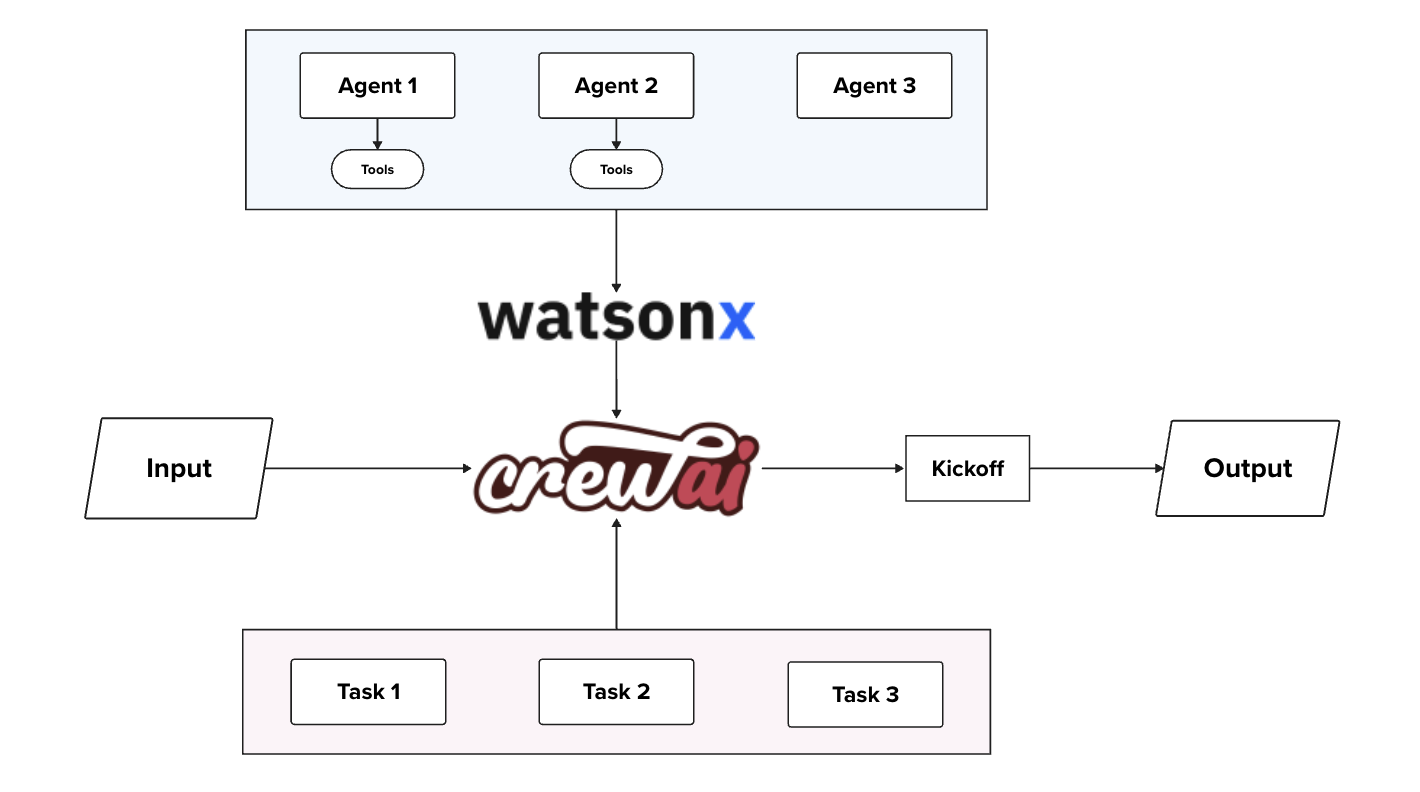
The key components are:
IBM watsonx platform
- Serves as the foundation of the system.
- Highlights the Granite language model used in this setup.
CrewAI framework
- Acts as the main container for the agents and tools.
Agents
- Consider an agent as a team member with specific skills and a dedicated role, contributing to the crew’s overall mission. The three boxes represent different agents: a data collector, a financial analyst, and a report writer, each with their unique responsibilities.
Tasks
- A task is a specific assignment completed by an agent. In this case, the tasks include data_collector_task, financial_analyst_task, and report_writer_task, each aligned with the respective agent's role.
Tools
- The two boxes at the bottom represent tools that equip agents with capabilities such as web searching, data analysis, collaboration, and task delegation among team members. Here, we're using the SerperDevTool and ScrapeWebsiteTool.
Essential tools for data gathering
Before I explain the agents, let’s discuss two crucial tools that the system uses for data collection:
SerperDevTool: This tool performs semantic searches on a given query by scanning online content, using the serper.dev API to retrieve and present the most relevant results. It's especially helpful for collecting up-to-date information that may not be included in the AI’s training data.
ScrapeWebsiteTool: This tool enables the agents to extract specific information from websites. It’s essential for collecting up-to-date financial data from company websites and financial portals.
The following code shows how the tools are set up.
from crewai_tools import ScrapeWebsiteTool, SerperDevTool

search_tool = SerperDevTool()
scrape_tool = ScrapeWebsiteTool()
Meet the team: The AI financial analysts
In the financial analysis crew, there are three main players:
- Data collector: Specializes in gathering accurate and up-to-date financial data from the web
- Financial analyst: Focuses on analyzing financial data and providing insights
- Report writer: Excels at compiling findings into comprehensive reports
The following example shows how you can bring these agents to life.
from crewai import Agent, Task, Crew, Process

data_collector = Agent(
    role='Data Collector',
    goal='Collect accurate and up-to-date financial data',
    backstory='You are an expert in gathering financial data from various sources.',
    tools=[scrape_tool, search_tool],
    verbose=True,
    allow_delegation=True,
    llm=custom_llm
)

financial_analyst = Agent(
    role='Financial Analyst',
    goal='Analyze financial data and provide insights',
    backstory='You are a seasoned financial analyst with years of experience in interpreting market trends.',
    verbose=True,
    allow_delegation=True,
    tools=[scrape_tool, search_tool],
    llm=custom_llm
)

report_writer = Agent(
    role='Report Writer',
    goal='Compile findings into a comprehensive report',
    backstory='You are skilled at creating clear and concise financial reports.',
    llm=custom_llm
)
Each agent is created with a specific role, goal, and set of tools. The custom_llm parameter refers to the watsonx-powered language model, which is discussed next.
Integrating watsonx: Enhancing agent capabilities
The partnership between IBM watsonx and CrewAI combines their strengths to revolutionize AI-driven workflows. The AI expertise in watsonx.ai complements CrewAI's orchestration capabilities, empowering organizations to elevate their processes. The seamless orchestration of AI models, agents, and tasks unlocks new possibilities, enabling enterprises to implement sophisticated workflows previously too complex to manage. This synergistic collaboration marks a milestone in AI-driven business evolution, allowing organizations to harness the full potential of intelligent automation and decision-making.
Watsonx provides access to advanced language models, offering several key advantages:
- Advanced natural language processing: Watsonx language models enable the agents to understand and generate human-like text with high accuracy.
- Scalability: Watsonx cloud infrastructure allows for efficient handling of complex, data-intensive tasks.
- Enterprise-grade security: Robust security measures from IBM ensure the protection of sensitive financial data throughout the analysis process.
Since the time of the CrewAI integration with watsonx.ai to build and streamline workflows with multiple AI agents, it has become easy to directly import large language models (LLMs) from CrewAI. The comprehensive guide on integrating CrewAI with various LLMs using LiteLLM includes supported providers and configuration options.
For example, the following code demonstrates how to set up a watsonx-powered language model:
import os
from crewai import LLM

WATSONX_url = "https://eu-de.ml.cloud.ibm.com"
WATSONX_API_KEY = ""
WATSONX_PROJECT_ID = ""
WATSONX_MODEL_ID = "watsonx/ibm/granite-13b-chat-v2"

os.environ["WATSONX_url"] = WATSONX_url  # (required) Base url of your WatsonX instance
os.environ["WATSONX_APIKEY"] = WATSONX_API_KEY  # IBM cloud API key (required)
os.environ["WATSONX_PROJECT_ID"] = WATSONX_PROJECT_ID  # Project ID of your WatsonX instance (required)

llm = LLM(
    model=WATSONX_MODEL_ID,
    base_url=WATSONX_url,
    project_id=WATSONX_PROJECT_ID,
    max_tokens=2000,
    temperature=0.7
)
This configuration uses the Granite-13B-Chat-V2 model, a state-of-the-art language model provided by IBM watsonx.ai that offers advanced natural language understanding and generation capabilities. The integration with CrewAI makes it easy to leverage these powerful models within multiagent workflows.
Implementing the financial analysis workflow
With the agents defined and the watsonx model configured, you can now set up the financial analysis workflow. This involves defining specific tasks for each agent and assembling them into a crew:
# Define the tasks
data_collector_task = Task(
    description='Collect stock data for {company_name} from their company website {company_website} and yahoo finance site {yahoo_finance} for the past month',
    agent=data_collector
)

financial_analyst_task = Task(
    description='Analyze the collected data and identify trends',
    agent=financial_analyst
)

report_writer_task = Task(
    description='Write a comprehensive report on the financial analysis',
    agent=report_writer
)

# Assemble the crew
financial_crew = Crew(
    agents=[data_collector, financial_analyst, report_writer],
    tasks=[data_collector_task, financial_analyst_task, report_writer_task],
    process=Process.sequential
)

# Execute the analysis
inputs = {
    'company_name': 'Tesla Inc.',
    'company_website': 'https://www.tesla.com/',
    'yahoo_finance': 'https://finance.yahoo.com/quote/TSLA'
}

result = financial_crew.kickoff(inputs)
print(result)
This setup creates a sequential workflow where the data collector gathers information, the financial analyst processes this data, and the report writer compiles the findings into a comprehensive report.
Advantages
The integration of CrewAI with watsonx for financial analysis offers several significant advantages:
- Automation of complex processes: The system can handle multifaceted financial analysis tasks with minimal human intervention.
- Depth of insights: By combining different AI specialties, the system can uncover insights that might be missed by traditional analysis methods.
- Scalability: The framework can easily adapt to analyze multiple stocks or financial instruments simultaneously.
- Customizability: Additional agents with specialized roles can be integrated to extend the system’s capabilities.
Potential application
This CrewAI-watsonx integration can serve as a valuable asset for various industries:
- Financial services: Automate comprehensive stock analysis and generate investment reports.
- Market research: Gather and analyze data from multiple sources to identify market trends.
- Competitive intelligence: Monitor competitors and provide insights into market positioning.
- Risk assessment: Analyze financial data to identify potential risks and opportunities.
- Automated journalism: Generate financial news articles based on real-time market data.
Summary
The integration of CrewAI with watsonx represents a significant step forward in the field of collaborative AI. By combining the power of specialized AI agents with advanced language models, businesses can tackle complex analytical tasks with unprecedented efficiency and insight.
As this technology continues to evolve, you can expect to see even more sophisticated applications across various domains, fundamentally changing how you approach data analysis and decision-making processes.