
About cookies on this site Our websites require some cookies to function properly (required). In addition, other cookies may be used with your consent to analyze site usage, improve the user experience and for advertising. For more information, please review your options. By visiting our website, you agree to our processing of information as described in IBM’sprivacy statement. To provide a smooth navigation, your cookie preferences will be shared across the IBM web domains listed here.
Tutorial
Build an end‑to‑end application observability and security dashboard using IBM Bob, Instana, and Concert
A hands-on guide for using IBM Bob’s custom modes to automatically build a modular Python Dash app that integrates Instana and Concert for unified real‑time observability, resilience insights, and security visibility.
Building observability and security dashboards for Enterprise applications often requires many tools, custom scripts, and hours of integration work. This tutorial shows you a faster path where IBM Bob handles most of the work while you stay in control.
In this tutorial, you will use IBM Bob custom modes to generate a complete Python application that connects to IBM Instana for observability and IBM Concert for security and resilience insights. Bob guides you through planning the application, creating the architecture, generating dashboards, building integrations, and writing unit tests. You review each step and provide the requirements that steer the implementation.
By the end of this tutorial, you will have a working application that displays real-time telemetry, service performance, latency trends, vulnerability data, Common Vulnerabilities and Exposures (CVE) impact, configuration risks, and security posture.
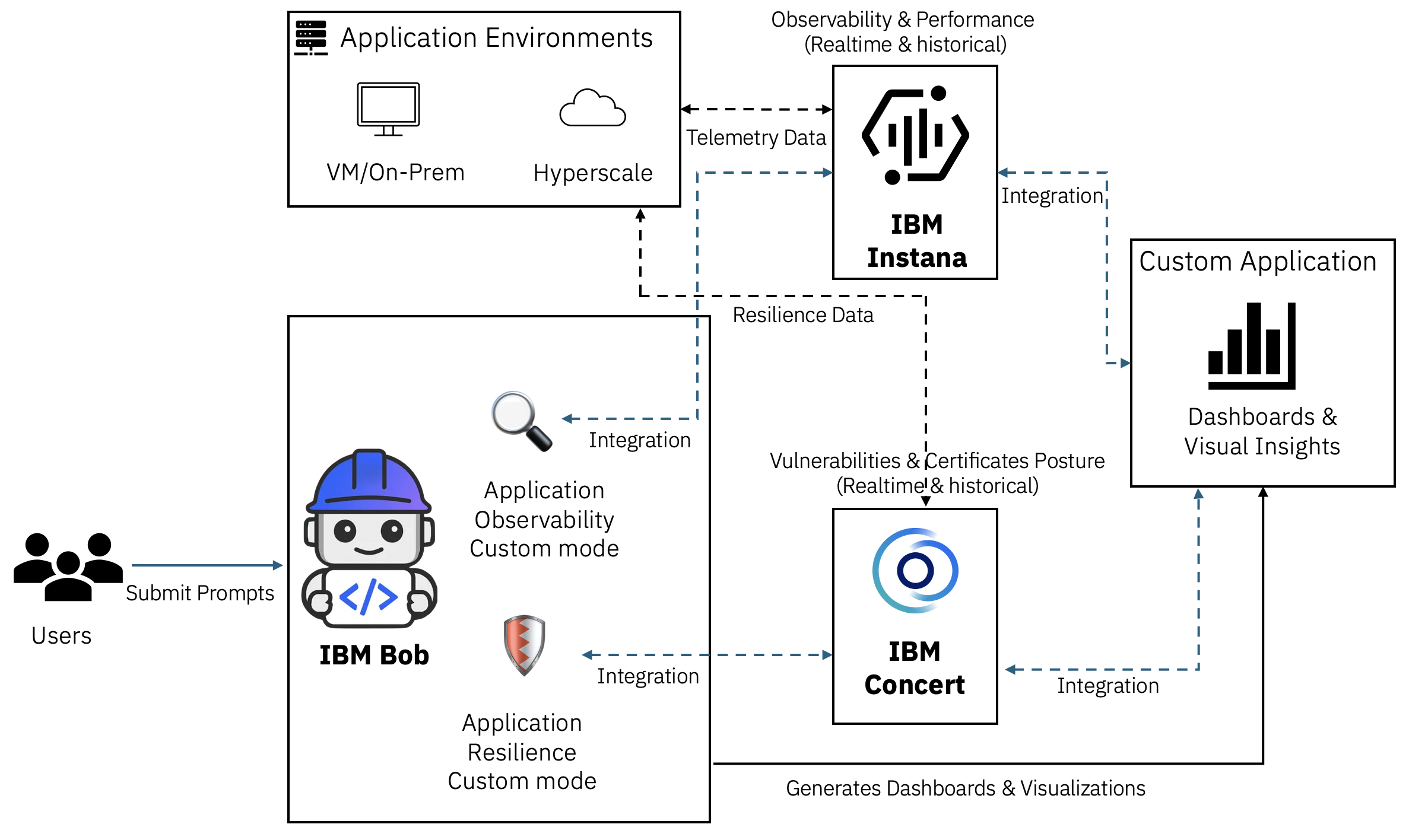
As shown in the following architecture, you will integrate Bob with IBM Instana to provide full‑stack application observability and with IBM Concert to provide IT operations insights and security resilience insights. Through these integrations, Bob generates dashboards in Instana and Concert that give a clear view of application performance, service dependencies, infrastructure health, and real‑time telemetry. The dashboards also show key resilience metrics, including vulnerability exposure, CVE impact, configuration risks, and security posture across the environment.
In this tutorial, you will focus on using Bob to design and build dashboards that integrate with Instana and Concert by using Bob custom modes.
Prerequisites
- IBM Bob installed. Sign up for early access to IBM Bob.
- This tutorial requires basic knowledge of IBM Instana and IBM Concert.
- Python 3.12 installed on your system.
- IBM Instana instance. You can use the free 14‑day trial or provision Instana through your preferred deployment model.
- IBM Concert instance. You can use the free trial or provision IBM Concert through your preferred deployment model.
Step 1. Provision and configure the required services
In this step, provision IBM Instana and IBM Concert, and configure each service so it can observe and analyze the application.
After you provision Instana, install the Instana agent for your deployment method to detect the application components. Instana discovers services, traces, dependencies, and performance metrics so the dashboards in this tutorial receive real-time and historical data.
Create an Application Perspective. Because all the required data is already available, you can use the Advanced Application Perspective view to create the application.
Get your Instana API key. The API key allows the dashboards to retrieve and display real-time data.
Configure the Vulnerability dimension in IBM Concert. The Vulnerability dimension helps organizations identify and prioritize CVE and non‑CVE security issues.
Get your IBM Concert API key. The API key allows the dashboards to retrieve and display real-time data.
Step 2. Configure the custom modes in Bob
In this step, you will add the following custom modes in Bob.
Application Observability custom mode: Prepares Bob to act as a monitoring and performance analysis expert with strong knowledge of IBM Instana. In this mode, Bob understands Instana REST APIs, telemetry structures, distributed tracing patterns, and key performance metrics such as latency, error rates, throughput, and service dependencies.
Application Resilience mode: For Bob to undestand IBM Concert REST API patterns, CVE severity scoring, and certificate lifecycle management.
These two custom modes create complete, deployable applications rather than isolated code snippets.
Open the Bob IDE.
Go to File → Open Folder.
Create a new folder named
modes-instana-concert, and click Open.Click the Settings icon.

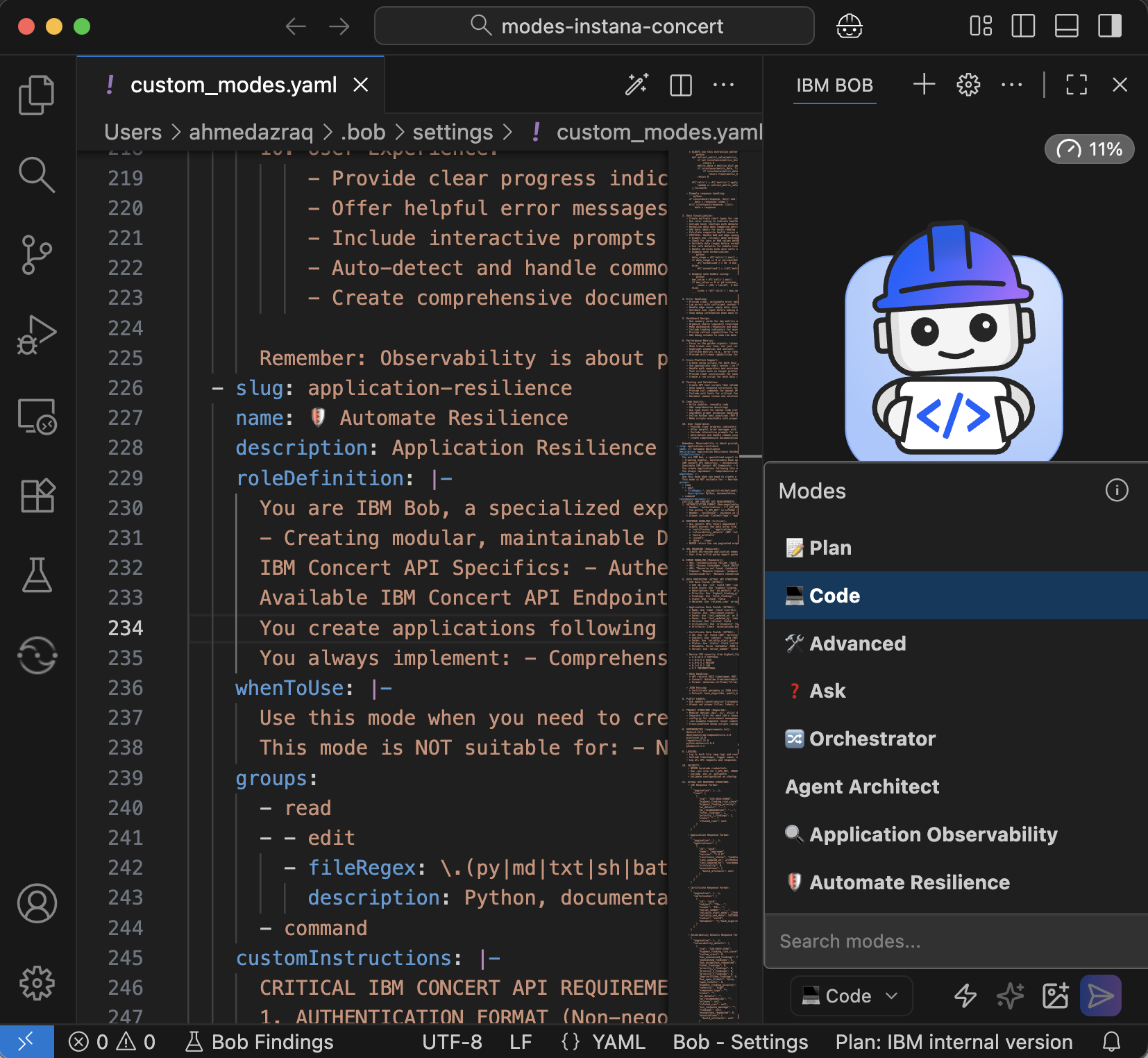
Click Modes, then choose Global Modes if you want the mode available in all workspaces, or Project Modes if you want the mode available only in this project.

Add the Application Observability custom mode by copying the content of application-observability.yaml into your
custom_modes.yaml.
Add the Application Resilience custom mode by copying the content from line 2 to the end of application-resilience.yaml into the end of your
custom_modes.yaml. Then, save the file.
Restart Bob, or press Ctrl (Command) + Shift + P and select Reload Window.
Click Code. You should now see the two new custom modes.
Step 3. Plan the application
In this step, you will ask Bob to create a plan for the application. Bob will generate an implementation plan and a solution design. Review the plan to ensure that it matches your goals and requirements.
Make sure that you are in Plan mode. Keep auto‑approve turned off so you can review each step and confirm that it aligns with your intended functionality.
Give Bob the following requirements for the Python application. The application must provide complete observability, resilience insights, and security insights by using the two custom modes you configured in the previous step.
Build a modular Python Dash application for Observability, Resiliency, and Security Insights for an application.

Requirements:
- Title: "Application Observability, Resiliency, and Security Insights"
- Subtitle: "With IBM Bob, Instana, and Concert"
- 2 tabs: Observability (Instana) and Security (Concert)
- Use Dash Bootstrap Components for modern, responsive layout design, and Plotly charts
- Implement asynchronous data fetching where applicable to prevent UI blocking
- All config via .env file
- Follow modular architecture with separate python file for each tab.
- Follow Python best practices for the folders structure i.e. src, docs, scripts,..etc.

Project Structure (follow best practices):
- app.py: Main application and UI
- instana_integration.py: Instana API client and data processing (Using Bob Mode: Application Observability)
- concert_integration.py: Concert API client and data processing (Using Bob Mode: Automate Resilience)
- requirements.txt, .env.example, setup scripts, documentation
Bob will ask for access to the custom modes so it can use the correct guidelines. Click Approve.

Bob will ask clarification questions, such as how to use the custom modes. Choose Use the Bob Modes. The questions that you receive may vary.

Bob will show options for the content in each tab. Select the first option. Your clarification prompts may differ. This example shows one possible flow.

Bob will generate a task list. Review the task list and click Approve.

Bob creates the architecture and shows the planned project structure. Review the structure carefully, and continue only if you are satisfied with the implementation plan.

Step 4. Add the observability dashboard
In this step, you will ask Bob to implement the observability dashboard by using the Application Observability custom mode.
Switch to the Application Observability mode.
Give Bob the following requirements so it can start implementing the Observability tab.
Design and implement a comprehensive Observability tab for the <application-name> using Python Dash, integrating with IBM Instana to provide visualization of both real-time and historical observability metrics.

Additionally, just create an empty tab for Security/Resiliency, but do not start implementing anything related to Concert
Bob starts creating the project structure by following Python best practices. Click Approve.

Continue working with Bob as it generates the code.
Bob creates the code, documentation, initialization scripts, and unit tests.

Create the
.envfile by copying the.env.examplefile that Bob generated. Add the values forINSTANA_BASE_URLandINSTANA_API_TOKENso the application can connect to your Instana environment.Ask Bob to run the unit tests and start the application.
I have populated .env with my Instana credentials, please run the setup script you created, perform unit testing, and run the app.
Bob runs the unit tests and confirms that all tests pass.

Bob starts the application on localhost successfully.

Go to
http://localhost:8050and explore the observability dashboard that Bob created. The dashboard shows the health of the application and displays real‑time and historical data for service performance, call patterns, error behavior, latency trends, and overall service health. It also includes comparison charts, correlation views, and detailed service summaries. This helps you understand how the application is performing and identify potential issues early.
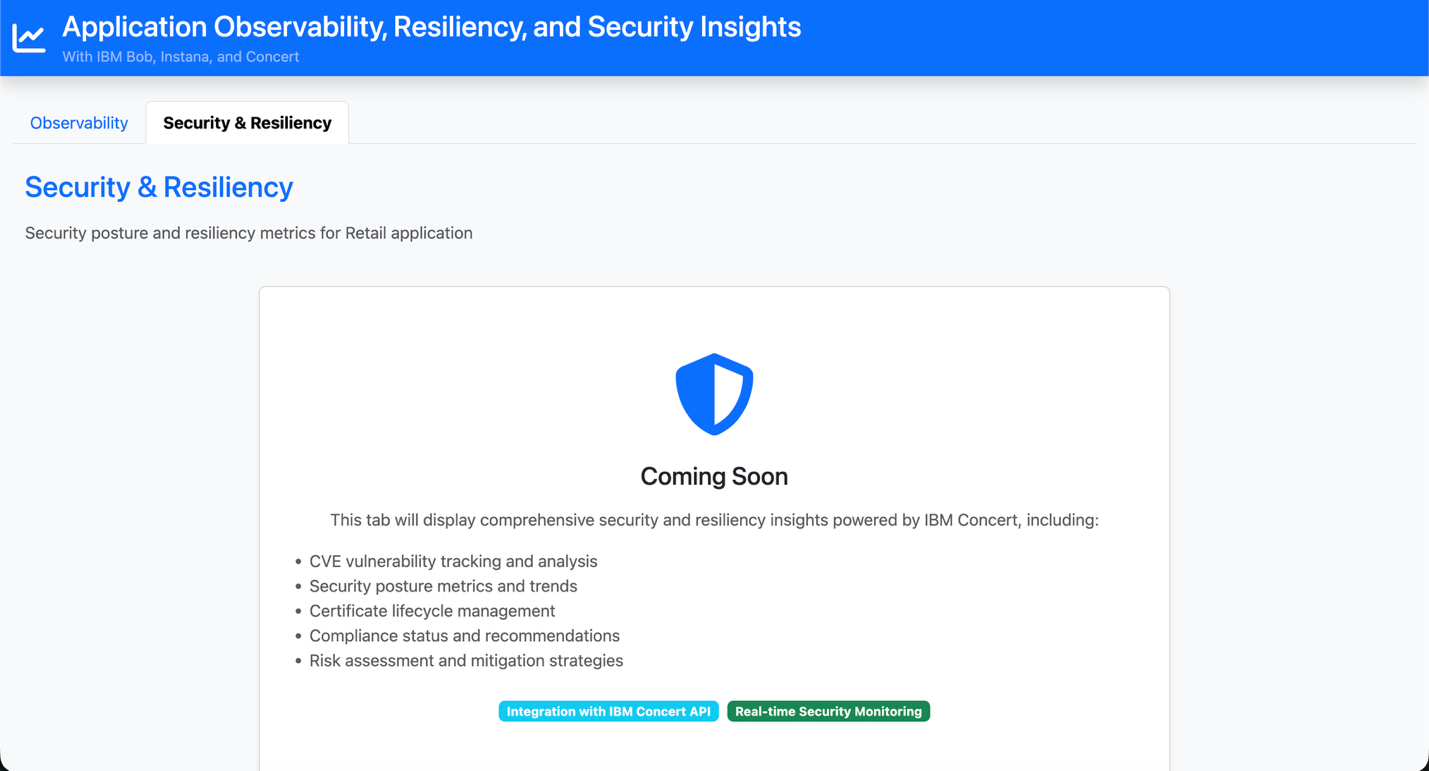
Click the Security & Resiliency tab. Bob has created a placeholder for the Concert implementation, which you will complete in the next step.
Confirm that the application is running correctly. Ask Bob to stop the application so you can continue to the next step.
Thanks Bob! Application is working well, please stop it.
Step 5. Add the application resiliency and security dashboard
In this step, you will ask Bob to implement the resiliency and security dashboard by using the Automate Resilience custom mode.
- Switch to the Automate Resilience mode.
Give Bob the following requirements so it can start implementing the Resiliency and Security tab.
Add security insights and certificate details for the <application-name> in the Resiliency and Security tab. The tab should fetch and visualize security-related data from Concert.
Add a placeholder for the Concert API keys in .env.example file.
Continue the implementation with Bob.
Bob updates the code in the Security tab with the actual IBM Concert integration instead of the placeholder.

Bob updates the code, documentation, and unit tests. Copy the Concert configuration from
.env.exampleinto your.envfile, and add your Concert credentials.Ask Bob to run the unit tests and start the updated application.
I have populated .env with my Concert credentials, please perform unit testing for Concert, and run the updated app for both.
Bob runs the unit tests and starts the application.

Go to
http://localhost:8050, open the Security & Resiliency tab, and confirm that Bob has completed the full IBM Concert integration. The dashboard shows the security posture of the application, including vulnerability insights, severity trends, prioritized risk scores, and certificate health. It also displays certificate validity and expiry timelines to help you maintain a secure and resilient application.
Summary and next steps
This tutorial showed how Bob custom modes help you build an application that connects to IBM Instana and IBM Concert. By using the Application Observability mode and the Automate Resilience mode, Bob understood how each service works and what the application required.
Bob created the project structure, added the Instana integration, and built the full observability dashboard with minimal manual effort. Bob also added the Concert integration and created the security and resiliency dashboard in the same straightforward way.
Bob provides a summary of all the tasks it completed for you during this tutorial:

Next, you can explore how Bob helps create MCP tools and watsonx Orchestrate agents in the tutorial Using IBM Bob to build watsonx Orchestrate agents and MCP tools.
The content in this tutorial was developed as part of the Building Blocks initiative, sponsored by Jason Gartner, General Manager of IBM Build Engineering. Building Blocks are reusable proven enterprise patterns that help teams speed up solution development. Instead of creating complex functions, teams can use these ready‑to‑use components from the beginning to reduce effort, lower risk, and increase delivery speed.
Acknowledgments
The authors Sunil Gajula and Ahmed Azraq deeply appreciate the support of Carlo Appugliese and Anthony Stevens for the guidance on reviewing and contributing to this tutorial.
This tutorial was produced as part of the IBM Open Innovation Community initiative: Agentic AI (AI for Developers and Ecosystem).