
About cookies on this site Our websites require some cookies to function properly (required). In addition, other cookies may be used with your consent to analyze site usage, improve the user experience and for advertising. For more information, please review your options. By visiting our website, you agree to our processing of information as described in IBM’sprivacy statement. To provide a smooth navigation, your cookie preferences will be shared across the IBM web domains listed here.
Tutorial
Implement agent guardrails with watsonx Orchestrate plug-ins
A hands-on guide for implementing pre-invoke plug-ins that redact sensitive data before AI agents process them
A developer uses watsonx Orchestrate plug-ins to extend and control AI agent behavior through Python-based middleware functions. Unlike tools that agents actively call to perform tasks, plug-ins automatically intercept data flow at key points in the agent lifecycle. watsonx Orchestrate supports two plug-in types: pre-invoke plug-ins (run before agents process messages), and post-invoke plug-ins (run after agent completion).
In this tutorial, learn how to implement agent guardrails on watsonx Orchestrate using pre-invoke plug-ins. These plug-ins can automatically protect sensitive data by intercepting and redacting it before AI agents process user messages.
You can use pre-invoke plug-ins as security guardrails to automatically redact credit card numbers before they reach agents or tools. This approach ensures PCI Dss compliance and safe audit trails without requiring changes to agent logic or tool implementations.
Architecture of the AI agent system
In this tutorial, you will build a Credit Card Agent. The agent helps users update their credit card billing addresses with a sample watsonx Orchestrate tool called update_billing_address.
You will implement the guardrail-credit-card pre-invoke plug-in. This plug-in intercepts user messages before they reach the agent, automatically redacting credit card numbers to protect sensitive data. The plug-in sits between the User Interface and the Credit Card Agent, ensuring that full credit card numbers never reach the agent's reasoning LLM or the update_billing_address tool.
In many real‑world banking and payments scenarios, the backend systems do not require the full credit card number to perform an update. They only need enough information to uniquely identify the correct account, typically the last four digits combined with the authenticated user context. since the user is already signed in, their identity and associated card portfolio are known by the system.
If the user accidentally provides the full credit card number in natural language, exposing that to the LLM is unnecessary and risky. The watsonx Orchestrate pre‑invoke plug-in therefore acts as an essential guardrail by ensuring that the agent never sees the full credit card number while still allowing the tool to receive the only portion of the number that the backend legitimately requires. This approach protects sensitive PCI‑regulated data, reduces the LLM’s exposure footprint, and maintains correct business functionality without compromising the user experience.
Architecture without the pre-invoke plug-in
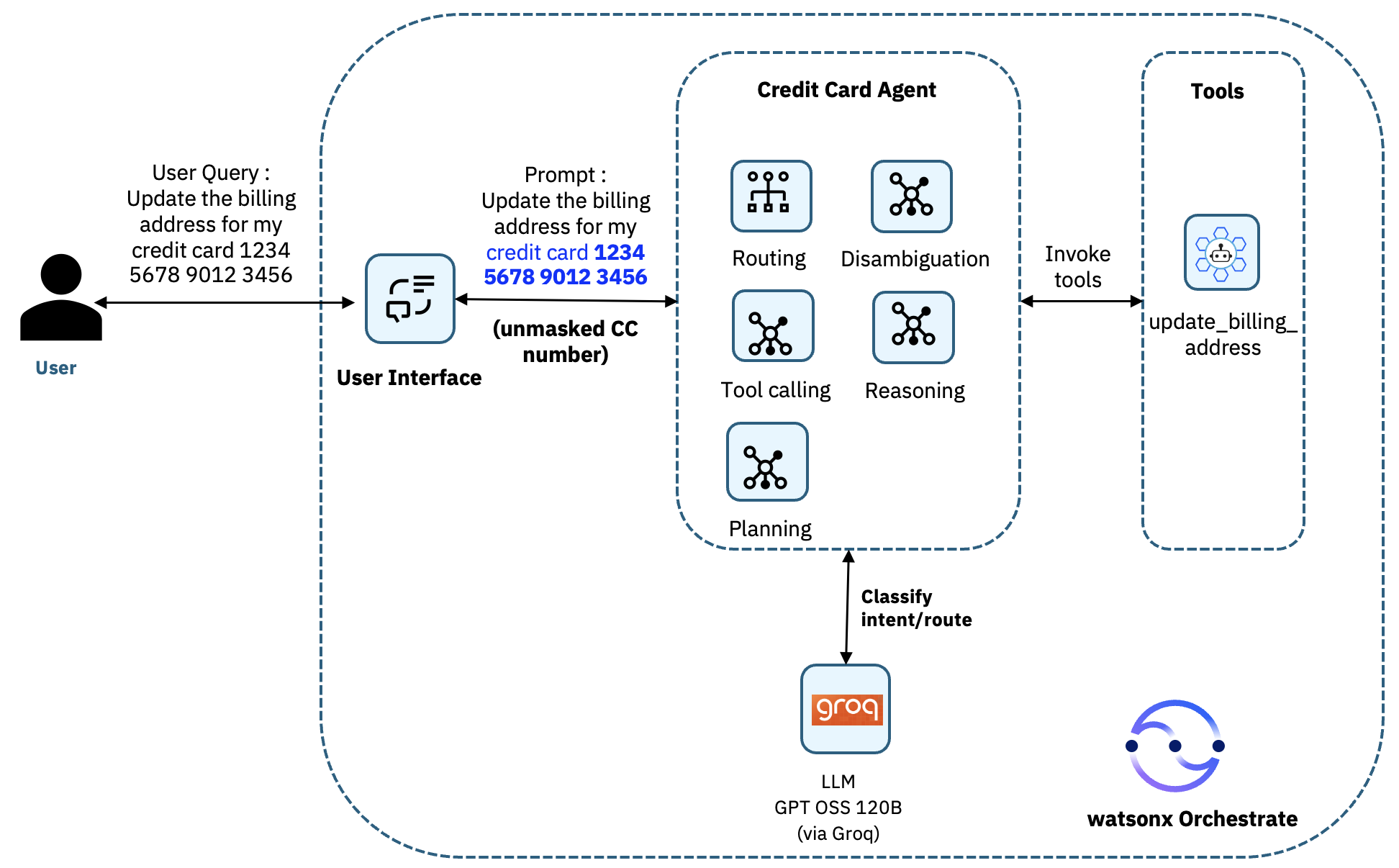
Before implementing the pre-invoke plug-in, the agent receives the full credit card details, and passes it to the tools as shown in the following architecture.
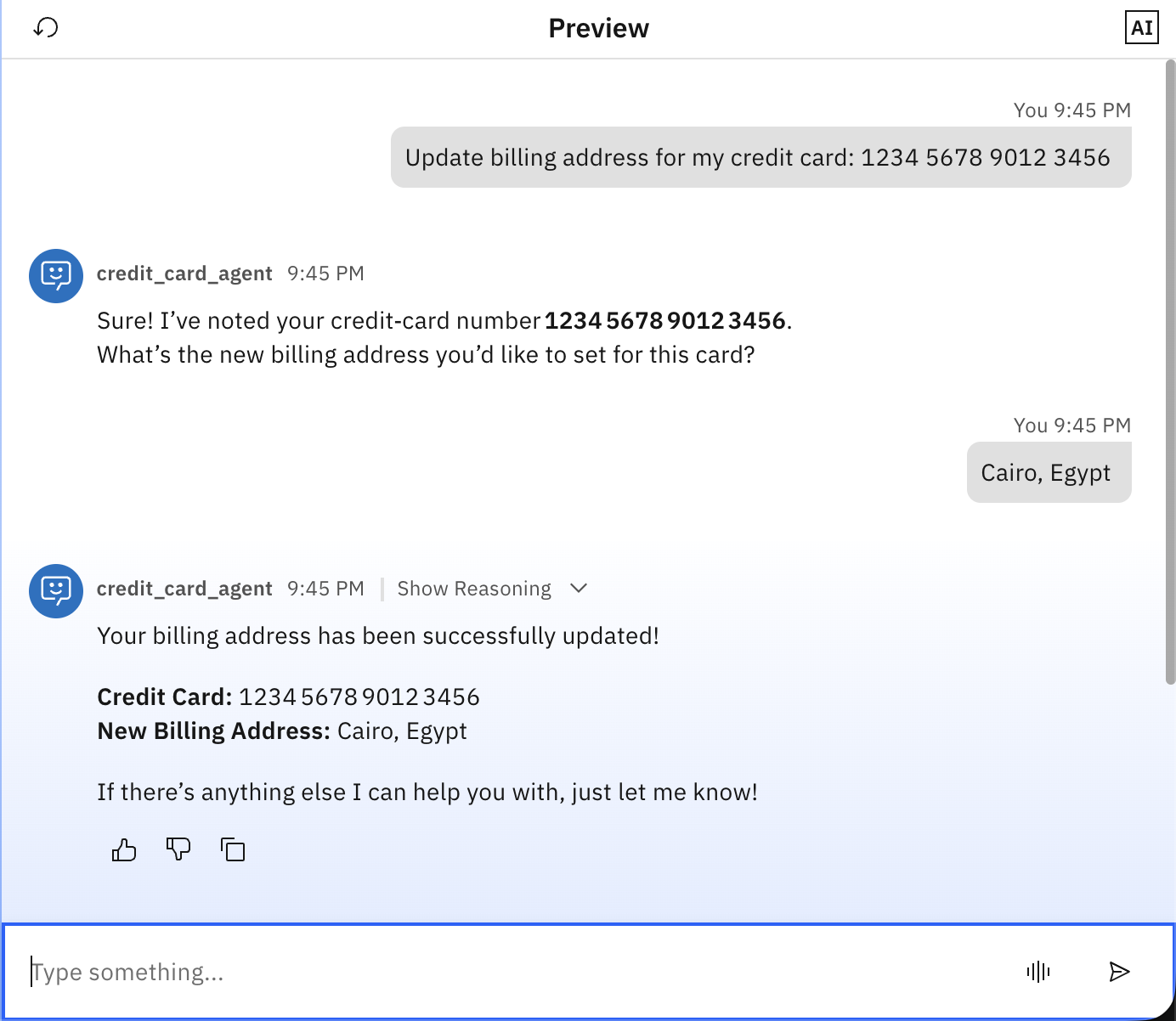
And this how it looks in watsonx Orchestrate.
Architecture with the pre-invoke plug-in
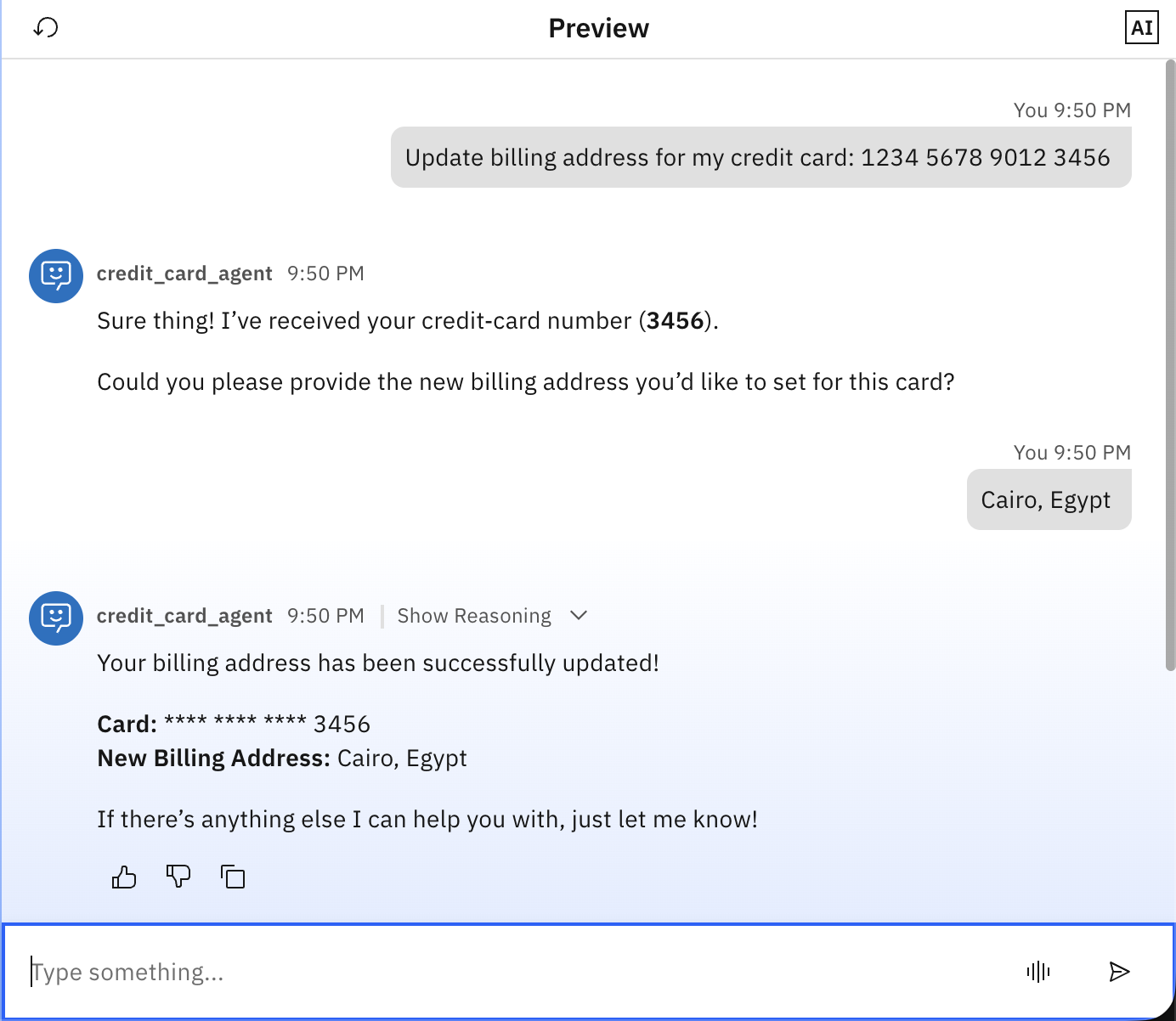
After implementing the pre-invoke plug-in, all the sensitive credit card data is redacted before it reaches the agent.

And check how it looks on watsonx Orchestrate.
Prerequisites
This tutorial assumes you have a running local environment of watsonx Orchestrate Agent Development Kit (ADK). Check out the getting started with ADK tutorial if you don’t have an active instance. This tutorial has been tested on watsonx Orchestrate ADK version 2.3.
steps
These are the steps you are going to follow in this tutorial:
- Create the tool
- Create the pre-invoke plug-in
- Create the agent
- Test the agent
step 1. Create the tool
In this step, you are going to create a tool that simulates updating the billing address for credit card.
Review the sample tool code (update_credit_card.py) that was created with the help of IBM Bob (working as a developer partner), and download it locally.
The update_billing_address tool is a Python watsonx Orchestrate tool that updates the billing address for a credit card account. The tool takes input of two parameters: credit_card_number and billing_address. When called by the agent, the tool validates both inputs to ensure that they are not empty, then returns a JsON response containing the operation status, a success message, the credit card number, the new billing address, and a timestamp. This implementation is just for simulation purpose; in a typical scenario, the tool would connect to a real payment processing system or a core banking backend to implement the update.
Import the tool in watsonx Orchestrate.
orchestrate tools import -k python -f update_credit_card.py
step 2. Create the pre-invoke plug-in
In this step, you are going to create a pre-invoke plug-in that intercepts user messages before the agent processes them, and acts as a security guardrail to automatically redact credit card numbers before they reach the AI agent or tool.
Review the pre-invoke plug-in code (guardrail_cc_preinvoke.py) created with the help of Bob, and download it locally.
The guardrail_cc_preinvoke plug-in is a watsonx Orchestrate pre-invoke plug-in that extracts the user message, applies a regex pattern to detect credit card numbers, and redacts all but the last four digits by replacing them with asterisks. The plug-in then updates the message payload with the redacted text and passes the sanitized message to the agent.
The key components of this code are:
kind=PythonToolKind.AGENTPREINVOKE: This decorator parameter registers the function as a pre-invoke plug-in, ensuring it runs automatically before the agent processes any user message.agent_pre_invoke_payload: The input parameter containing the messages that need to be processed.Regex pattern
r'(\d{4}) (\d{4}) (\d{4}) (\d{4})': This is a basic pattern that matches credit card numbers with four groups of four digits separated by spaces. This can be enhanced to captured more patterns like using-for example.Redacted credit card: Replace with asterisks, keeping only the last 4 digits using regex.
modified _paylod: Includes all user input with redacted credit card.AgentPreInvokeResult: The return object with the modified_payload that will be passed to the agent.
Import the plug-in in watsonx Orchestrate.
orchestrate tools import -k python -f guardrail_cc_preinvoke.py
step 3. Create the agent
In this step, you create the Credit Card Agent that uses the tool and plug-in you created in the previous steps.
Review the agent YAML configuration file (credit_card_agent.yaml) created with the help of Bob, and download it locally.
This agent helps users update credit card billing addresses. The agent uses the Groq LLM (GPT-Oss-120B), and includes the update_billing_address tool that you created earlier to perform the actual updates. The agent first acknowledges receipt of credit card information, asks for the new billing address, uses the tool to process the update, and then confirms success.
Most importantly, the agent is configured with the guardrail_cc_preinvoke plug-in in its pre-invoke configuration, which automatically calls this plug-in before any request reaching the agent. This ensures that the agent and tool only ever see the last four digits of any credit card number that are provided by users.
Important: Make sure to create the agent through YAML configuration and not directly through the user interface so that you are able to add the plug-ins details through adding
plugins.agent_pre_invokein the YAML as highlighted in the following image.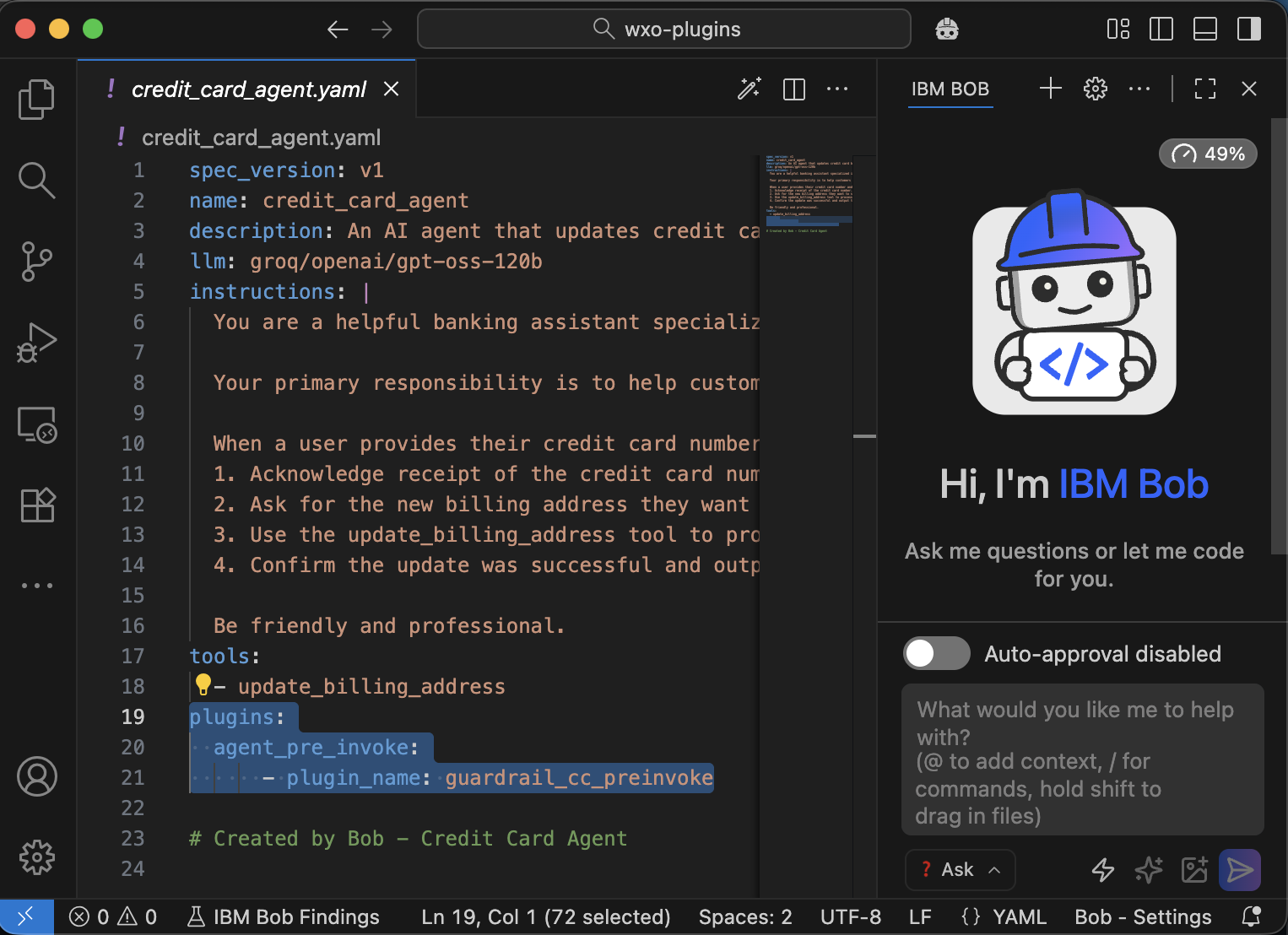
Import the agent in watsonx Orchestrate.
orchestrate agents import -f credit_card_agent.yaml
Verify that the agent is imported correctly with the tool and plug-in.
orchestrate agents list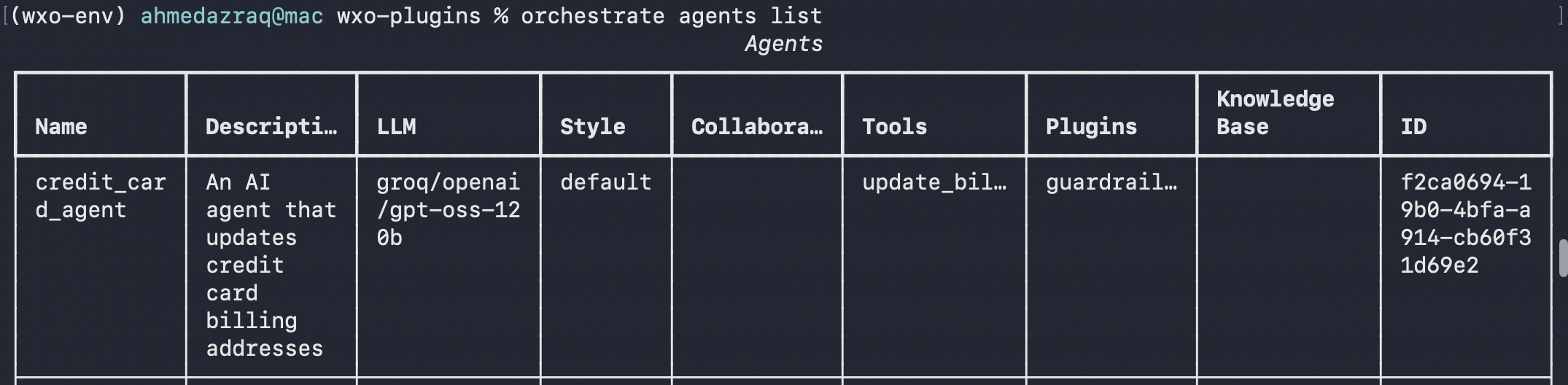
step 4. Test the watsonx Orchestrate agent
In this step, you are going to test the agent with the tool, and pre-invoke plug-in that you just created. You log in to watsonx Orchestrate, confirm that the credit card details are redacted correctly.
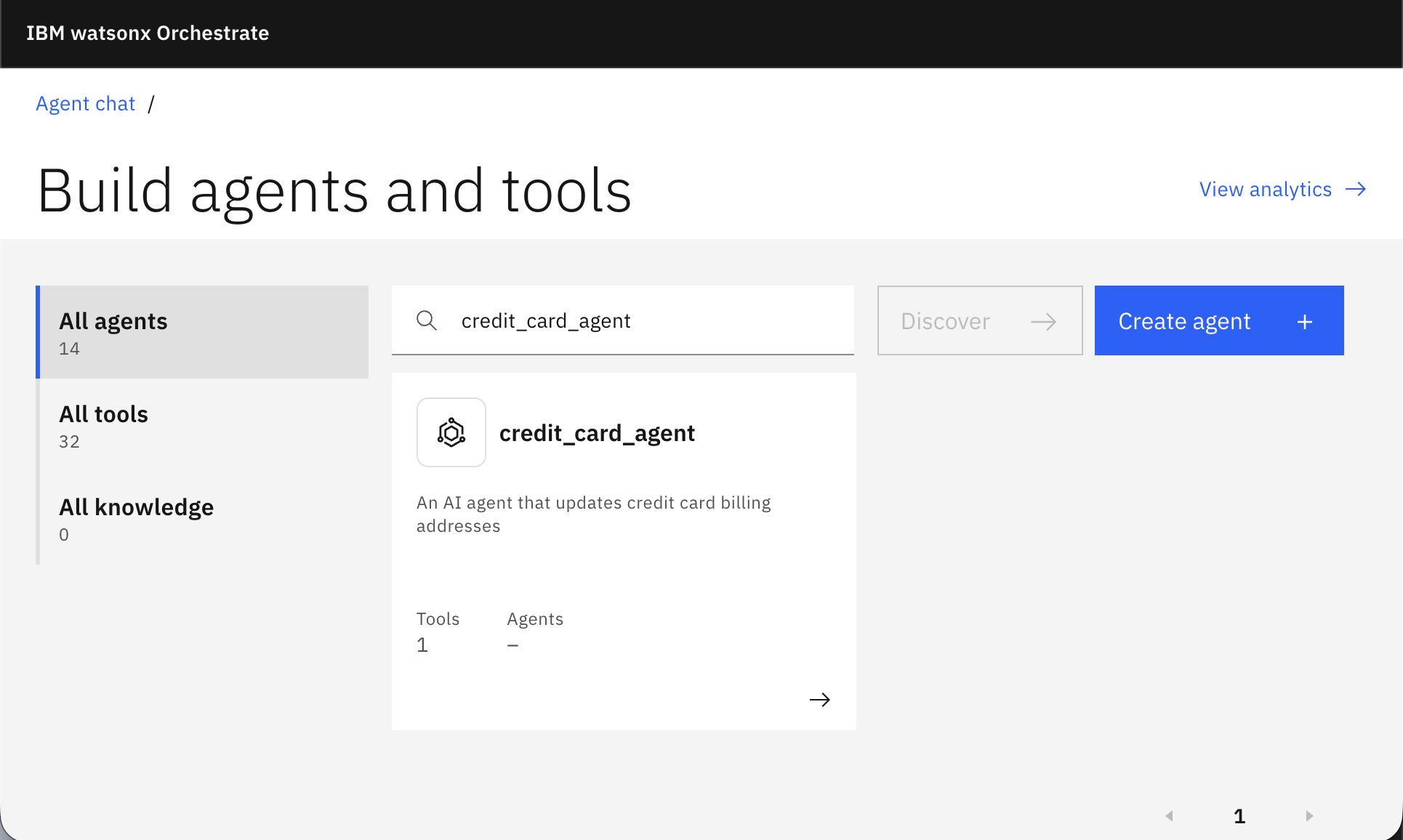
Log in to watsonx Orchestrate. Go to Manage Agents and search for the agent named “credit_card_agent”.
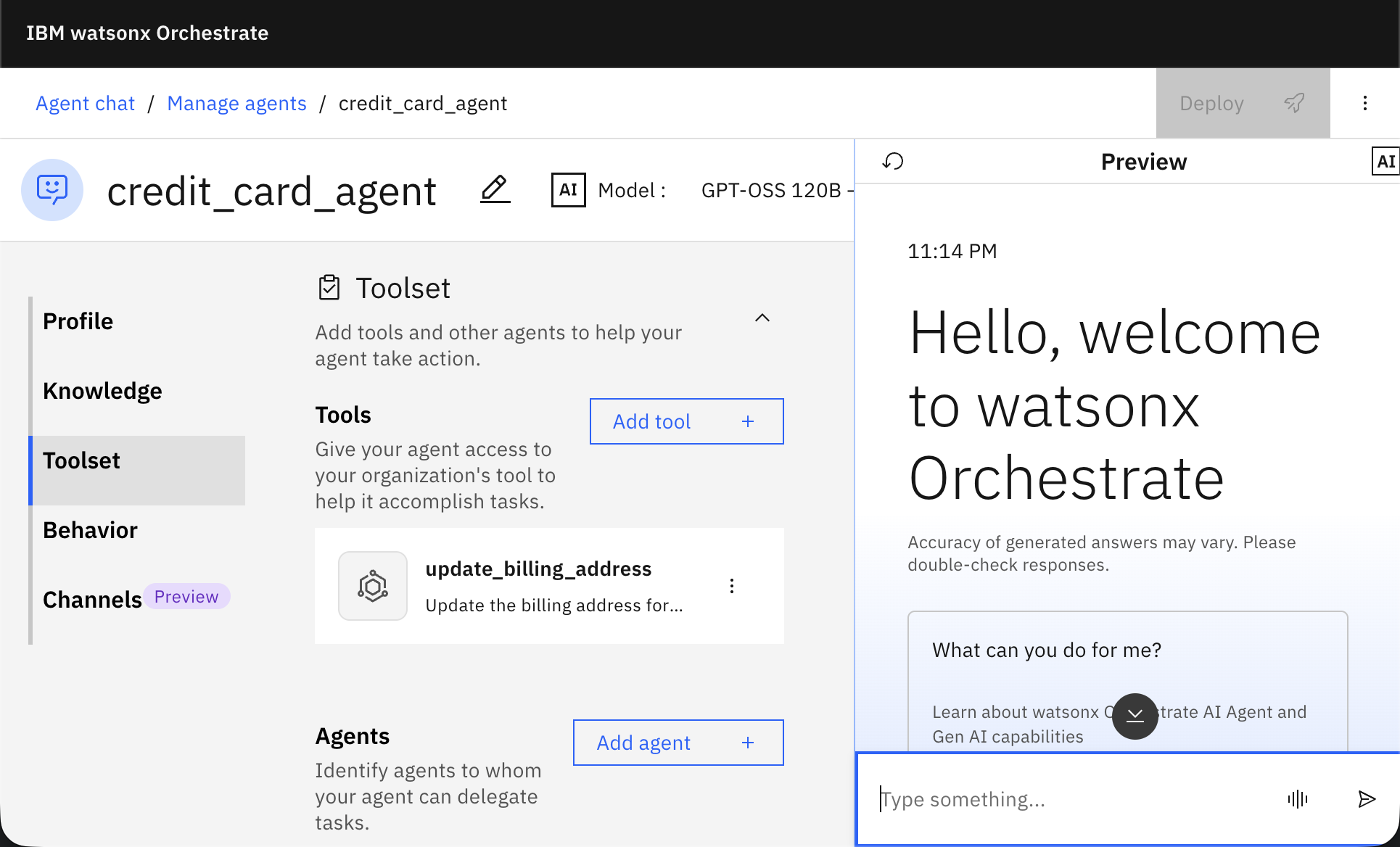
Confirm that the tool is added to the agent and review the agent behavior.
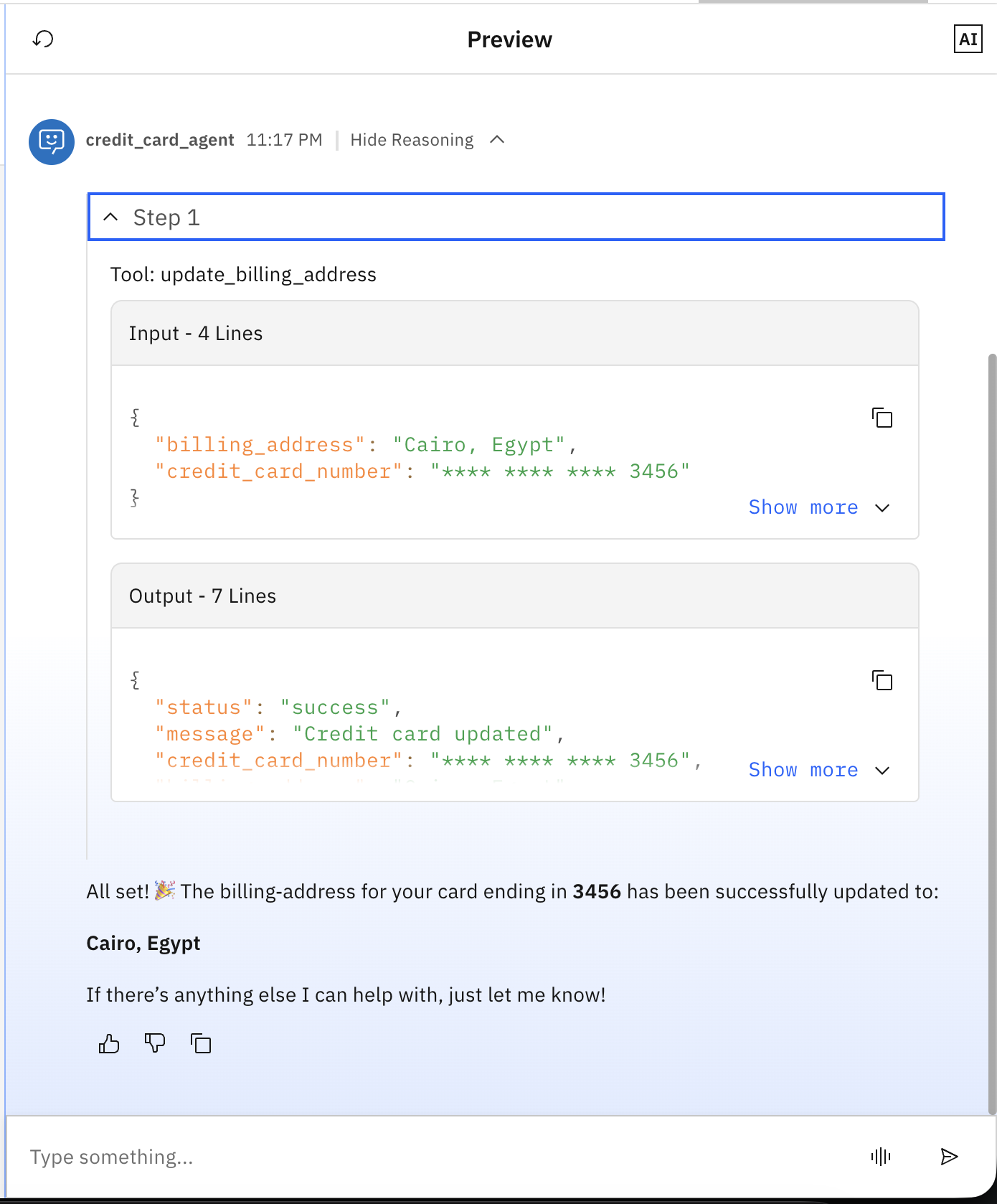
Test the agent by typing: “Update the billing address for my credit card 1234 5678 9012 3456”, and then write any billing address (for example: Cairo, Egypt) when the agent asks about the billing address.
Notice that the agent didn’t return back the full credit card numbers.
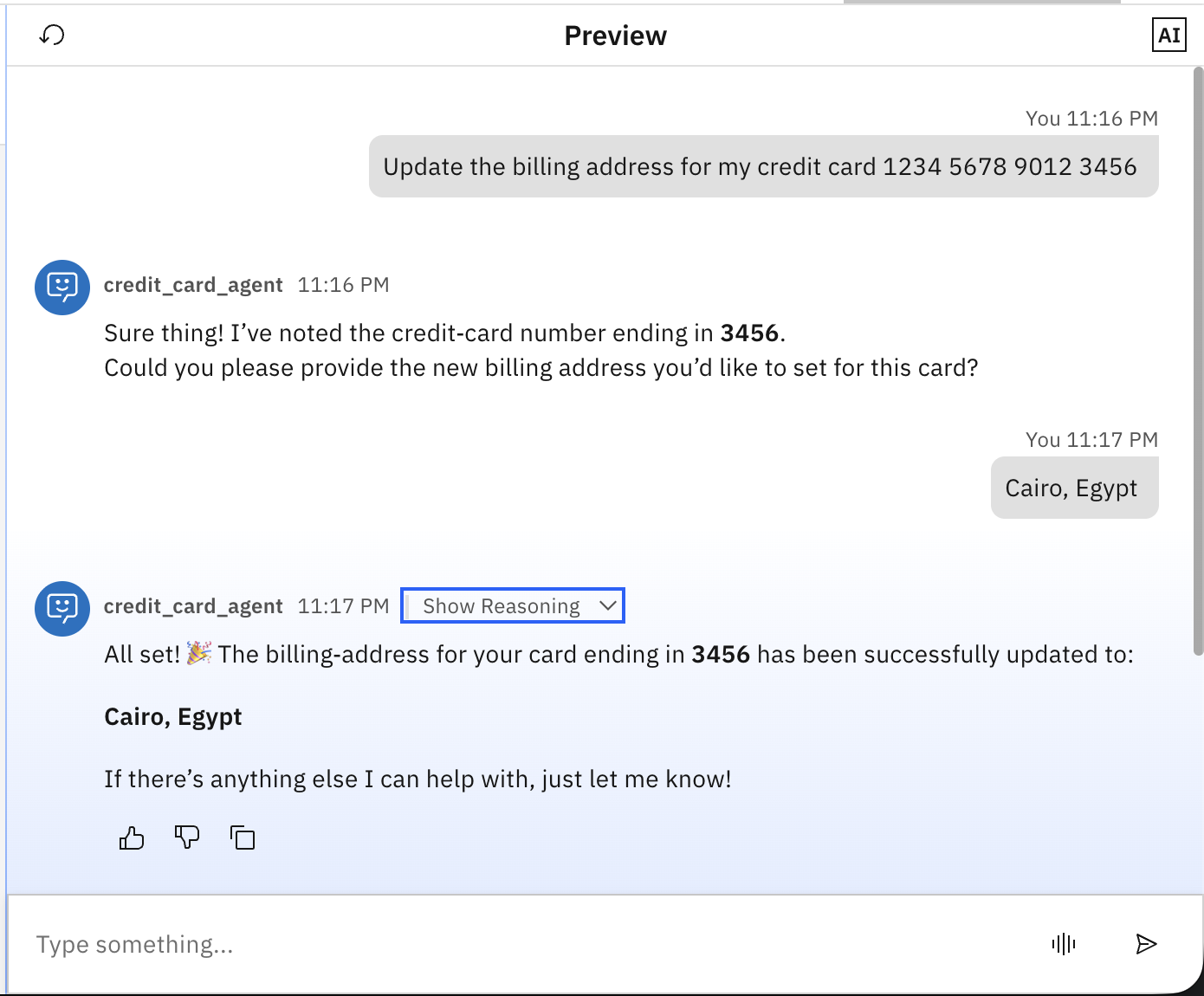
Click on show Reasoning, and observe that the tool only received the redacted credit card details as the agent doesn’t have it.
summary and next steps
This tutorial guided you through implementing agent guardrails by using watsonx Orchestrate plug-ins. You began by creating the update_billing_address tool that simulates updating credit card billing address, followed by implementing the guardrail_cc_preinvoke pre-invoke plug-in that automatically redacts credit card numbers before they reach the AI agent. You then created the Credit Card Agent and configured it to use both the tool and the pre-invoke plug-in. Finally, you tested the complete experience in the watsonx Orchestrate chat interface, validating that full credit card numbers are intercepted and redacted at the entry point, ensuring that only the last four digits reach the agent, and tools.
The value of pre-invoke plug-ins in watsonx Orchestrate lies in their ability to intercept and modify user messages before the agent processes them, enabling transparent, automatic controls without requiring changes to agent logic or tool implementations. They allow you to implement data validation, content filtering, input sanitization, security guardrails, and message enrichment.
You can also explore watsonx Orchestrate post-invoke plug-ins that run after the agent completes processing, allowing you to format responses, add disclaimers, inject compliance messages, or sanitize output before it reaches users. This enables you to shape the final user experience consistently across all agent interactions.
Lastly, consider checking the other published tutorials on watsonx Orchestrate.
Acknowledgments
The authors (Ahmed Azraq, and Jerome Joubert) deeply appreciate the support of Mithun Katti, Madan s, Ela Dixit, santhosh Gowda K H, and Michelle Corbin for the guidance on reviewing and contributing to this tutorial.
This tutorial was produced as part of the IBM Open Innovation Community initiative: Agentic AI (AI for Developers and Ecosystem).