
About cookies on this site Our websites require some cookies to function properly (required). In addition, other cookies may be used with your consent to analyze site usage, improve the user experience and for advertising. For more information, please review your options. By visiting our website, you agree to our processing of information as described in IBM’sprivacy statement. To provide a smooth navigation, your cookie preferences will be shared across the IBM web domains listed here.
Article
Supervised fine-tuning of the open source IBM Granite model using transformers
Create a specialized LLM using the Low-Rank Adaption (LoRA) transformer technique and Optuna library for a question answering task
Supervised fine-tuning of large language models (LLM) involves refining a pretrained model on a specific, labeled data set to improve its performance on a particular task.
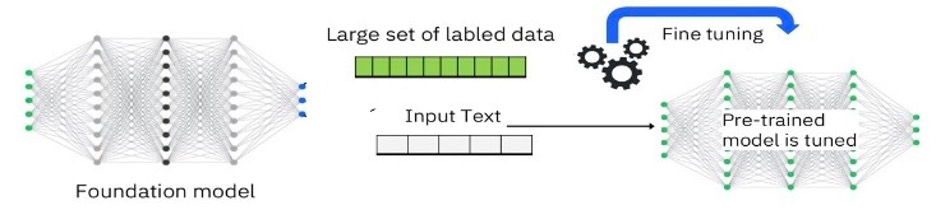
During this process, the model is trained using pairs of inputs and corresponding correct outputs, allowing it to learn task-specific, domain-specific, and data-specific patterns and nuances. This approach is essential for adapting general-purpose LLMs to specialized tasks like sentiment analysis, question answering, or text summarization, for adapting enterprise data for a specific domain or use-case, and for ensuring that the model generates more accurate and contextually relevant responses.
Fine-tuning is often enhanced with techniques like Low-Rank Adaptation (LoRA) and quantization to optimize performance and efficiency.
This tutorial focuses on fine-tuning the open source IBM Granite model to create a specialized LLM using the Low-Rank Adaption (LoRA) transformer technique and the Optuna library for a question answering task.
To ease the process of fine-tuning, we use an autotune function that determines the best parameters for the provided data set without the user performing a trial and error in choosing the best parameters. This function also shows how to evaluate the results that are generated before and after fine-tuning the model by using the BERT embeddings-based similarity metric where the results can easily be downloaded on the local machine.
Runtime, dataset and model used
In this tutorial, we used the following hardware and software:
Collab notebook with T4 GPU (make sure to open this notebook in google colab and use the T4 GPU runtime)
A fine-tuned model: ibm-granite/granite-7b-base on Hugging Face
Data set used for fine-tuning: lamini/lamini_docs from Hugging Face
Environment setup and define evaluation functions
To begin with, in the notebook we have the environment setup to set up an environment for working with natural language processing (NLP) tasks using pretrained models like BERT. It includes utilities for data manipulation, model training, hyperparameter tuning, and evaluation. The code also takes care of handling text encodings and warnings, ensuring that the environment is well-prepared for subsequent tasks. This setup is particularly useful for tasks like text similarity, translation, and classification, where pre-trained models can be fine-tuned or used for inference.
The code also defines functions for evaluating the similarity or quality of text by using different metrics, such as BERT embeddings that are based on cosine similarity and the METEOR score. It is designed to work with NLP tasks where comparing the similarity between two pieces of text is essential, such as in translation or text generation evaluations.
# Load pre-trained BERT model and tokenizer
tokenizer = BertTokenizer.from_pretrained('bert-base-uncased')
model = BertModel.from_pretrained('bert-base-uncased')

# Function to calculate BERT embeddings for a sentence
def get_bert_embedding(sentence):
    # Tokenize input sentence
    tokens = tokenizer(sentence, return_tensors='pt', padding=True,
truncation=True)
    input_ids = tokens['input_ids']
    attention_mask = tokens['attention_mask']
    # Get BERT model output
    with torch.no_grad():
        outputs = model(input_ids, attention_mask=attention_mask)
        embeddings = outputs.last_hidden_state[:, 0, :]
# Use the [CLS] token embedding
    return embeddings.numpy().flatten()  # Convert to 1-D numpy array

# Function to calculate similarity score between two sentences
# We have used the bert score but any evaluation function can be used here
def calculate_similarity_score(sentence1, sentence2):
    # Get BERT embeddings for both sentences
    embedding1 = get_bert_embedding(sentence1)
    embedding2 = get_bert_embedding(sentence2)
    # Calculate cosine similarity between the embeddings
    similarity_score = 1 - cosine(embedding1, embedding2)
    similarity_score = round(similarity_score, 2)
    if len(list(sentence1)) == 0 and len(list(sentence2)) == 0:
        similarity_score = 1
    else:
        if len(list(sentence1)) == 0 or len(list(sentence2)) == 0:
            similarity_score = 0
    int_similarity_score = similarity_score
    similarity_score = str(similarity_score).replace(".", ",")
    return int_similarity_score
Read file and convert into JSON format
The following functions are designed to read a file (with a flexible file format) into a Pandas DataFrame and then convert that DataFrame into a JSON-like structure, focusing on two specific columns (an input and an output).
def get_file_type(file_path):
    _, file_extension = os.path.splitext(file_path)
    return file_extension
file_path = 'Demo_xml.xml'
file_type = get_file_type(file_path)
print(f'The file type is: {file_type}')

def file_to_dataframe(filename=file_path):
  file_extension = get_file_type(filename)
  file_extension_formatted = file_extension.replace('.', '')
  command_to_be_executed = f'pd.read_{file_extension_formatted}("{filename}")'
  dataframe = eval(command_to_be_executed)
  print(dataframe.keys(), dataframe.info())
  return dataframe

def json_converter(dataframe, input_col, output_col):
  # Json file format expected is as below
  # [ { "input": "", "output": "" }, { "input": "", "output": "" }]
  json = []
  for input_record, output_value in zip(dataframe[input_col],
dataframe[output_col]):
    json.append({"input":input_record, "output":output_value})
  return json

def reader(file, input_col, output_col):
  df = file_to_dataframe(filename=file)
  json_file = json_converter(df, input_col, output_col)
  return json_file
Auto fine-tune the model by determining the optimal hyperparameters using Optuna library
The finetune_auto class in the notebook is the main class, with the automatic fine-tuning function that is designed to fine-tune a pretrained LLM by using a specific data set.
Set parameters
The following code block sets various parameters for the model and training process, such as the model’s name, data set, device configuration, training epochs, and learning rate.It also configures quantization settings for efficient model loading and training and initializes placeholders for data sets, the model, tokenizer, and other components that are needed for fine-tuning.
def __init__(self, granite_model, input_dataset):
    # granite_model currently in use = 'ibm-granite/granite-7b-base'
    # input dataset given currently = 'lamini/lamini_docs'
    self.max_seq_length = None
    # if set to True, will result in ValueError: the
    #`--group_by_length` option is only available for `Dataset`, not
    #`IterableDataset
    self.packing = False
    self.device_map = {"": 0}
    self.use_4bit = True
    self.bnb_4bit_compute_dtype = 'float16'
    # Quantization Type (fp4 or nf4)
    self.bnb_4bit_quant_type = 'nf4'
    self.use_nested_quant = False
    # Training Arguments Parameters
    self.output_dir = "/content/results"
    self.num_train_epochs = 3
    # Enable fp16/bf16 training (set bf16 to True with an A100)
    self.fp16 = False
    self.bf16 = False
    self.per_device_train_batch_size = 4
    self.per_device_eval_batch_size = 4
    self.gradient_accumulation_steps = 1
    self.gradient_checkpointing = True
    self.max_grad_norm = 0.3
    self.learning_rate = 1e-3
    self.weight_decay = 0.001
    self.optim = "sgd"
    # reduce lr on plateau support currently in pipeline, due to its
    # adaptive nature the SFFTTrainer requires modifications
    self.lr_scheduler_type = "cosine_with_restarts"
    self.max_steps = -1
    self.warmup_ratio = 0.03
    self.group_by_length = True
    self.save_steps = 0
    self.logging_steps = 25
    self.model_name = granite_model
    self.dataset = input_dataset
    self.output_dir = "/content/results"
    self.eval_strategy = "steps"
    # evaluation strategy can be epoch, no or steps(string)
    # LoRA attention dimension
    self.lora_r = 64
    # Alpha parameter for LoRA scaling
    self.lora_alpha = 32
    # Dropout probability for LoRA layers
    self.lora_dropout = 0.075
    # Initializing future parameters to None
    self.train_set_optimize = None
    self.test_set_optimize = None
    self.train_dataset = None
    self.test_dataset = None
    self.transformed_dataset = None
    self.finetuned_model = None
    self.finetuned_base_model = None
    self.dataset_object = None
    self.model = None
    self.tokenizer = None
    self.trainer = None
    self.finetuned_model = None
    self.finetuned_base_model = None
    self.peft_config = None
    self.training_arguments = None
    self.best_params = None
    self.optim_subset_train_size = 35
    self.optim_subset_test_size = 30
    self.optimal_trainer = None
    self.optimized_training_arguments = None
    self.study = None
    # Other parameters to be used throughout training process
    self.dataset = input_dataset
    self.training_size = 150
    self.testing_size = 50
Load the data set and model
The following code block loads the specified data set for training.Configures the model with quantization options to make it more efficient.It also Loads the tokenizer, which handles text processing, and adjusts it for specific requirements like padding.
def model_tokenizer_loading(self):
    # this is the part where the model is loaded
    #- download the shards from here-
    # kaggle shards- dataset linking should be done above
    #(in the same function)
    self.dataset_object = load_dataset(self.dataset, split = "train")
    # Load tokenizer and model with QLoRA configuration
    compute_dtype = getattr(torch, self.bnb_4bit_compute_dtype)
    bnb_config = BitsAndBytesConfig(
        load_in_4bit=self.use_4bit,
        bnb_4bit_quant_type=self.bnb_4bit_quant_type,
        bnb_4bit_compute_dtype=compute_dtype,
        bnb_4bit_use_double_quant=self.use_nested_quant,
    )
    # Check GPU compatibility with bfloat16
    if compute_dtype == torch.float16 and self.use_4bit:
        major, _ = torch.cuda.get_device_capability()
        if major >= 8:
            print("=" * 80)
            print("Your GPU supports bfloat16: accelerate training with bf16=True")
            print("=" * 80)
    # Load the base model
    self.model = AutoModelForCausalLM.from_pretrained(
        self.model_name,
        quantization_config=bnb_config,
        device_map=self.device_map
    )
    self.model.config.use_cache = False
    self.model.config.pretraining_tp = 1
    # Load LLaMA tokenizer
    self.tokenizer = AutoTokenizer.from_pretrained(self.model_name, trust_remote_code=True)
    self.tokenizer.pad_token = self.tokenizer.eos_token
    # specifically applies the token for the llama
    self.tokenizer.padding_side = "right"
Tranform the input data set into a suitable format
The following code block transforms the data set into a format suitable for training by reformatting each example into a structured text sequence.It contains utility functions for handling different file types and converting them into a usable format (like JSON) for training.
def transform_conversational_dataset(self):
    # Load the dataset
    dataset = load_dataset(self.dataset)
    # Define the transformation function
    def transform(example):
        question = example['question'].strip()
        answer = example['answer'].strip()
        reformatted_segment = f'<s>[INST] {question} [/INST] {answer} </s>'
        return {'text': reformatted_segment}
    # Apply the transformation function using map
    self.transformed_dataset = dataset.map(transform)

  def dataset_corrector(self):
    # File not found error or XML Parsing error arises- do not run this cell

    def get_file_type(file_path):
        _, file_extension = os.path.splitext(file_path)
        return file_extension

    def file_to_dataframe(filename=file_path):
      file_extension = get_file_type(filename)
      file_extension_formatted = file_extension.replace('.', '')
      command_to_be_executed = f'pd.read_{file_extension_formatted} ("{filename}")'
      dataframe = eval(command_to_be_executed)
      print(dataframe.keys(), dataframe.info())
      return dataframe

    def json_converter(dataframe, input_col, output_col):
      # Json file format expected
      # [ { "input": "", "output": "" }, { "input": "", "output": "" }]
      json = []
      for input_record, output_value in zip(dataframe[input_col], dataframe[output_col]):
        json.append({"input":input_record, "output":output_value})
      return json

    def reader(file, input_col, output_col):
      df = file_to_dataframe(filename=file)
      json_file = json_converter(df, input_col, output_col)
      return json_file
Random sampling of the data set into train and test sets
The following code selects a specific number of examples from the transformed data set for training and testing and randomly shuffles and selects a subset of the data set for training and testing to optimize model parameters.
# the functions defined above need to be called here in order to pass
    # the objects continuously to these functions (in order)
    # reader(file_path, 'title', 'description')

  def set_training_and_testing(self, training_size, testing_size):
    self.train_set = self.transformed_dataset['train'].select(range(training_size))
    self.test_set = self.transformed_dataset['test'].select(range (testing_size))
    # train_set = train_set.select(range(size))

  def set_random_training_and_testing(self, input_size, output_size):
    self.train_set_optimize = self.transformed_dataset['train'].shuffle().select(range(input_size))
    self.test_set_optimize = self.transformed_dataset['test'].shuffle().select(range(output_size))
Define the evaluation function
The following code block defines a function for evaluating the model’s predictions by using a specific metric (like METEOR) to compare predicted and actual answers.
def custom_evaluator(self, eval_pred: EvalPrediction):
    # Convert logits to token IDs if predictions are logits
    if eval_pred.predictions.ndim == 3:
        predictions = torch.tensor(eval_pred.predictions).argmax(dim=-1)
    else:
        predictions = eval_pred.predictions
    labels = eval_pred.label_ids
    # Replace -100 in labels with the padding token ID (0 in most cases)
    labels[labels == -100] = self.tokenizer.pad_token_id
    # Decode the predictions and labels
    decoded_preds = [self.tokenizer.decode(pred.tolist(),skip_special_tokens=True).strip() for pred in predictions]
    decoded_labels = [self.tokenizer.decode(label.tolist(),skip_special_tokens=True).strip() for label in labels]
    # Tokenize the decoded predictions and labels
    tokenized_preds = [pred.split() for pred in decoded_preds]
    tokenized_labels = [label.split() for label in decoded_labels]
    # Calculate METEOR scores
    meteor_scores = [meteor_score([label], pred) for label, pred in zip(tokenized_labels, tokenized_preds)]
    avg_meteor_score = sum(meteor_scores) / len(meteor_scores)
    return {'METEOR Score': avg_meteor_score}
Find optimal hyperparameters for training using the Optuna library
The following code base uses the Optuna library to find optimal hyperparameters for training through trial-and-error. This includes parameters viz, gradient_accumulation_steps, weight_decay, num_train_epochs,max_grad_norm, optim, lr_scheduler_type, warmup_ratio, logging_steps, per_device_train_batch_size, and per_device_eval_batch_size. It also sets up training parameters and initializes a trainer with these settings and the model.
def preset_optimal_params(self, optuna.tria trial:l):
    self.learning_rate = trial.suggest_loguniform('learning_rate', 1e-5, 1e-3)
    self.gradient_accumulation_steps = trial.suggest_int('gradient_accumulation_steps', 1, 10)
    self.weight_decay = trial.suggest_loguniform('weight_decay', 0.01, 0.2)
    self.num_train_epochs = trial.suggest_int('num_train_epochs', 2, 5)
    self.max_grad_norm = trial.suggest_uniform('max_grad_norm', 0.1, 0.6)
    self.optim = trial.suggest_categorical('optim', ['sgd', 'adamw_hf', 'adamw_torch', 'adagrad'])
    self.lr_scheduler_type = trial.suggest_categorical('lr_scheduler_type', ["linear", "cosine", "cosine_with_restarts", "constant", "constant_with_warmup"])
    self.warmup_ratio = trial.suggest_uniform('warmup_ratio', 0.01, 0.1)
    self.logging_steps = trial.suggest_int('logging_steps', 10, 50)
    self.per_device_train_batch_size = trial.suggest_int('per_device_train_batch_size', 4, 12)
    self.per_device_eval_batch_size = trial.suggest_int('per_device_eval_batch_size', 4, 20)
    # set a smaller train and test set so that we can obtain optimal params
    # Faster- ideally it should scale up, having similar accuracy metric values
    # for larger number of rows from the training and testing dataset as well
    # Load LoRA configuration
    self.peft_config = LoraConfig(
        lora_alpha=self.lora_alpha,
        lora_dropout=self.lora_dropout,
        r=self.lora_r,
        bias="none",
        task_type="CAUSAL_LM",
    )
    # Set training parameters
    # Gradient accumulation steps is responsible for accumulating the gradient
    # updates over a series of epochs and updating the weights at once
    self.optimal_training_arguments = TrainingArguments(
        output_dir=self.output_dir,
        num_train_epochs=self.num_train_epochs,
        per_device_train_batch_size=self.per_device_train_batch_size,
        gradient_accumulation_steps=self.gradient_accumulation_steps,
        optim=self.optim,
        save_steps=self.save_steps,
        logging_steps=self.logging_steps,
        learning_rate=self.learning_rate,
        weight_decay=self.weight_decay,
        fp16=self.fp16,
        bf16=self.bf16,
        max_grad_norm=self.max_grad_norm,
        max_steps=self.max_steps,
        warmup_ratio=self.warmup_ratio,
        group_by_length=self.group_by_length,
        lr_scheduler_type=self.lr_scheduler_type,
        report_to="tensorboard",
    )
    # Initialize the trainer
    # custom compute metrics need to be defined here - explicitly set as a
    # parameter irrespective of function used-
    # also define function for computing the metric beforehand (like bert
    # embedding score retreiver above, etc.)
    self.optimal_trainer = SFTTrainer(
        model=self.model,
        train_dataset=self.train_set_optimize,
        peft_config=self.peft_config, # LoRA config
        dataset_text_field="text",
        max_seq_length=self.max_seq_length,
        tokenizer=self.tokenizer,
        args=self.optimal_training_arguments,
        packing=self.packing,
        compute_metrics=self.custom_evaluator,
        eval_dataset=self.test_set_optimize,
    )
Train without finding the optimal parameters (classic method)
# for normal training
  def set_parameters_for_training(self):
    best_params = self.best_params
    self.learning_rate = best_params["learning_rate"]
    self.gradient_accumulation_steps = best_params["gradient_accumulation_steps"]
    self.weight_decay = best_params["weight_decay"]
    self.num_train_epochs = best_params["num_train_epochs"]
    self.max_grad_norm = best_params["max_grad_norm"]
    self.optim = best_params["optim"]
    self.lr_scheduler_type = best_params["lr_scheduler_type"]
    self.warmup_ratio = best_params["warmup_ratio"]
    self.logging_steps = best_params["logging_steps"]
    self.per_device_train_batch_size = best_params["per_device_train_batch_size"]
    self.per_device_eval_batch_size = best_params["per_device_eval_batch_size"]
    # Load LoRA configuration
    self.peft_config = LoraConfig(
        lora_alpha=self.lora_alpha,
        lora_dropout=self.lora_dropout,
        r=self.lora_r,
        bias="none",
        task_type="CAUSAL_LM",
    )
    # Set training parameters
    # Gradient accumulation steps is responsible for accumulating the gradient
    # updates over a series of epochs and updating the weights at once
    self.training_arguments = TrainingArguments(
        output_dir=self.output_dir,
        num_train_epochs=self.num_train_epochs,
        per_device_train_batch_size=self.per_device_train_batch_size,
        gradient_accumulation_steps=self.gradient_accumulation_steps,
        optim=self.optim,
        save_steps=self.save_steps,
        logging_steps=self.logging_steps,
        learning_rate=self.learning_rate,
        weight_decay=self.weight_decay,
        fp16=self.fp16,
        bf16=self.bf16,
        max_grad_norm=self.max_grad_norm,
        max_steps=self.max_steps,
        warmup_ratio=self.warmup_ratio,
        group_by_length=self.group_by_length,
        lr_scheduler_type=self.lr_scheduler_type,
        report_to="tensorboard"
    )
    #Set supervised fine-tuning parameters
    self.trainer = SFTTrainer(
        model=self.model,
        train_dataset=self.train_set,
        peft_config=self.peft_config, # LoRA config
        dataset_text_field="text",
        max_seq_length=self.max_seq_length,
        tokenizer=self.tokenizer,
        args=self.training_arguments,
        packing=self.packing
    )
Train the model with Optimal parameters found, evaluate the results, and save the trained model and results
The following code trains the model with the optimal parameters found and evaluates it.It then trains the model on the full data set by using the best-found parameters, then saves the fine-tuned model and runs the model on the test set, generates predictions, and calculates a similarity score (for example, METEOR).Then saves these predictions to a CSV file and allows downloading the results.
def train_and_find_optimal(self):
    self.optimal_trainer.train()
    eval_result = self.optimal_trainer.evaluate()
    return eval_result['eval_loss']

  def objective(self, trial):
    self.preset_optimal_params(trial)
    return self.train_and_find_optimal()

  def train_and_save(self):
    self.trainer.train()
    new_model = f'{self.model_name}_finetune'
    self.trainer.model.save_pretrained(new_model)
    self.finetuned_model = self.trainer.model
    self.finetuned_base_model = self.finetuned_model.base_model

  def return_best_params(self):
    # Create a study and optimize the objective
    self.study = optuna.create_study(direction='minimize')
    # Automate finding the right value of n_trials
    self.study.optimize(self.objective, n_trials=20)
      # Get the best parameters
    self.best_params = self.study.best_params
    print(f'the best parameters for the given dataset are: {self.best_params}')

  def save_finetuned_model(self):
    # below is the code to evaluate 50 datapoints from the test set using the
    # finetuned model and download the results on laptop.
    # Ensure output directory exists
    os.makedirs(self.output_dir, exist_ok=True)
    # Set up the text generation pipeline
    pipe = pipeline(
        task="text-generation",
        model=self.finetuned_model,
        tokenizer=self.tokenizer,
        max_length=200  # you can set this to any value you need
    )
    # Run inference and collect the results
    results = []
    avg_similarity, avg_loss = 0, 0
    for index, example in enumerate(tqdm(self.test_set, desc='Training Progress:')):
        question = example['question']
        actual_answer = example['answer']
        prompt = f"<s>[INST] {question} [/INST]"
        generated = pipe(prompt)
        predicted_answer = generated[0]['generated_text']
        results.append({"question": question, "actual_answer": actual_answer,"predicted_answer": predicted_answer})
        avg_similarity = evaluator_function(2, actual_answer, predicted_answer)
        print(f"Training Progress: {((index)/len(self.test_set))*100} %")
    print(f"Average Meteor-Score Similarity: {avg_similarity/len(self.test_set)}")
    print(f"Average Loss (wrt similarity scores): {avg_loss/len(self.test_set)}")
    # Convert results to DataFrame
    df = pd.DataFrame(results)
    # Save the results to a CSV file
    csv_file_path = os.path.join(self.output_dir, "predictions.csv")
    df.to_csv(csv_file_path, index=False)
    # Download the CSV file
    files.download(csv_file_path)
Evaluate the model responses using the test data set
Now, you have the predictions.csv file downloaded on your machine.
The following code gets a response from this fine-tuned LLM and evaluates it on the test data set.
# getting a response from this finetuned llm
help(checker)
print(True if checker.finetuned_model else False)
pipe = pipeline(
    task="text-generation",
    model=checker.finetuned_model,
    tokenizer=checker.tokenizer,
    max_length=200 # you can set this to any value you need
)
# to run the inference on the whole test set, get the bert
# similarity scores and download the results
dataset_name = "lamini/lamini_docs"  # replace with your dataset name
test_set = load_dataset(dataset_name, split="test")
test_set = test_set.select(range(50))

# Run inference and collect the results
results_all = []
avg_similarity = 0
avg_loss = 0
for index, example in enumerate(test_set):
    question = example['question']
    actual_answer = example['answer']
    prompt = f"<s>[INST] {question} [/INST]"
    generated = pipe(prompt)
    predicted_answer = generated[0]['generated_text']
    results_all.append({"question": question, "actual_answer": actual_answer,"predicted_answer": predicted_answer})
    avg_similarity += calculate_similarity_score(actual_answer,predicted_answer)
    avg_loss += 1-avg_similarity
    print(f"Training Progress: {((index)/len(test_set))*100} %")
print(f"Average Similarity: {avg_similarity/len(test_set)}")
print(f"Average Loss (wrt similarity scores): {avg_loss/len(test_set)}")
# Convert results to DataFrame
df = pd.DataFrame(results)

# Save the results to a CSV file
csv_file_path = os.path.join(self.output_dir,
"predictions_individual_bertEmbedding.csv")
df.to_csv(csv_file_path, index=False)

# Download the CSV file
files.download(csv_file_path)
print("file downloaded")
You can see that 60% of the time the fine-uned model performs better than the general purpose LLM in retrieval augmented generation (RAG)-based use cases.
You can use any of the open source models and data sets from Hugging Face in the previous code for fine-tuning, keeping in mind the fact that larger models need larger GPU support.
This code can also be run using GPU supported WML notebook.
Summary
This tutorial focuses on the method of fine tuning the IBM Granite LLM to create a specialized LLM using the LoRA transformer technique. It provides detailed steps for loading the data and model, random sampling of train and test data set, then finding optimal parameter values using hyperparameter tuning using Optuna library, then using those parameters to fine-tune the model, then test the model using the test data and evaluate the model performance based on predefined metrics like bert score and meteor score, and then finally save the trained model and evaluations.
Next Steps
The fine-tuned IBM Granite foundation model from this tutorial can be used for further inferencing using the domain specific data using watsonx.ai and its "bring your own model" capability. Learn more in this blog.