
About cookies on this site Our websites require some cookies to function properly (required). In addition, other cookies may be used with your consent to analyze site usage, improve the user experience and for advertising. For more information, please review your options. By visiting our website, you agree to our processing of information as described in IBM’sprivacy statement. To provide a smooth navigation, your cookie preferences will be shared across the IBM web domains listed here.
Tutorial
Automate Maximo workflows with watsonx Orchestrate ADK
Learn how to use the watsonx Orchestrate ADK to connect Maximo, fetch asset data, and automate service requests
Learn how to build a custom agent called Maximo using the Agent Development Kit (ADK) in watsonx Orchestrate.
This Maximo agent works with IBM Maximo to perform the following tasks:
- Fetch assets from Maximo Health based on a health score provided by the user.
- Create service requests in Maximo when the user confirms the asset number.
This tutorial guides you through creating two Python tools, setting up connections, and linking them to the agent. Each tool uses Python and makes REST API calls to the Maximo instance. For authentication, we will create a connection that stores the API key of Maximo. This key will be used by the Python tools to authenticate and make the API calls.
Prerequisites
Before you begin, make sure that you have:
- Access to watsonx Orchestrate ADK. For installation instructions, see Setting up and installing the ADK.
- Python 3.11 or later installed
- Basic knowledge of Python and REST APIs
- Access to a Maximo instance with API credentials. To generate an API key, see Generating and managing API keys.
Activate environments
Before running commands, check that the correct watsonx Orchestrate environment is active.
orchestrate env list
A list of environments is shown. The active environment is marked with (active) at the end.

For details on managing environments, see Configure access to remote environments.
Steps
Step 1. Set up the connection
A connection is used to store credentials for external services. Create a connection to save the Maximo API key, which the Python tools use for REST API calls.
Create a file named
maximo_connection.yaml:spec_version: v1 kind: connection app_id: maximo_health_api environments: draft: kind: api_key type: team sso: false server_url: https://demo.manage.maximo.cloud/ live: kind: api_key type: team sso: false server_url: https://demo.manage.maximo.cloud/Replace
server_urlwith the URL of your Maximo instance.To Import the connection, run the following command in the terminal:
orchestrate connections import --file maximo_connection.yamlTo configure the connection, run the following commands in the terminal to set your API key. Replace
api-key-valuewith the API key from your Maximo instance.orchestrate connections set-credentials --app-id maximo_connection --env draft --api-key api-key-valueorchestrate connections set-credentials --app-id maximo_connection --env live --api-key api-key-value
Step 2. Create the Maximo tools
We will create two Python tools: health.py and servicerequest.py.
Using the general instructions about authoring python-based tools, create the following Python tools:
health.py: Fetch assets based on health.
import requests from ibm_watsonx_orchestrate.agent_builder.tools import tool, ToolPermission from ibm_watsonx_orchestrate.run import connections from ibm_watsonx_orchestrate.agent_builder.connections import ConnectionType, ExpectedCredentials @tool( name="healthapi", permission=ToolPermission.READ_ONLY, expected_credentials=[ExpectedCredentials( app_id = "maximo_connection", type = ConnectionType.API_KEY_AUTH )], description="This tool will fetch the assets whose assethealth is below the given threshold.") def health_api(assethealth: int): """ Fetches a list of assets from Maximo whose health is below the given threshold. The function queries the Maximo Health API using the provided asset health value and returns the JSON response containing key asset metrics like asset number, health score, criticality, and risk trend. Args: assethealth (int): Integer threshold to filter assets with assethealth less than this value. Returns: str: JSON response as a string from the Maximo API. """ BASE_URL = "https://demo.manage.maximo.cloud/" url = BASE_URL+ "maximo/api/os/mhasset?lean=1&oslc.select=assetuid,assetnum,assethealth, apm_scorecriticality.apmnumval, apm_scorerisk.scoretrendvalue&oslc.pageSize=5&oslc.where=assethealth<"+str(assethealth) conn = connections.api_key_auth("maximo_connection") headers = { "apikey": conn.api_key } response = requests.get(url, headers=headers, verify=False) if response.status_code != 200: raise Exception(f"API request failed with status {response.status_code}: {response.text}") return response.textservicerequest.py: Create a service request
import requests import json from ibm_watsonx_orchestrate.agent_builder.tools import tool, ToolPermission from ibm_watsonx_orchestrate.run import connections from ibm_watsonx_orchestrate.agent_builder.connections import ConnectionType, ExpectedCredentials @tool( name="servicerequest", permission=ToolPermission.READ_ONLY, expected_credentials=[ExpectedCredentials( app_id = "maximo_connection", type = ConnectionType.API_KEY_AUTH )], description="Creates service request for assetnum in the Maximo manage. assetnum, description and site fields are mandatory before creating a serivce request.") def health_api(assetnum: str, site: str, description: str): """ Creates a service request in the Maixmo Manage Args: assetnum (str): Name of assetnum for which service request to be created site (str): Site name where the asset is located description (str): Description of Service request Returns: str: JSON response as a string from the Maximo API. """ BASE_URL = "https://demo.manage.maximo.cloud/" url = BASE_URL + "maximo/api/os/mxapisr/?lean=1" request_body = { "historyflag": False, "sitevisit": True, "actlabhrs": 0, "status": "NEW", "template": False, "description": description, "description_longdescription": "This SR is created for demo purpose", "reportedby": "leap", "site": site } conn = connections.api_key_auth("maximo_connection") headers = { "apikey": conn.api_key } response = requests.post(url, json=request_body, headers=headers, verify=False) if response.status_code != 201: raise Exception(f"API request failed with status {response.status_code}: {response.text}") return "Service request created successfully"Note: Make sure to update the BASE_URL with the URL of your Maximo instance.
In both tool files (
health.pyandservicerequest.py), we used maximo_connection. This tells ADK to use the connection values. Run the following commands to import the tools:orchestrate tools import -k python -f health.py --app-id maximo_connectionorchestrate tools import -k python -f servicerequest.py --app-id maximo_connectionNote: In the preceding commands, the value of
--app-idis the connection name.
Step 3. Create an agent
Create a file named maximo.yaml and add the following code. For more details, see Authoring agents.
spec_version: v1 kind: native style: react name: maximo llm: watsonx/meta-llama/llama-3-2-90b-vision-instruct description: > You are a Maximo agent which performs task like fetching the assets based on the health, creates service request etc. Use the given tools to complete the tasks. instructions: > You have access to below tools to full fill the request. *healthapi* tool to get the list of the assets which has assethealth lower than given value. Focus on the assetnum,assethealth fields in the reponse. Display the response in the clear TABLE format. After that suggest the assetnum for which service request should be created. *servicerequest* tool to create a service request in the Maximo manage for given assetnum. If assetnum is not given, ask for the assetnum. collaborators: [] tools: - healthapi - servicerequestTo import the agent, run the following command:
orchestrate agents import -f maximo.yamlThe
maximoagent will now be available in watsonx Orchestrate and ready to use.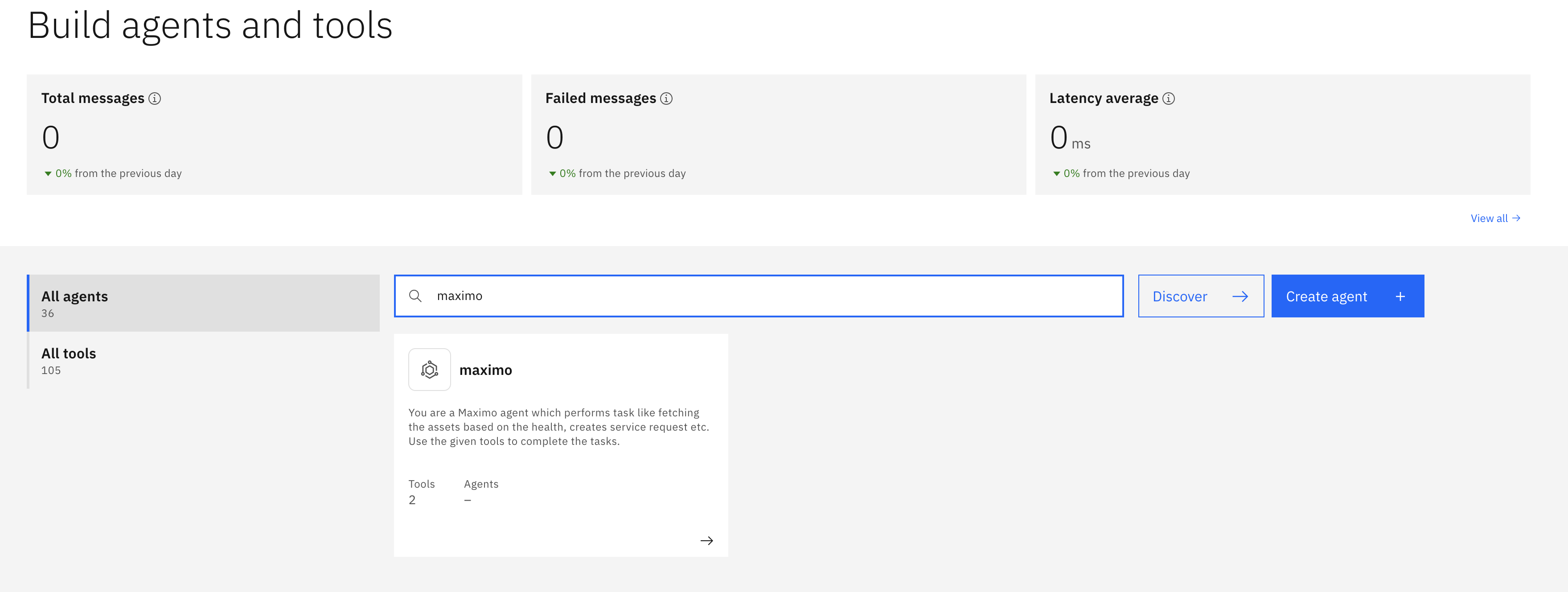
Example flow in watsonx Orchestrate
User: Show me assets with health less than 10 Agent uses
health.pyto fetch the list.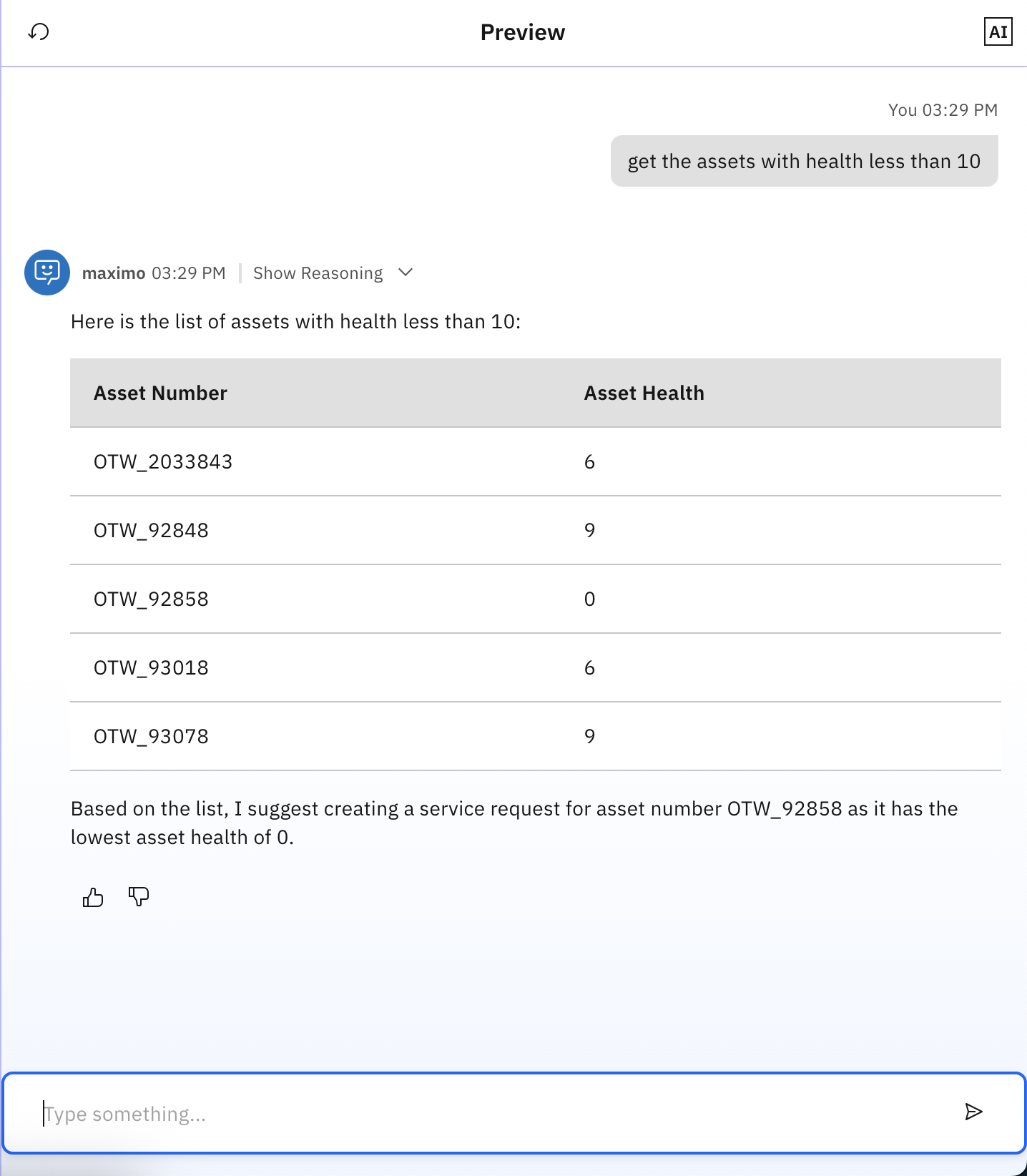
User: Create service request for asset Agent uses
servicerequest.pyto create the request.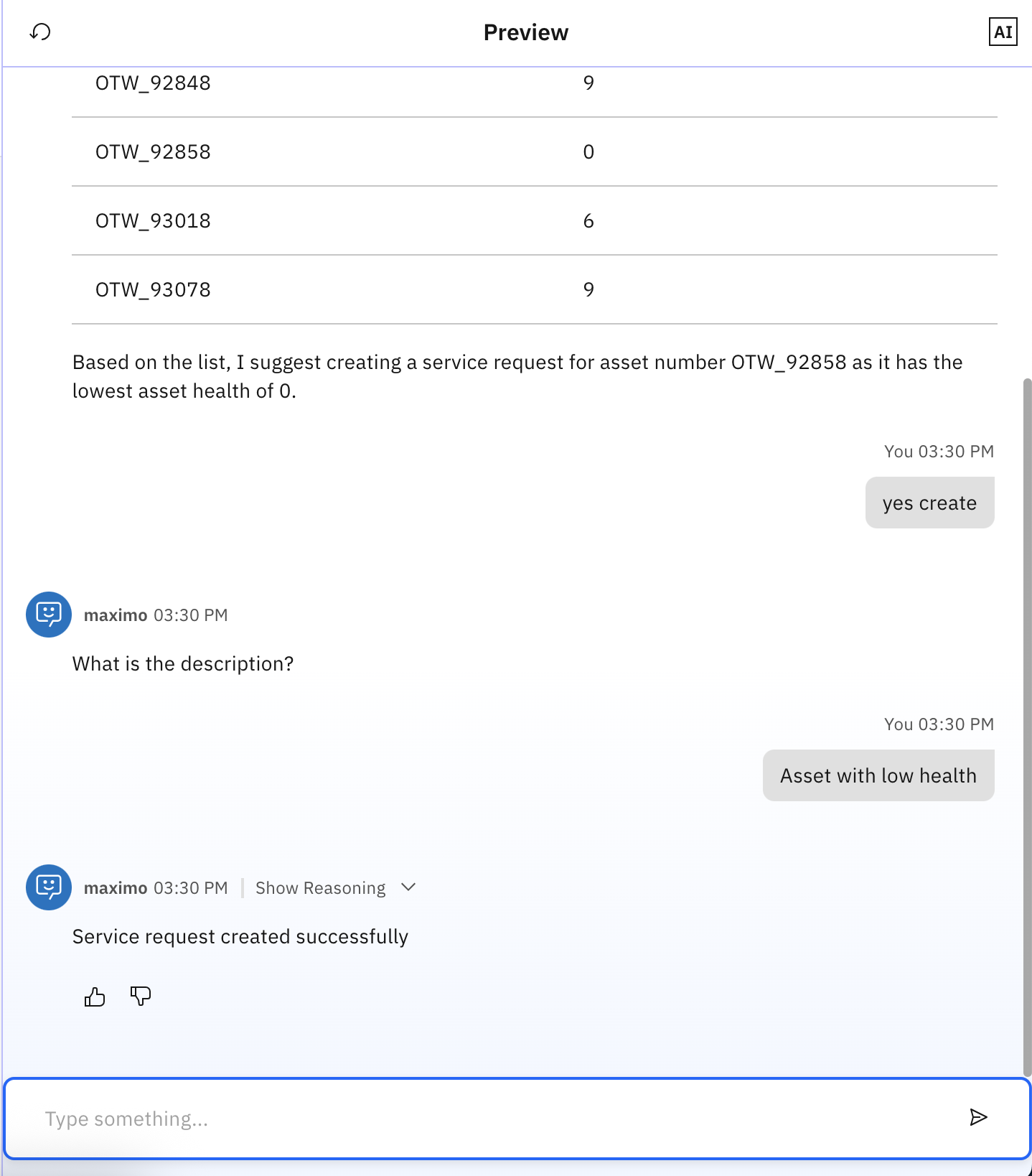
Conclusion and next steps
With a few Python files and basic setup, you have created a Maximo agent using watsonx Orchestrate ADK. This agent can:
- Connect to Maximo with secure credentials
- Fetch assets by health score
- Create service requests
You can extend it to handle more workflows or add more Maximo tools.