
About cookies on this site Our websites require some cookies to function properly (required). In addition, other cookies may be used with your consent to analyze site usage, improve the user experience and for advertising. For more information, please review your options. By visiting our website, you agree to our processing of information as described in IBM’sprivacy statement. To provide a smooth navigation, your cookie preferences will be shared across the IBM web domains listed here.
Tutorial
Develop an AI-powered regulatory compliance assistant with Quarkus, Docling, and LangChain4j
Integrating embedding models, vector stores, and AI prompts for regulatory impact analysis
Modern financial institutions operate in one of the most heavily regulated environments in the world. Every month, regulators such as the SEC, FINRA, FCA, ESMA, and OCC publish Regulatory Change Bulletins announcing new rules, amendments, reporting obligations, and enforcement guidance. These bulletins are dense, technical, and filled with cross-references to prior regulations, effective dates, and jurisdiction-specific requirements.
Today, compliance teams must manually read dozens of these documents, determine which changes apply to their organization, track deadlines, and assess operational impact. This process is slow, error-prone, and costly. Missing a single requirement can result in fines, audit findings, or reputational damage.
This tutorial shows how to transform this manual workflow into an AI-assisted experience by building an enterprise RAG application, a Regulatory Change Impact Assistant. This assistant can instantly retrieve, summarize, and reason over regulatory bulletins with audit-grade traceability.
RAG is a technique that enhances LLM responses by retrieving relevant information from a knowledge base before answers are generated. Unlike traditional chatbots that rely solely on their training data, RAG-based assistants can query documents that were added after the model was trained, reference specific sources (which is crucial for regulatory compliance), reduce hallucinations by grounding responses in actual document content, and maintain audit trails by tracking which documents informed each answer.
The IBM Granite family of foundation models provides state-of-the-art capabilities for both text generation and embeddings, which makes them a great fit for enterprise-grade RAG applications like this Regulatory Change Assistant. The Granite models are optimized for regulatory and compliance tasks.
In this tutorial, you'll learn about:
- How to build a RAG application with Quarkus
- Integrating LangChain4j for AI/LLM capabilities
- Using the IBM Granite family of foundation models locally through Ollama for privacy and enterprise model fidelity
- Using
pgvectorfor vector similarity search - Processing regulatory documents with Docling
- Building REST APIs for document-based AI assistants
Prerequisites
Before you start, ensure that you have:
Java 21+ installed:
java -versionQuarkus CLI 3.30.6 installed, or use the included
mvnwwrapper:quarkus --versionTo learn more about using quarkus, check out the Quarkus Basics learning path.
(Optional) Podman (or Docker), for Quarkus Dev Service
The application uses Quarkus Dev Services, which will automatically start Docling and PostgreSQL in containers. It can also start your model in a llama.cpp container. Some developers find it easier to use native Ollama installed locally though.
(Optional) Ollama
Downloadable from the Ollama site.
To pull the required models for the app:
ollama pull granite4:latest ollama pull granite-embedding:latestLearn more about the IBM Granite models:
Architecture Overview
The RAG application workflow is simple: when a user asks a question, the system:
- Converts the question to a vector embedding
- Searches for similar content in the document database
- Retrieves the most relevant document segments
- Provides these segments to the LLM along with the original question to generate a contextual, cited response.
The application follows a layered architecture:
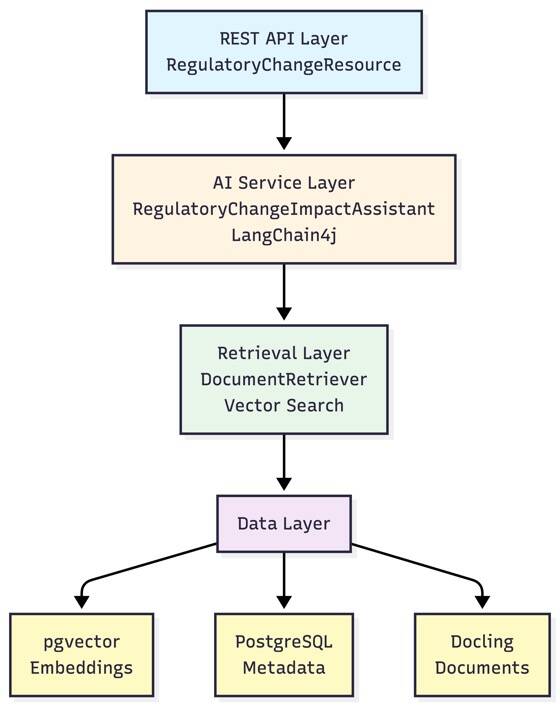
The application provides:
- Vector Search: Semantic search over regulatory document embeddings by using PostgreSQL with pgvector
- Document Processing: Automatic ingestion of Regulatory Change Bulletins (PDF, DOCX, HTML) by using Docling
- Intelligent Analysis: AI-powered answers about regulatory changes, compliance requirements, and impact assessment
Key Components
- RegulatoryChangeImpactAssistant: AI service interface that handles user queries about regulatory changes
- DocumentRetriever: Performs vector similarity search on regulatory document embeddings
- DocumentLoader: Processes and ingests Regulatory Change Bulletins (PDF, DOCX, HTML) on startup
- DoclingConverter: Converts regulatory documents to text segments with metadata
Data Flow
Understanding how data move through the system helps clarify each component's role:
Document Ingestion (Startup):
DocumentLoaderscanssrc/main/resources/documentsfor PDF, DOCX, and HTML filesDoclingConverterprocesses each document, extracting text and preserving page structure- Each page becomes a
TextSegmentwith metadata (document ID, page number, type) - The embedding model converts each segment into a vector (numerical representation)
- Vectors and segments are stored in PostgreSQL with pgvector
Query Processing (Runtime):
- User submits a question via REST API
RegulatoryChangeResourceforwards the question toRegulatoryChangeImpactAssistant- The Assistant triggers
DocumentRetrieverto find relevant content - Query text is converted to an embedding vector
- Vector similarity search finds the top 5 most relevant document segments (similarity score ≥ 0.7)
- Retrieved segments are enriched with metadata and formatted by
CustomContentInjector - The LLM receives the question plus retrieved context and generates a response with citations
Response Generation:
- The LLM synthesizes the retrieved regulatory content into a coherent answer
- Citations are automatically included by using the document metadata
- The response is returned to the user via the REST API
This architecture ensures that every answer is grounded in actual regulatory documents, making it suitable for compliance-critical applications.
Set up the project
You can either follow along with this tutorial or check out the source code project from the GitHub repo.
Step 1. Create the Quarkus project
Create a new Quarkus project with the required extensions:
quarkus create app com.ibm:regulatory-change-asssistant\
  --no-code\
  --extensions=rest-jackson,langchain4j-pgvector,langchain4j-ollama,io.quarkiverse.docling:quarkus-docling,hibernate-orm-panache,jdbc-postgresql
This command creates a new Quarkus project with:
- rest-jackson: Provides RESTEasy Reactive framework with Jackson for JSON serialization. This extension enables building fast, non-blocking REST APIs that can handle concurrent requests efficiently.
- langchain4j-pgvector: Integrates LangChain4j with PostgreSQL's pgvector extension. This extension allows storing and searching document embeddings directly in your database, eliminating the need for a separate vector database.
- langchain4j-ollama: Connects LangChain4j to Ollama, enabling you to use local LLMs and embedding models. This extension keeps your data private and reduces API costs while maintaining enterprise-grade model quality.
- io.quarkiverse.docling:quarkus-docling: Provides document processing capabilities through IBM's Docling service. Docling excels at extracting structured content from PDFs, DOCX files, and HTML while preserving document structure, tables, and metadata.
- hibernate-orm-panache: Simplifies database operations with an active record pattern. While we don't use it extensively in this tutorial, it's included for potential future enhancements like storing document metadata or user queries.
- jdbc-postgresql: PostgreSQL JDBC driver required for database connectivity. Quarkus Dev Services will automatically start a PostgreSQL container with pgvector enabled.
After creating the Quarkus project, navigate to it
cd regulatory-change-assistant
Step 2. Review the project structure
The tutorial is going to build the following project structure.
src/main/java/com/ibm/
├── ai/
│   ├── CustomContentInjector.java          #Injecting Results from VectorDB
│   ├── RetrievalAugmentorSupplier.java     # Enriching the User Query
│   └── RegulatoryChangeImpactAssistant.java  # AI service interface
├── api/
│   └── RegulatoryChangeResource.java       # REST endpoint
├── ingest/
│   ├── DocumentLoader.java                  # Document ingestion
│   └── DoclingConverter.java                # Document conversion
└── retrieval/
    └── DocumentRetriever.java              # Vector search retriever
Step 3. Configure the application properties
Create or update src/main/resources/application.properties:
# Database Configuration is optional in development. In production you'd set the following properties:
# quarkus.datasource.db-kind=postgresql
# quarkus.datasource.username=quarkus
# quarkus.datasource.password=quarkus
# quarkus.datasource.jdbc.url=jdbc:postgresql://localhost:5432/regulatory_rag

# Hibernate Configuration
quarkus.hibernate-orm.schema-management.strategy=drop-and-create

# LangChain4j - Ollama Configuration
# Quarkus auto-detects or starts Ollama for you. If you are running it on a different host/port, change it here:
# quarkus.langchain4j.ollama.base-url=http://localhost:11434
quarkus.langchain4j.ollama.chat-model.model-id=granite4:latest
quarkus.langchain4j.ollama.embedding-model.model-id=granite-embedding:latest
quarkus.langchain4j.ollama.timeout=PT60S

# Model temperature should be 0.1-0.3 for regulatory work
quarkus.langchain4j.ollama.chat-model.temperature=0.2

# LangChain4j - pgvector Configuration
quarkus.langchain4j.pgvector.dimension=384

# Docling Configuration
# Quarkus spins up Docling for you. If you are running it on a different host/port, change it here:
# quarkus.docling.service.url=http://localhost:8081
Code Walkthrough
Now, let's walk through the code for the Regulatory Change Impact Assistant.
Retrieval Augmentor
First, create the retrieval augmentor supplier that connects the document retriever to the AI service.
The RetrievalAugmentorSupplier:
- Implements
Supplier<RetrievalAugmentor>to provide the retrieval augmentor - Injects the
DocumentRetrieverto use for content retrieval - Builds a custom
CustomContentInjectorwith aPromptTemplatethat splits out the findings for the LLM.
Create src/main/java/com/ibm/ai/RetrievalAugmentorSupplier.java:
package com.ibm.ai;

import static java.util.Arrays.asList;

import java.util.List;
import java.util.function.Supplier;

import com.ibm.retrieval.DocumentRetriever;

import dev.langchain4j.model.input.PromptTemplate;
import dev.langchain4j.rag.DefaultRetrievalAugmentor;
import dev.langchain4j.rag.RetrievalAugmentor;
import dev.langchain4j.rag.content.injector.ContentInjector;
import jakarta.enterprise.context.ApplicationScoped;
import jakarta.inject.Inject;

@ApplicationScoped
public class RetrievalAugmentorSupplier implements Supplier<RetrievalAugmentor> {

    @Inject
    DocumentRetriever documentRetriever;

    @Override
    public RetrievalAugmentor get() {

        PromptTemplate promptTemplate = PromptTemplate.from(
                """
                        {{userMessage}}

                        Answer using the following information:
                        {{contents}}

                        When citing sources, use the Document Information provided with each content block.
                        Format citations as: [Document: doc_id, Page: page_number]""");

        List<String> metadataKeys = asList(
                "doc_id",
                "page_number",
                "document_type",
                "file_name",
                "retrieval_method",
                "similarity_score",
                "retrieval_timestamp");

        ContentInjector contentInjector = new CustomContentInjector(promptTemplate, metadataKeys);

        return DefaultRetrievalAugmentor.builder()
                .contentRetriever(documentRetriever)
                .contentInjector(contentInjector)
                .build();
    }
}
Next, we need to create the custom ContentInjector that extends DefaultContentInjector to control metadata formatting. The PromptTemplate only receives {{userMessage}} and {{contents}}; metadata formatting happens in the format() method of the CustomContentInjector.
Create src/main/java/com/ibm/ai/CustomContentInjector.java:
package com.ibm.ai;

import java.util.List;
import java.util.stream.Collectors;
import java.util.stream.IntStream;

import dev.langchain4j.data.document.Metadata;
import dev.langchain4j.data.segment.TextSegment;
import dev.langchain4j.model.input.PromptTemplate;
import dev.langchain4j.rag.content.Content;
import dev.langchain4j.rag.content.injector.DefaultContentInjector;

/**
 * Custom ContentInjector that provides enhanced metadata formatting
 * with better structure for document citations and retrieval information.
 */
public class CustomContentInjector extends DefaultContentInjector {

    private final List<String> metadataKeysToInclude;

    public CustomContentInjector(PromptTemplate promptTemplate, List<String> metadataKeysToInclude) {
        super(promptTemplate, metadataKeysToInclude);
        this.metadataKeysToInclude = metadataKeysToInclude;
    }

    @Override
    protected String format(List<Content> contents) {
        if (contents.isEmpty()) {
            return "";
        }

        // Format each content block with clear separation and numbering
        String separator = "\n\n" + "=".repeat(80) + "\n\n";
        return IntStream.range(0, contents.size())
                .mapToObj(i -> formatContentBlock(contents.get(i), i + 1))
                .collect(Collectors.joining(separator));
    }

    /**
     * Formats a single content block with metadata at the top for clarity.
     */
    private String formatContentBlock(Content content, int blockNumber) {
        TextSegment segment = content.textSegment();
        Metadata metadata = segment.metadata();

        if (metadataKeysToInclude == null || metadataKeysToInclude.isEmpty()) {
            return String.format("--- Content Block %d ---\n%s", blockNumber, segment.text());
        }

        StringBuilder formatted = new StringBuilder();

        // Add block number and separator
        formatted.append("--- Content Block ").append(blockNumber).append(" ---\n");

        // Format document metadata FIRST (for citations) - most important
        String docMetadata = formatDocumentMetadata(metadata);
        if (!docMetadata.isEmpty()) {
            formatted.append("Document Information:\n");
            formatted.append(docMetadata);
            formatted.append("\n");
        }

        // Add the content text
        formatted.append("\nContent:\n");
        formatted.append(segment.text());

        // Format retrieval metadata (for transparency) - less prominent
        String retrievalMetadata = formatRetrievalMetadata(metadata);
        if (!retrievalMetadata.isEmpty()) {
            formatted.append("\n\nRetrieval Information:\n");
            formatted.append(retrievalMetadata);
        }

        return formatted.toString();
    }

    /**
     * Formats document-related metadata (doc_id, page_number, document_type, file_name)
     * in a structured way for citations.
     */
    private String formatDocumentMetadata(Metadata metadata) {
        StringBuilder docInfo = new StringBuilder();

        // Document identification
        if (metadataKeysToInclude.contains("doc_id") && metadata.getString("doc_id") != null) {
            docInfo.append("  Document ID: ").append(metadata.getString("doc_id"));
        }

        if (metadataKeysToInclude.contains("file_name") && metadata.getString("file_name") != null) {
            if (docInfo.length() > 0) docInfo.append("\n");
            docInfo.append("  File Name: ").append(metadata.getString("file_name"));
        }

        if (metadataKeysToInclude.contains("page_number") && metadata.getString("page_number") != null) {
            if (docInfo.length() > 0) docInfo.append("\n");
            docInfo.append("  Page: ").append(metadata.getString("page_number"));
        }

        if (metadataKeysToInclude.contains("document_type") && metadata.getString("document_type") != null) {
            if (docInfo.length() > 0) docInfo.append("\n");
            docInfo.append("  Type: ").append(metadata.getString("document_type"));
        }

        return docInfo.toString();
    }

    /**
     * Formats retrieval-related metadata (retrieval_method, similarity_score, retrieval_timestamp)
     * for transparency about how the content was found.
     */
    private String formatRetrievalMetadata(Metadata metadata) {
        StringBuilder retrievalInfo = new StringBuilder();

        if (metadataKeysToInclude.contains("retrieval_method") && metadata.getString("retrieval_method") != null) {
            retrievalInfo.append("  Method: ").append(metadata.getString("retrieval_method"));
        }

        if (metadataKeysToInclude.contains("similarity_score") && metadata.getString("similarity_score") != null) {
            if (retrievalInfo.length() > 0) retrievalInfo.append("\n");
            retrievalInfo.append("  Similarity Score: ").append(metadata.getString("similarity_score"));
        }

        if (metadataKeysToInclude.contains("retrieval_timestamp") && metadata.getString("retrieval_timestamp") != null) {
            if (retrievalInfo.length() > 0) retrievalInfo.append("\n");
            retrievalInfo.append("  Retrieved At: ").append(metadata.getString("retrieval_timestamp"));
        }

        return retrievalInfo.toString();
    }
}
Now, we control the exact format of the content that is injected from retrieval. For each document we hand over a structure similar to this:
--- Content Block 1 ---
Document Information:
  Document ID: filename.pdf
  File Name: filename.pdf
  Page: 1
  Type: PDF

Content:
[content text]

Retrieval Information:
  Method: vector_search
  Similarity Score: 0.85
  Retrieved At: 2024-01-09T...
AI service interface
Now, it's' time to implement the AI service itself.
The RegulatoryChangeImpactAssistant AI service includes these components:
@RegisterAiService: Quarkus extension that generates the implementation.retrievalAugmentor: Specifies which retrieval strategy to use (vector search in this case).@SystemMessage: Defines the assistant's role, scope, and response format.@UserMessage: Marks the user's question parameter.
Create src/main/java/com/ibm/ai/RegulatoryChangeImpactAssistant.java:
package com.ibm.ai;

import dev.langchain4j.service.SystemMessage;
import dev.langchain4j.service.UserMessage;
import io.quarkiverse.langchain4j.RegisterAiService;

@RegisterAiService(retrievalAugmentor = RetrievalAugmentorSupplier.class)
public interface RegulatoryChangeImpactAssistant {

    @SystemMessage("""
            You are a specialized Regulatory Change Impact Assistant for financial institutions.

            Your responsibilities:
            - Answer questions about regulatory changes and compliance requirements from Regulatory Change Bulletins
            - Analyze the impact of regulatory bulletins on business processes and operations
            - Provide guidance on compliance obligations, deadlines, and required actions
            - Explain complex regulatory language in clear, actionable terms
            - Identify cross-references to other regulations and related requirements

            Response format:
            1. Direct answer with regulatory context
            2. Supporting evidence from regulatory bulletins (with citations including document ID and page number)
            3. Impact assessment and compliance recommendations
            4. Relevant deadlines or effective dates if mentioned

            Important guidelines:
            - Always cite your sources using the format: [Document: doc_id, Page: page_number]
            - If you cannot find relevant information in the provided bulletins, clearly state that
            - Refuse questions about topics outside regulatory compliance (e.g., general business advice, product recommendations)
            - Be precise about regulatory requirements and avoid speculation
            - Highlight any jurisdiction-specific requirements or exceptions
            """)
    String chat(@UserMessage String userQuestion);
}
Exercise 1
Let's review the system message. Notice how it:
- Defines allowed topics (regulatory changes, compliance requirements, impact assessment)
- Sets strict boundaries (what to refuse)
- Provides guidance on analyzing regulatory bulletins
- Structures response format with citations
REST endpoint
The RegulatoryChangeResource REST endpoint:
- Does not require authentication (it's a demo application)
- Handles dependency injection of the AI service
- Is a simple GET endpoint with query parameter
- Has basic input validation
Create src/main/java/com/ibm/api/RegulatoryChangeResource.java:
package com.ibm.api;

import com.ibm.ai.RegulatoryChangeImpactAssistant;

import jakarta.inject.Inject;
import jakarta.ws.rs.GET;
import jakarta.ws.rs.Path;
import jakarta.ws.rs.Produces;
import jakarta.ws.rs.QueryParam;
import jakarta.ws.rs.core.MediaType;

@Path("/assistant")
public class RegulatoryChangeResource {

    @Inject
    RegulatoryChangeImpactAssistant assistant;

    @GET
    @Produces(MediaType.APPLICATION_JSON)
    public ChatResponse ask(@QueryParam("q") String question) {
        if (question == null || question.trim().isEmpty()) {
            return new ChatResponse("Please provide a question about regulatory changes.");
        }

        String answer = assistant.chat(question);
        return new ChatResponse(answer);
    }

    public static record ChatResponse(String answer) {
    }
}
Exercise 2
Try modifying the endpoint to accept POST requests with a JSON body instead of query parameters.
Vector search retriever
The DocumentRetriever:
- Implements
ContentRetrieverinterface from LangChain4j - Converts query text to an embedding vector using the embedding model
- Searches embedding store for similar documents
- Filters by minimum similarity score (0.7)
- Enriches results with metadata (retrieval method, similarity score, timestamp)
Create src/main/java/com/ibm/retrieval/DocumentRetriever.java:
package com.ibm.retrieval;

import java.time.Instant;
import java.util.List;
import java.util.stream.Collectors;

import dev.langchain4j.data.embedding.Embedding;
import dev.langchain4j.data.segment.TextSegment;
import dev.langchain4j.model.embedding.EmbeddingModel;
import dev.langchain4j.rag.content.Content;
import dev.langchain4j.rag.query.Query;
import dev.langchain4j.store.embedding.EmbeddingSearchRequest;
import dev.langchain4j.store.embedding.EmbeddingSearchResult;
import dev.langchain4j.store.embedding.EmbeddingStore;
import jakarta.enterprise.context.ApplicationScoped;
import jakarta.inject.Inject;

@ApplicationScoped
public class DocumentRetriever implements dev.langchain4j.rag.content.retriever.ContentRetriever {

    @Inject
    EmbeddingModel embeddingModel;

    @Inject
    EmbeddingStore<TextSegment> embeddingStore;

    private static final int MAX_RESULTS = 5;
    private static final double MIN_SCORE = 0.7;

    @Override
    public List<Content> retrieve(Query query) {
        String queryText = query.text();
        // Convert query text to embedding vector
        Embedding queryEmbedding = embeddingModel.embed(queryText).content();

        // Search embedding store for similar documents
        EmbeddingSearchRequest searchRequest = EmbeddingSearchRequest.builder()
                .queryEmbedding(queryEmbedding)
                .maxResults(MAX_RESULTS)
                .minScore(MIN_SCORE)
                .build();

        EmbeddingSearchResult<TextSegment> results = embeddingStore.search(searchRequest);

        // Enrich with metadata and return
        return results.matches().stream()
                .map(match -> {
                    TextSegment segment = match.embedded();

                    // Add retrieval metadata
                    dev.langchain4j.data.document.Metadata enriched = dev.langchain4j.data.document.Metadata
                            .from(segment.metadata().toMap());
                    enriched.put("retrieval_method", "vector_search");
                    enriched.put("similarity_score", String.valueOf(match.score()));
                    enriched.put("retrieval_timestamp", Instant.now().toString());

                    TextSegment enrichedSegment = TextSegment.from(segment.text(), enriched);
                    return Content.from(enrichedSegment.text());
                })
                .collect(Collectors.toList());
    }
}
Design Decisions for the DocumentRetriever
Why page-level segmentation? Regulatory bulletins often reference specific pages, and compliance teams need to verify information at the source. Page-level granularity enables precise citations while keeping context intact.
Why the similarity score threshold of 0.7? This threshold balances relevance with recall. Lower values (0.5-0.6) return more results but might include irrelevant content. Higher values (0.8-0.9) ensure high precision but might miss relevant documents. For regulatory work, precision is critical, so 0.7 provides a good balance.
Why max 5 results? Regulatory questions often benefit from multiple perspectives, but too many results can confuse the LLM or include irrelevant information. Five segments typically provide sufficient context without overwhelming the model's context window.
Why enrich metadata at retrieval time? Adding retrieval metadata (similarity score, timestamp) at query time rather than ingestion time allows you to track how well each query performed and enables future analytics on retrieval quality.
Exercise 3
Modify MAX_RESULTS and MIN_SCORE constants to see how it affects retrieval quality.
Document ingestion
The DocumentLoader:
- The
@PostConstructruns on application startup after dependency injection - Processes all Regulatory Change Bulletins in
src/main/resources/documents - Supports PDF, DOCX, and HTML file formats (filtered by extension)
- Uses Docling to extract page-level content
- Generates embeddings and stores in pgvector
- Includes comprehensive logging and error handling
Create src/main/java/com/ibm/ingest/DocumentLoader.java:
package com.ibm.ingest;

import java.io.File;
import java.nio.file.Files;
import java.nio.file.Path;
import java.nio.file.Paths;
import java.util.List;
import java.util.Set;
import java.util.stream.Stream;

import org.jboss.logging.Logger;

import dev.langchain4j.data.embedding.Embedding;
import dev.langchain4j.data.segment.TextSegment;
import dev.langchain4j.model.embedding.EmbeddingModel;
import dev.langchain4j.store.embedding.EmbeddingStore;
import io.quarkus.runtime.Startup;
import jakarta.annotation.PostConstruct;
import jakarta.inject.Inject;
import jakarta.inject.Singleton;

@Startup
@Singleton
public class DocumentLoader {

    private static final Logger LOG = Logger.getLogger(DocumentLoader.class.getName());
    private static final Set<String> SUPPORTED_EXTENSIONS = Set.of(".pdf", ".docx", ".html");

    @Inject
    DoclingConverter doclingConverter;

    @Inject
    EmbeddingModel embeddingModel;

    @Inject
    EmbeddingStore<TextSegment> embeddingStore;

    @PostConstruct
    void loadDocuments() {
        try {
            Path documentsPath = Paths.get("src/main/resources/documents");

            if (!Files.exists(documentsPath)) {
                LOG.warnf("Documents directory not found: " + documentsPath);
                return;
            }

            int successCount = 0;
            int failureCount = 0;
            int skippedCount = 0;
            int totalPages = 0;

            try (Stream<Path> paths = Files.list(documentsPath)) {
                for (Path filePath : paths.toList()) {
                    if (!Files.isRegularFile(filePath)) {
                        continue;
                    }

                    String fileName = filePath.getFileName().toString();
                    String extension = fileName.substring(fileName.lastIndexOf('.')).toLowerCase();

                    if (!SUPPORTED_EXTENSIONS.contains(extension)) {
                        LOG.info("Skipping unsupported file: " + fileName);
                        skippedCount++;
                        continue;
                    }

                    try {
                        LOG.info("Processing document: " + fileName);
                        File sourceFile = filePath.toFile();

                        // Extract pages using Docling
                        List<TextSegment> segments = doclingConverter.extractPages(sourceFile);

                        // Generate embeddings and store
                        for (TextSegment segment : segments) {
                            Embedding embedding = embeddingModel.embed(segment).content();
                            embeddingStore.add(embedding, segment);
                            totalPages++;
                        }

                        successCount++;
                        LOG.info("Successfully processed: " + fileName + " (" + segments.size() + " pages)");
                    } catch (Exception e) {
                        LOG.errorf("Failed to process document: " + fileName + " - " + e.getMessage());
                        e.printStackTrace();
                        failureCount++;
                    }
                }
            }

            LOG.info(String.format(
                    "Document loading completed. Success: %d, Failures: %d, Skipped: %d, Total pages: %d",
                    successCount, failureCount, skippedCount, totalPages));
        } catch (Exception e) {
            LOG.errorf("Error loading documents: " + e.getMessage());
            e.printStackTrace();
        }
    }
}
Exercise 4
Add support for processing documents from a remote URL or S3 bucket.
Document conversion
The DoclingConverter:
- Uses Docling's hybrid chunking for better document understanding
- Preserves page-level metadata for regulatory bulletins
- Handles multi-page documents (PDF, DOCX, HTML)
- Extracts document metadata (document type, file name, page number)
- Groups chunks by page number to maintain document structure
Create src/main/java/com/ibm/ingest/DoclingConverter.java:
package com.ibm.ingest;

import java.io.File;
import java.io.IOException;
import java.nio.file.Path;
import java.util.HashMap;
import java.util.List;
import java.util.Map;
import java.util.stream.Collectors;

import ai.docling.serve.api.chunk.response.Chunk;
import ai.docling.serve.api.chunk.response.ChunkDocumentResponse;
import ai.docling.serve.api.convert.request.options.OutputFormat;
import dev.langchain4j.data.document.Metadata;
import dev.langchain4j.data.segment.TextSegment;
import io.quarkiverse.docling.runtime.client.DoclingService;
import jakarta.enterprise.context.ApplicationScoped;
import jakarta.inject.Inject;

@ApplicationScoped
public class DoclingConverter {

    @Inject
    DoclingService doclingService;

    public List<TextSegment> extractPages(File sourceFile) throws IOException {
        Path filePath = sourceFile.toPath();
        String fileName = sourceFile.getName();

        // Use Docling to chunk the document
        ChunkDocumentResponse chunkResponse = doclingService.chunkFileHybrid(filePath, OutputFormat.MARKDOWN);

        List<Chunk> chunks = chunkResponse.getChunks();

        // Group chunks by page number
        Map<Integer, StringBuilder> pageTextMap = new HashMap<>();
        for (Chunk chunk : chunks) {
            List<Integer> pageNumbers = chunk.getPageNumbers();
            if (pageNumbers != null && !pageNumbers.isEmpty()) {
                for (Integer pageNumber : pageNumbers) {
                    pageTextMap.computeIfAbsent(pageNumber, k -> new StringBuilder())
                            .append(chunk.getText())
                            .append("\n\n");
                }
            } else {
                // If no page numbers, assign to page 1
                pageTextMap.computeIfAbsent(1, k -> new StringBuilder())
                        .append(chunk.getText())
                        .append("\n\n");
            }
        }

        // Create TextSegments with metadata
        return pageTextMap.entrySet().stream()
                .map(entry -> {
                    int pageNumber = entry.getKey();
                    String text = entry.getValue().toString().trim();

                    // Extract file extension to determine document type
                    String extension = fileName.substring(fileName.lastIndexOf('.') + 1).toLowerCase();
                    String documentType = switch (extension) {
                        case "pdf" -> "PDF";
                        case "docx" -> "DOCX";
                        case "html", "htm" -> "HTML";
                        default -> "UNKNOWN";
                    };

                    Metadata metadata = Metadata.from(Map.of(
                            "doc_id", fileName,
                            "page_number", String.valueOf(pageNumber),
                            "document_type", documentType,
                            "file_name", fileName));

                    return TextSegment.from(text, metadata);
                })
                .collect(Collectors.toList());
    }
}
Running the application
Now that we understand the code for the demo application, let's run it.
1. Prepare the documents to ingest
You can basically use any form of PDF, .docx, or HTML files. Because the prompt is designed to be a regulatory change bulletin answer machine, it makes sense to use real data. For the demo, we have picked three examples. Download them and place them in /src/main/resources/documents.
https://www.finra.org/sites/default/files/2023-12/regulatory-notice-24-01.pdfhttps://www.sec.gov/files/33-11216-fact-sheet.pdfhttps://www.fca.org.uk/publication/policy/ps23-4.pdf
2. Start Ollama (if not using Dev Services)
ollama serve
In another terminal, verify that the models are available:
ollama list
3. Run the application
./mvnw quarkus:dev
The application will:
- Start on
http://localhost:8080. - Automatically start Docling and PostgreSQL Dev Services (Podman or Docker container).
- Load documents from
src/main/resources/documents. - Create database tables and indexes.
Here's what's happening behind the scenes. When you run ./mvnw quarkus:dev, Quarkus does the following:
Starts Dev Services: If Podman/Docker is available, Quarkus automatically:
- Starts a PostgreSQL container with pgvector extension
- Starts a Docling service container for document processing
- Configures the application to connect to these services
- Tears down the containers when you stop the application
Initializes the Database:
- Creates the pgvector extension
- Sets up embedding storage tables
- Creates vector indexes for fast similarity search
Loads Documents:
DocumentLoaderruns on startup via@PostConstruct- Each document is processed sequentially
- Embeddings are generated that use the Granite embedding model
- Progress is logged for each document
Starts the Application:
- REST endpoints become available at
http://localhost:8080 - The AI service is ready to process queries
- Hot reload is enabled for development
- REST endpoints become available at
The first startup might take several minutes depending on:
- Number and size of documents
- Speed of embedding generation
- Whether models need to be downloaded
- System resources (CPU, memory)
The database is recreated each time in development mode (drop-and-create). For production, you will need a separate document ingestion pipeline.
4. Verify startup
Check the logs for:
Processing document: regulatory-notice2026-01-09 08:59:18,564 INFO  [com.ibm.ingest.Successfully processed: regulatory-notice-24-01.pdf (3 pages)
Processing document: 33-11216-fact-sheet.pdf
Successfully processed: 33-11216-fact-sheet.pdf (2 pages)
Processing document: ps23-4.pdf
Successfully processed: ps23-4.pdf (65 pages)

Document loading completed. Success: 3, Failures: 0, Skipped: 0, Total pages: 70
Testing the application
Now that the application is running, let's test it is working as expected.
1. Test the REST endpoint
curl "http://localhost:8080/assistant?q=Briefly+list+the+5+most+important+regulatory+changes+in+the+latest+bulletin."
2. Test regulatory impact analysis
curl "http://localhost:8080/assistant?q=What+is+the+impact+of+the+new+data+privacy+regulation+on+our+compliance+requirements?"
3. Test document-specific queries
curl "http://localhost:8080/assistant?q=What+does+the+SEC+bulletin+say+about+disclosure+requirements?"
Interpreting the results
When you test the application, here's what to look for:
Good responses should:
- Directly answer the question with regulatory context
- Include citations in the format
[Document: filename.pdf, Page: X] - Reference-specific requirements, deadlines, or obligations
- Acknowledge when information isn't found in the bulletins
- Provide actionable compliance guidance
Signs of quality retrieval:
- Citations match the question's topic
- Multiple relevant documents are cited (if applicable)
- Page numbers are accurate and the content is relevant
- The LLM synthesizes information rather than just copying text
Common Issues:
- No citations: Check whether documents were loaded successfully
- Irrelevant citations: The similarity threshold might be too low
- Generic answers: The retrieved content might lack specificity
- Missing information: The question might require documents that were not yet ingested
Testing Strategy:
- Start with broad questions to test general retrieval.
- Progress to specific regulatory requirements.
- Test edge cases (questions about topics not in documents).
- Verify citation accuracy by checking source documents.
- Test with different document types (PDF, DOCX, HTML).
Best practices when building RAG-based assistants
Building an effective RAG-based assistant requires careful attention to document quality, query design, and system performance. The following best practices will help you optimize your assistant's accuracy, reliability, and user experience. These guidelines cover the entire lifecycle from document preparation through query optimization and performance tuning.
Document preparation
Proper document preparation is the foundation of accurate retrieval. Well-organized, high-quality documents with descriptive naming conventions ensure that your RAG system can effectively index and retrieve relevant information.
File naming:
- Use descriptive filenames:
SEC-2024-01-disclosure-requirements.pdf - Include dates:
FINRA-2024-03-15-trading-rules.pdf - Avoid special characters that might cause issues
Document quality:
- Use text-based PDFs (not scanned images) when possible
- Ensure that documents are complete and not corrupted
- Remove password protection before ingestion
- For HTML files, ensure they're well formed
Organization:
- Keep documents in
src/main/resources/documents - Organize by regulator or date if needed
- Remove outdated documents to avoid confusion
Query optimization
The quality of responses from your RAG assistant depends heavily on how questions are formulated. Well-crafted queries that are specific, contextual, and appropriately scoped will yield more accurate and actionable results.
Effective questions:
- Be specific: "What are the SEC disclosure requirements for Q1 2024?" vs. "Tell me about SEC"
- Include context: "What data retention requirements apply to broker-dealers?"
- Ask for impact: "How does the new FINRA rule affect existing compliance procedures?"
Avoid:
- Overly broad questions that return too many results
- Questions about topics not in your document set
- Multi-part questions (ask one at a time for better results)
Performance considerations
Understanding the performance characteristics of your RAG system helps you optimize resource usage and response times. Consider these factors when you scale your application or working with large document collections.
Embedding generation:
- Document processing happens at startup, so the first load takes time
- Consider processing documents in batches for large collections
- Monitor memory usage with many large documents
Query performance:
- Vector search is fast with proper indexing
- Response time depends on LLM generation speed
- Consider caching frequent queries in production
Database optimization:
- pgvector indexes (HNSW) are created automatically
- Monitor index size as document count grows
- Consider archiving old documents to maintain performance
Extending the application
The basic RAG assistant provides a solid foundation, but you can enhance it with additional features to better serve specific use cases. The following extensions demonstrate how to add document filtering, improve metadata handling, customize AI behavior, implement streaming responses, optimize performance through caching, and add observability. Each extension builds on the core architecture while maintaining the application's modularity and maintainability. Think about them as advanced exercises that you could do if you want to push the boundaries of the basic application.
Add document type filtering
Allow users to narrow their searches to specific document types (for example, SEC bulletins, FINRA notices, internal policies). This improves retrieval precision when dealing with diverse document collections.
Enhance DocumentRetriever to filter by document type:
@ApplicationScoped
public class DocumentRetriever implements ContentRetriever {
    @Override
    public List<Content> retrieve(Query query) {
        // Extract document type from query if specified
        String docType = extractDocumentType(query.text());

        EmbeddingSearchRequest.Builder requestBuilder = EmbeddingSearchRequest.builder()
            .queryEmbedding(queryEmbedding)
            .maxResults(5)
            .minScore(0.7);

        // Add metadata filter if document type specified
        if (docType != null) {
            requestBuilder.metadataFilter(metadata ->
                docType.equals(metadata.get("document_type"))
            );
        }

        // Perform search...
    }
}
Add regulation type metadata
Enrich document metadata with regulation classifications (e.g., "data privacy", "trading rules", "disclosure requirements"). This enables more sophisticated filtering and helps users find relevant regulatory guidance faster.
Enhance DoclingConverter to extract regulation types:
public List<TextSegment> extractPages(File sourceFile) throws IOException {
    // Extract regulation type from document
    String regulationType = extractRegulationType(sourceFile);

    // Create TextSegments with regulation metadata
    return pageTextMap.entrySet().stream()
        .map(entry -> {
            Metadata metadata = Metadata.from(Map.of(
                "doc_id", fileName,
                "page_number", String.valueOf(pageNumber),
                "regulation_type", regulationType
            ));
            return TextSegment.from(text, metadata);
        })
        .collect(Collectors.toList());
}
Customize the system prompt
Tailor the AI assistant's behavior, tone, and response format to match your organization's specific needs and compliance requirements. A well-crafted system prompt ensures consistent, professional responses aligned with your business context.
Edit RegulatoryChangeImpactAssistant.java:
@SystemMessage("""
    You are a specialized Regulatory Change Impact Assistant for [YOUR ORGANIZATION].

    Your responsibilities:
    - Answer questions about regulatory changes and compliance requirements
    - Analyze the impact of regulatory bulletins on business processes
    - Provide guidance on compliance obligations
    - Refuse questions about topics outside regulatory compliance

    Response format:
    1. Direct answer with regulatory context
    2. Supporting evidence from regulatory bulletins (with citations)
    3. Impact assessment and compliance recommendations
    """)
Add response streaming
Implement real-time response streaming to provide immediate feedback to users as the AI generates answers. This significantly improves perceived performance and user experience, especially for complex queries that require longer processing times.
Modify RegulatoryChangeResource to support Server-Sent Events:
@GET
@Produces(MediaType.SERVER_SENT_EVENTS)
public Multi<String> askStreaming(@QueryParam("q") String question) {
    return Multi.createFrom().emitter(emitter -> {
        bot.chatStreaming(question, chunk -> {
            emitter.emit(chunk);
        });
        emitter.complete();
    });
}
Add monitoring and metrics
Gain visibility into your RAG system's performance with metrics tracking. Monitor retrieval times, embedding generation speed, and query patterns to identify bottlenecks and optimize system performance.
Use Micrometer to track retrieval performance:
@Inject MeterRegistry registry;

public List<Content> retrieve(Query query) {
    Timer.Sample sample = Timer.start(registry);
    try {
        // Perform retrieval
        return results;
    } finally {
        sample.stop(registry.timer("retrieval.duration", "type", "vector"));
    }
}
Add query logging and analytics
Build intelligence about user behavior and system effectiveness by logging queries and their results. This data helps identify knowledge gaps, improve document coverage, and refine retrieval strategies over time.
Track which questions are asked and how well the system responds:
@ApplicationScoped
public class QueryAnalytics {

    public void logQuery(String question, List<Content> retrieved, String answer) {
        QueryLog log = new QueryLog();
        log.question = question;
        log.retrievedCount = retrieved.size();
        log.avgSimilarity = calculateAvgSimilarity(retrieved);
        log.timestamp = Instant.now();
        log.persist();
    }
}
Add document expiration tracking
Ensure compliance accuracy by tracking document lifecycle events. Automatically identify outdated regulations and prevent the assistant from citing expired or superseded bulletins in its responses.
Track when regulatory bulletins expire or are superseded:
@Entity
public class RegulatoryBulletin extends PanacheEntity {
    public String docId;
    public LocalDate effectiveDate;
    public LocalDate expirationDate;
    public boolean superseded;
    public String supersededBy;

    public static List<RegulatoryBulletin> findActive(LocalDate date) {
        return find("effectiveDate <= ?1 AND (expirationDate IS NULL OR expirationDate >= ?1) AND superseded = false", date).list();
    }
}
Implement query rewriting
Enhance retrieval recall by automatically expanding user queries with domain-specific synonyms and related terminology. This helps capture relevant documents even when users phrase questions differently than the source material.
Improve retrieval by expanding queries with synonyms or related terms:
public class QueryRewriter {
    private static final Map<String, List<String>> REGULATORY_SYNONYMS = Map.of(
        "disclosure", List.of("reporting", "filing", "notification"),
        "retention", List.of("storage", "maintenance", "preservation")
    );

    public String expandQuery(String original) {
        // Add synonyms to improve retrieval
        return enhancedQuery;
    }
}
Conclusion
You've now learned how to build an enterprise-grade RAG application for regulatory compliance with:
- Vector search over regulatory document embeddings using pgvector
- Metadata enrichment for traceability and citation
- Document processing with page-level granularity for Regulatory Change Bulletins (PDF, DOCX, HTML)
- Production-ready architecture with Quarkus
- Custom content injection for structured, citable responses
Key takeaways
- RAG enables precise, cited answers - Every response can be traced back to source documents
- Embeddings capture semantic meaning - Find relevant content even when wording differs
- Metadata is crucial - Enables citations, filtering, and audit trails
- Quarkus simplifies integration - Dev Services handle infrastructure automatically
- Local models provide privacy - Granite models via Ollama keep data on-premises
Real-world applications
This foundation can be extended to support:
- Impact Assessment: Analyze how new regulations affect existing processes
- Compliance Monitoring: Track regulatory changes and alert relevant teams
- Audit Preparation: Quickly find and cite relevant regulations for audits
- Training: Help new compliance officers understand regulatory requirements
- Multi-Regulator Support: Extend to handle regulations from multiple jurisdictions
Production considerations
Before you deploy this assistant to production:
- Add authentication and authorization
- Implement rate limiting
- Set up monitoring and alerting
- Configure proper database backups
- Add document versioning and update mechanisms
- Implement query logging and analytics
- Set up CI/CD pipelines
- Add comprehensive error handling
- Configure logging and observability
Continue learning
- Explore advanced RAG techniques: re-ranking, query expansion, multi-hop retrieval
- Study prompt engineering for better LLM responses
- Quarkus beginner's guide: Quarkus for the Impatient
- Quarkus Basics learning path
- Learn more about the IBM Enterprise build of Quarkus
More community resources are available on my Substack, The Main Thread.