
About cookies on this site Our websites require some cookies to function properly (required). In addition, other cookies may be used with your consent to analyze site usage, improve the user experience and for advertising. For more information, please review your options. By visiting our website, you agree to our processing of information as described in IBM’sprivacy statement. To provide a smooth navigation, your cookie preferences will be shared across the IBM web domains listed here.
Tutorial
Automate document analysis with highly intelligent agents
Integrate IBM watsonx with IBM Docling and open source CrewAI
Processing and analyzing documents efficiently can be challenging. But, IBM Docling and open-source CrewAI help to address those challenges. IBM Docling is IBM’s cutting-edge document processing tool, which works seamlessly with the open source CrewAI, a collaborative agent-driven framework for complex task execution. And, by integrating these tools with IBM watsonx, IBM's advanced AI platform, developers can automate document analysis with highly intelligent agents.
To demonstrate the power of integrating Docling, Crewai, and watsonx, we’ll tackle a practical scenario of analyzing NDA (Non-Disclosure Agreement) clauses. This involves:
- Ingesting NDA documents in PDF or DOCX format.
- Comparing key clauses (for example, Parties, Terms, and Remedies) against benchmark legal practices.
- Generating detailed analyses and actionable recommendations using AI-driven agents.
This use case highlights the tools’ capabilities in streamlining and scaling document analysis tasks for legal or business scenarios.
Sample application architecture
Before diving into the implementation, let’s understand the core components in this architecture:
IBM Docling
Docling is a robust document conversion and processing framework that handles multiple file formats (PDF, DOCX, etc.) and converts them into a unified structure called the Docling document. Introduced in Docling v2, this Pydantic datatype enables consistent representation of text, tables, images, document hierarchy, and layout metadata.
The architecture is modular, with distinct components for:
- document parsing: Handles multiple file formats.
- Pipelines: Orchestrates document conversion using specific backends.
- Conversion results: Produces reusable formats (such as Markdown, dictionary, YAML, or tokens).
- Chunking: Splits large documents into manageable chunks for downstream processing.
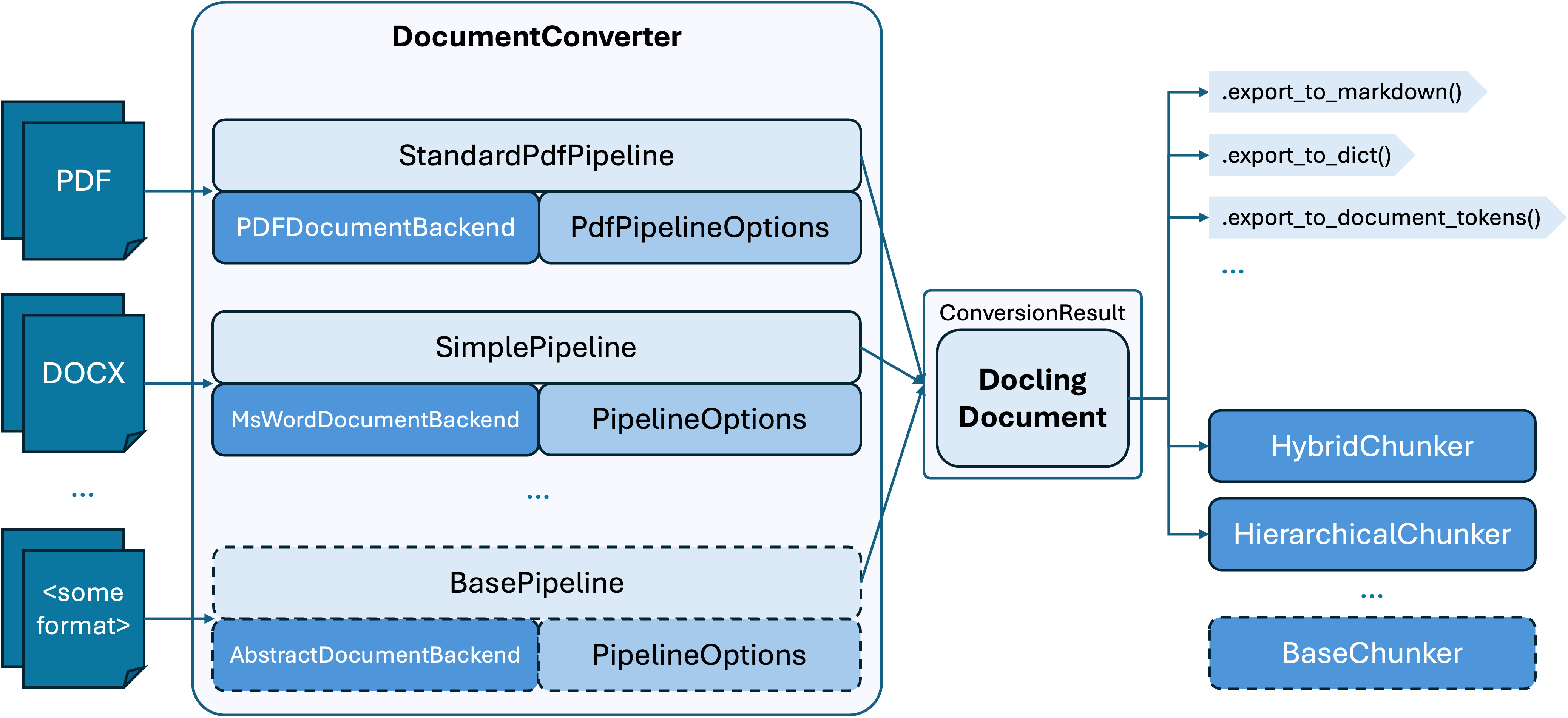
With its document construction APIs, developers can use Docling to build or manipulate documents programmatically while preserving essential layout and structural details.
CrewAI
CrewAI is a powerful framework for creating and running task-driven agents. Each agent in CrewAI has:
- A role (for example, “Corporate Lawyer”).
- A goal (for example, analyzing NDA clauses).
- Access to tools (like Docling and Composio).
- Backstory and knowledge sources for contextual reasoning.
Pydantic
Pydantic is used for data validation and enforcing type constraints in Python. In our example, we use it to define the structured outputs of our agents.
Composio
The Composio integrates the Composio SDK, which is a set of tools for file and document management. It supports:
- File searching and manipulation
- Accessing external knowledge sources
- Exporting files in various formats
IBM watsonx
The IBM watsonx platform significantly enhances the capabilities of our AI agents. Watsonx includes advanced large language models that provide several key advantages:
- Advanced natural language lrocessing (NLP): Using watsonx, our agents can understand and generate human-like text with exceptional accuracy, making clause comparison and analysis more reliable.
- Scalability: The cloud infrastructure of watsonx efficiently handles complex, data-intensive tasks, making it suitable for enterprise-level document processing.
- Enterprise-grade security: The robust security measures of watsonx ensure that sensitive data, such as financial or legal documents, is protected throughout the data analysis process.
Steps
Step 1. Set up your environment
Before you begin, ensure you have Python 3.8 or higher installed.
Install the required libraries. Run the following command to install the libraries:
pip install crewai composio-core 'crewai[tools]' pydantic python-dotenvCreate a Watsonx.ai project. Log in to your IBM Cloud account, and generate an API key under Manage > Access (IAM) > API Keys (this will be your WATSONX_APIKEY). Then, log in to watsonx.ai, and create a project and retrieve the Project ID from the Manage tab under General Options (this will be your WATSONX_PROJECT_ID).
Obtain a Composio API key. Log in to Composio, install the Composio SDK, and either use the
composio logincommand or export your Composio API key as an environment variable (this will be your COMPOSIO_API_KEY).Set up the environment variables. Create a
.envfile in your project directory and add the following keys with your respective API credentials:WATSONX_URL = xxx WATSONX_APIKEY = xxx WATSONX_PROJECT_ID = xxx COMPOSIO_API_KEY = xxx
Step 2. Set up the knowledge source
We’ll start by initializing a CrewDoclingSource, which imports articles or documents for benchmarking.
Here is the sample document referenced in the code: nda.txt.
from crewai.knowledge.source.crew_docling_source import CrewDoclingSource
# Initialize knowledge source
content_source = CrewDoclingSource(
    file_paths=[
        "sample.txt",
        "https://...",
        "sample.docx",
    ]
)
Step 3. Define the LLM
Next, we configure the LLM with parameters for token generation and sampling.
from crewai import LLM
# LLM setup
WATSONX_MODEL_ID = "watsonx/meta-llama/llama-3-8b-instruct"
parameters = {
    "decoding_method": "sample",
    "max_new_tokens": 1000,
    "temperature": 0.7,
    "top_k": 50,
    "top_p": 1,
    "repetition_penalty": 1
}
llm = LLM(
    model=WATSONX_MODEL_ID,
    parameters=parameters,
    max_tokens=1000,
    temperature=0
)
Step 4. Initialize Composio tools
The Composio tools provide file management capabilities.
from composio_crewai import Action, App, ComposioToolSet

# Toolset initialization
tool_set = ComposioToolSet()
rag_tools = tool_set.get_tools(
    apps=[App.RAGTOOL],
    actions=[
        Action.FILETOOL_LIST_FILES,
        Action.FILETOOL_CHANGE_WORKING_DIRECTORY,
        Action.FILETOOL_FIND_FILE,
    ]
)
Step 5. Define the agents
Agents are task-specific components with defined roles. In our example, we are defining a corporate lawyer agent and a clause analysis agent.
from crewai import Agent

# Define the corporate lawyer agent
corporate_lawyer_agent = Agent(
    role="Corporate Lawyer",
    goal="Ingest NDAs and build a robust knowledge base for comparing NDA clauses.",
    tools=rag_tools,
    verbose=True,
    llm=llm,
)
# Define the clause analysis agent
clause_analysis_agent = Agent(
    role="Clause Analysis Specialist",
    goal="Analyze and evaluate NDA clauses against benchmark documents.",
    tools=rag_tools,
    verbose=True,
    llm=llm,
)
Step 6. Define the tasks for the agents
Tasks define specific goals that agents must achieve.
from crewai import Task

# Define a clause analysis task
EXPECTED_TASK_OUTPUT = """
A JSON that includes:
1. Layman's explanation of the clause.
2. Recommendations for improvements.
"""
def create_accumulating_task(original_task, key):
    def accumulating_task(agent, context):
        result = original_task.function(agent, context)
        if "accumulated_results" not in context:
            context["accumulated_results"] = {}
        context["accumulated_results"][key] = result
        return context["accumulated_results"]
    return Task(
        description=original_task.description,
        agent=original_task.agent,
        function=accumulating_task,
        expected_output=original_task.expected_output,
        output_pydantic=original_task.output_pydantic,
        context=original_task.context,
    )
Step 7. Execute the process
Finally, we initialize a CrewAI instance to execute the tasks sequentially.
from crewai import Crew, Process

def get_crew(input_doc):
    crew = Crew(
        agents=[corporate_lawyer_agent, clause_analysis_agent],
        tasks=get_tasks(input_doc),
        knowledge_sources=[content_source],
        process=Process.sequential,
        verbose=True,
    )
    return crew
def get_agent_output(document_from_frontend):
    crew = get_crew(document_from_frontend)
    result = crew.kickoff()
    if isinstance(result, dict) and "accumulated_results" in result:
        return result["accumulated_results"]
    else:
        return {"final_recommendation": result}
Example output
Here is a snippet of the output generated by the AI agents:
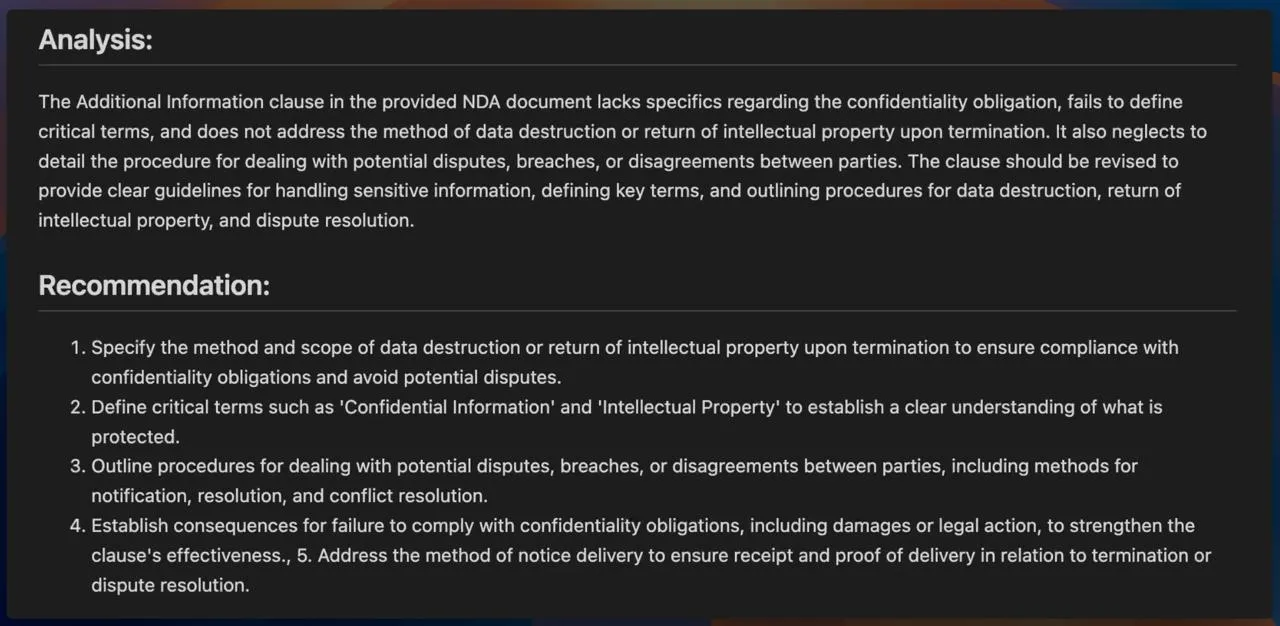
This output demonstrates how agents analyze each clause and provide actionable recommendations.
Summary and next steps
Docling and Crewai represent a significant leap in automated document analysis. Their modular architecture, combined with tools like Composio and robust LLMs, offers unparalleled flexibility and scalability. This framework ensures accuracy, speed, and actionable insights.
Start exploring today, and take your document processing to the next level! For a complete implementation of this example, refer to the Jupyter Notebook in my GitHub repository.