
About cookies on this site Our websites require some cookies to function properly (required). In addition, other cookies may be used with your consent to analyze site usage, improve the user experience and for advertising. For more information, please review your options. By visiting our website, you agree to our processing of information as described in IBM’sprivacy statement. To provide a smooth navigation, your cookie preferences will be shared across the IBM web domains listed here.
Tutorial
Optimizing block storage in a striped configuration for IBM Cloud VPC (3, 5, 10, and custom tiers)
Learn how to calculate and validate optimal block storage configurations using Python, Angular, and FIO on IBM Cloud VPC
Imagine a client needs a block storage setup that delivers 2.176 GB/s of throughput, 80,000 input/output operations per second (IOPS), and 50 TB of storage. Meeting these demands can be challenging, especially since throughput, IOPS, and size are interdependent in IBM Cloud Virtual Private Cloud (VPC) block storage.
This tutorial introduces a simple method to calculate the optimal block storage configuration based on three inputs: storage size, IOPS, and throughput. The goal is to find the best combination of block storage volumes that meets the requirements as closely as possible. We focus on VPC block storage tiers 3, 5, 10, and Custom.
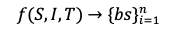
Where,
- S: Storage size
- I: Input/output operations per second (IOPS)
- T: Throughput
- bs: Block size
All disks will be configured in a striped layout (for example, RAID0) to combine their performance. Each volume in the setup will have the same size, tier, and performance characteristics. The virtual server (VSI) must also support the total required throughput across all volumes.
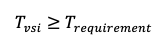
The tutorial includes a Python implementation of the method and applies it to a real-world example. This provides a practical and repeatable way to estimate how many disks you need and what type to meet specific performance and capacity targets.
Note: This method is not officially endorsed by IBM. It’s an analytical tool designed to help with planning. You may want to slightly overprovision IOPS, size, or throughput in production. This is up to your judgment and use case.
Next, let’s look at how throughput works across different storage tiers.
Understanding throughput in block storage tiers
Before we dive into the method, it's important to understand how throughput, IOPS, and storage size are related across different IBM Cloud VPC block storage tiers.
Tiers 3, 5, and 10
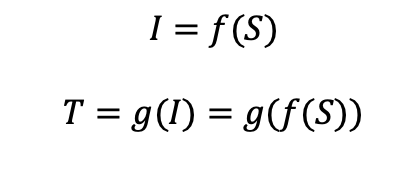
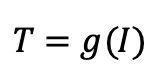
In tiers 3, 5, and 10, throughput is directly tied to the size of the storage volume. As the size increases, so does the available throughput.
Custom tier
In the Custom tier, IOPS and size are decoupled, you can choose them independently. However, IOPS values are restricted based on specific size ranges. These rules are outlined in the official IBM documentation.
Maximum values by tier
Here are the maximum limits for each tier:
| Tier | Max Throughput | Max IOPS | Max Size (GB) |
|---|---|---|---|
| 3 | 670 MB/s | 48,000 | 16,000 |
| 5 | 768 MB/s | 48,000 | 9,600 |
| 10 | 1 GB/s | 48,000 | 4,800 |
| Custom | 1 GB/s | 48,000 | 16,000 |
For more information, see the block storage profiles documentation.
Key input variables for configuration
To propose a suitable block storage setup, you’ll need to define:
Number of disks
IOPS per disk
Size per disk
You don’t need to explicitly set throughput, as it is derived from the IOPS and size based on the selected tier.
Analytical method for calculating block storage disks in a VPC
To begin, it's important to understand that:
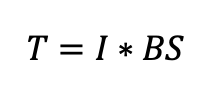
Throughput refers to the total number of read/write blocks processed per second by all applications using the disk.
The block size depends on the application.
For example:
SQL Server typically uses 64 KB blocks
The ext4 file system uses 4 KB
Oracle often uses 16 KB
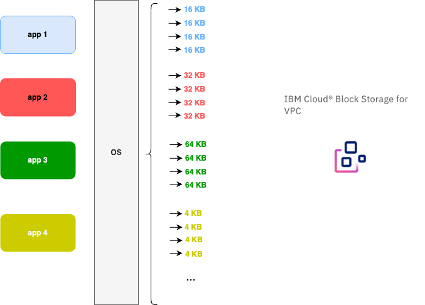
In this method, we first focus on the custom tier, where size and IOPS are decoupled. This allows us to calculate IOPS and size independently.
Later, we will extend the method to handle tiers 3, 5, and 10, where IOPS and size are interdependent.
Case: Custom tier with decoupled size and IOPS
Let’s start with the Custom tier, where size and IOPS are decoupled. While there are some limits based on predefined ranges, we’ll treat them as decoupled for now and adjust later.
Understanding throughput
Throughput is the total data transferred per second, essentially the sum of all read/write operations in a second multiplied by their block size.
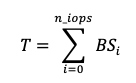
This means there is an average block size used across all disk operations in a given second.
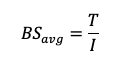
Step-by-step calculation
Estimate the average block size based on application behavior (for example, 4 KB, 16 KB, 64 KB).
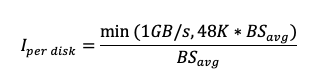
Calculate IOPS per Disk. Use the average block size and remember that for custom tier:
Max throughput = 1 GB/s per disk
Max IOPS = 48,000 per disk

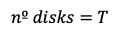
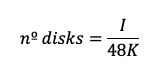
Determine number of disks based on how much throughput and IOPS you need:
If block size ≥ 16 KB, fewer disks may be needed, each using close to max IOPS:
If block size < 16 KB, more disks will be needed, as throughput is limited by IOPS:
Check size constraint once you have the number of disks based on IOPS and throughput, check if this also meets the total required storage.
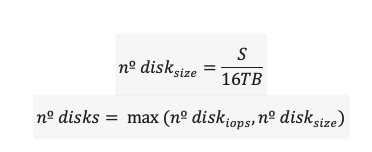
If:
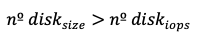
You will overprovision IOPS and throughput.
In all cases, aim to rebalance IOPS and throughput across the disks to get as close as possible to the target specifications.
Rebalancing IOPS and throughput
When adding more disks, throughput and IOPS can become unbalanced. In the previous section, we assumed each disk delivers maximum performance based on the average block size. Now, we’ll walk through how to balance these values.
Calculate throughput per disk
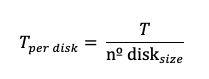
Calculate IOPS per disk
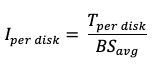
Correct IOPS for custom tier profile. Since the Custom tier assumes a block size of 256 KB, adjust the IOPS accordingly:

Calculate size per disk
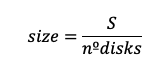
This size may need adjustment to fit the custom tier’s allowed IOPS-to-size ranges, as documented in IBM Cloud VPC - Block Storage Profiles.
Final output for the block storage proposal
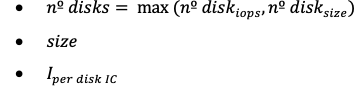
Case: Coupled size/IOPS in tiers 3, 5, and 10
In the previous section, we looked at custom tier volumes where size and IOPS can be considered mostly decoupled. However, for Tiers 3, 5, and 10, IOPS is directly tied to volume size, so we need to adjust the calculations accordingly.
Tier 3 specifications (example)
Max Size: 16 TB
Max Throughput: 670 MB/s
Max IOPS: 48,000
Step-by-step calculation
Estimate average block size
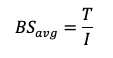
This is the average block size used in disk operations per second.
Calculate max IOPS per disk. Since IOPS is limited by both the size and the throughput cap, we compute:
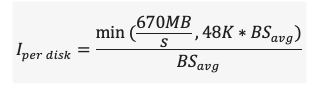
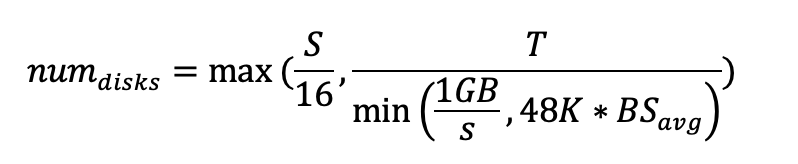
Calculate number of disks
To satisfy throughput and IOPS:

To satisfy storage:
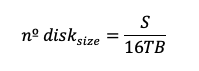
Choose the greater disk count to meet all requirements (IOPS, throughput, and size):

If
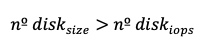
We are overprovisioning IOPS and throughput. While rebalancing based on throughput (as described in the previous section) is possible, it may lead to invalid size values since IOPS is directly tied to volume size in these tiers.
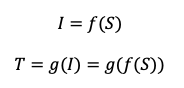
To handle this, we propose rebalancing based on size, not throughput. Especially when:
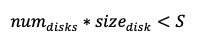
Rebalancing when size requires more disks
To rebalance, we use size as the basis. First, we calculate the size per disk.
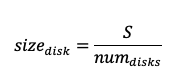
Calculate corresponding IOPS and throughput per disk
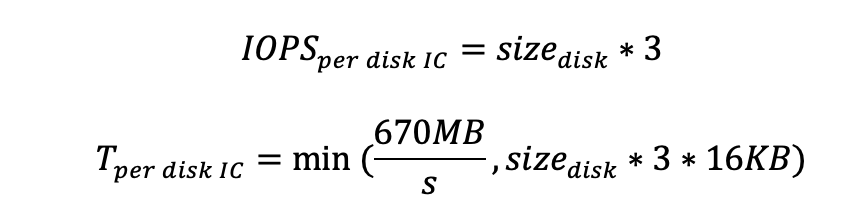
Estimate maximum throughputerror
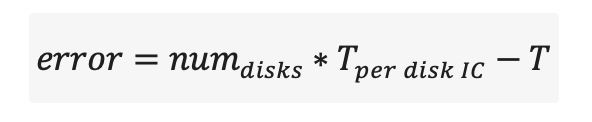
Where:
Final output for block storage proposal

Validating size-based rebalancing
We need to confirm that rebalancing based on storage size still meets throughput requirements.
We define:

Case 1: Size-based count is greater than IOPS-based count
If number of disks based on size is greater than the number of disks based on IOPS, we may overprovision IOPS and throughput. To verify that this still satisfies throughput:
Throughput from IOPS-based count:

Throughput from size-based count:

Finally, we want to show that:

We know from earlier that:

Therefore,
This proves our requirement is met.
Case 2: IOPS-based count is greater than size-based count
Now, if number of disks based on IOPS is greater than the number of disks based on size, we need to confirm that adjusting throughput also satisfies the size requirement.
We are using Tier 3 as an example, but this logic applies to Tiers 5 and 10 as well.
Now, let’s prove that when the number of disks based on size is greater than the number based on IOPS, adjusting the throughput (T) ensures the size-based disk count is still valid.
We define the throughput difference as:

This leads to the corresponding size adjustment:
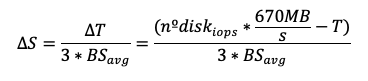
Finally, we want to show that even after reducing the total IOPS, the adjusted storage size still meets the original size requirement.
We start with:

Substituting ∆S and simplifying:

This becomes:

or simply:

Which holds true as long as:
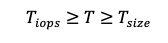
Thus, the size-based disk count remains valid.
Summary of the procedure
Let’s walk through the tier 3 scenario, which is the most complex case:
| Step | Description |
|---|---|
| 1 | Calculate the average block size. |
| 2 | Calculate the number of disks needed to meet IOPS requirements (assuming 48K IOPS per disk). |
| 3 | Calculate the number of disks needed to meet size requirements (assuming 16 TB per disk). |
| 4 | Choose the maximum of the two values:  |
| 5 | Adjust values based on throughput limits. |
| 6 | If size is unbalanced, rebalance based on size. |
| 7 | Return the final number of disks and size per disk to meet the input requirements for size, IOPS, and throughput. |
To explore how these steps are implemented in Python, check out the reference implementation on GitHub, IBM Block Storage Sizing – volumes.py
Write performance considerations
The previous steps focus on read operations, where we assume that maximum IOPS and throughput can be achieved. However, this may not hold true for write operations, especially in some tiers. Since there is no official documentation on write-specific IOPS or throughput limits, write performance scenarios are not covered in this tutorial.
Using RAID 0 for volume striping
The previous sections explained how to calculate the number of identical disks needed to meet IOPS, size, and throughput targets. Now, let's apply that logic to a RAID 0 (striped) configuration. Before diving in, we’ll define a few key terms to guide the analysis.
Key Definitions
 : Block size defined at the RAID 0 (for example, LVM) level. The system waits for a full read/write operation to complete on one disk before accessing the next disk.
 : The ideal block size that enables reaching both maximum IOPS and maximum throughput simultaneously. It is calculated as:
MAX_THROUGHPUT / MAX_IOPSExamples:Tier 3: 670 MB/s ÷ 48K IOPS ≈ 13.95 KB
Tier 5: 768 MB/s ÷ 48K IOPS = 16 KB
Tier 10 / Custom: 1 GB/s ÷ 48K IOPS ≈ 20.83 KB
 : Block size defined in the
 fiobenchmarking tool. : Latency observed for a block size of
 x.
Why RAID 0 block size matters
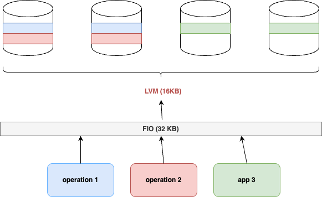
When RAID 0 block size is smaller than the fio block size
Example:
= 16 KB, = 32 KB
The 32 KB block from fio is split into two 16 KB blocks by LVM and written across two disks.
At the fio level: You’ll observe only half the maximum IOPS because a single fio operation spans two disks.
At the system/stat level: You’ll see full IOPS utilization, as both disks are actively handling 16 KB blocks.
Drawbacks of Using RAID0
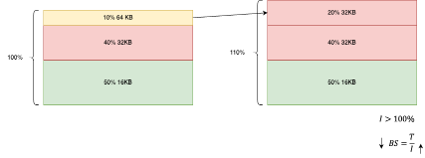
LVM operates at a 16KB block size, so in the custom tier, the maximum throughput becomes limited to
16KB × 48K = 768 MB/s.This setup generates more IOPS than initially estimated, which invalidates our original assumptions for IOPS (I) and throughput (T).
As a result, the average block size
 also changes, affecting performance calculations.
How to avoid the first limitation
To avoid the first drawback, ensure that the RAID0 block size is greater than the block size needed to achieve maximum throughput and IOPS simultaneously :
Tiers 3 and 5: Use
≥ 16KBTier 10 and Custom: Use
≥ 32KB
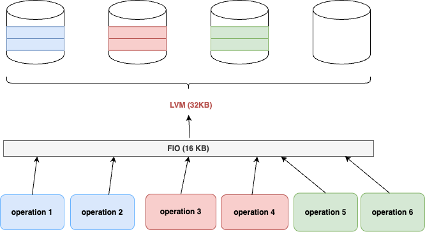
When RAID0 block size is greater than FIO block size
When = 32KB and = 16KB, FIO uses 16KB blocks, which means LVM must wait for two 16KB operations to complete before moving to the next disk.
At the FIO level, we observe 100% of the maximum IOPS.
At the system (stat) level, we also observe 100% of the maximum IOPS.
Key outcomes
- should be greater than any block size used in operations on the volume.
To avoid performance loss,
must be greater than Tier 3 and tier 5: use at least 16KB
Tier 10 and custom: use at least 32KB
Implementation with Angular and Python
Clone the repository.
git clone https://github.com/IBM/ic-bs-vpc-proposal-sizing cd ic-bs-vpc-proposal-sizingSet up the Python backend. The backend is built using Python and Flask.
cd api virtualenv -p python3 venv source venv/bin/activate pip install -r requirements.txt cd srcRun the backend.
python3 main.pyTest the API. Use
curlto send a test request:curl -X POST localhost:5000/volumes \ -H "Content-type: application/json" \ -d '{"thoughput": 0.670, "iops": 48000, "size": 16, "tier": "tier3"}'Notes:
Throughput is in GB/s
Size is in TB
Tier values can be:
tier3tier5tier10custom
Deploy the frontend locally
Install Node.js and Angular CLI.
nvm install 18 npm install -g @angular/cliInstall dependencies.
cd front npm installRun the frontend.
ng serve -c localOpen the application http://localhost:4200 in your browser.
Testing the application
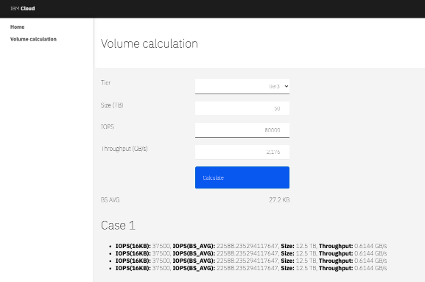
Suppose a customer needs a Tier 3 block storage setup with the following requirements:
Size: 50 TB
IOPS: 80,000
Throughput: 2.176 GB/s
Using the tool, the suggested configuration includes 4 disks, each with:
IOPS: 35,700
Size: 12.5 TB
Testing the block disk proposal
Provision a virtual machine with enough bandwidth to meet the storage requirements. For this example:
Image:
ibm-redhat-9-4-minimal-amd64-7Profile:
cx3d-48x120Block storage: 4 disks, each with 12.5 TB and 35,700 IOPS
Steps
Log in to the machine.
ssh root@<PUBLIC_IP>Install required packages.
yum install -y lvm2 fioCreate a striped logical volume.
pvcreate /dev/vdf /dev/vdg /dev/vdh /dev/vdi vgcreate vg01 /dev/vdf /dev/vdg /dev/vdh /dev/vdi lvcreate --type striped -i 4 -I 64 -L 100G -n l01 vg01Format the logical volume using the
ext4filesystem and mount it:mkfs -t ext4 /dev/vg01/l01 mkdir -p /mnt/vol01 mount /dev/vg01/l01 /mnt/vol01Create the FIO test file. This configuration sets up 10 jobs for random read operations, distributed as follows:
50% use a block size of 16 KB
40% use 32 KB
10% use 64 KB
cat << EOF > fio.txt
[global]
ioengine=libaio
direct=1
iodepth=16
runtime=60
time_based
rw=randread
numjobs=2
size=10G
group_reporting
[jobvol01]
bs=16k
directory=/mnt/vol01

[jobvol02]
bs=16k
directory=/mnt/vol01

[jobvol03]
bs=16k
directory=/mnt/vol01

[jobvol04]
bs=16k
directory=/mnt/vol01

[jobvol05]
bs=16k
directory=/mnt/vol01

[jobvol06]
bs=32k
directory=/mnt/vol01

[jobvol07]
bs=32k
directory=/mnt/vol01

[jobvol08]
bs=32k
directory=/mnt/vol01

[jobvol09]
bs=32k
directory=/mnt/vol01 [jobvol10] bs=64k directory=/mnt/vol01
EOF
Why this configuration?
We selected this configuration because the average block size ( ) for the workload is 27.2 KB, which matches the expected mix of IOPS and throughput. This value is calculated based on the workload distribution:
= 0.5 16KB + 0.4 32KB + 0.1 * 64KB = 27.2KB
Run the test
Now, execute the test using fio:
fio fio.txt
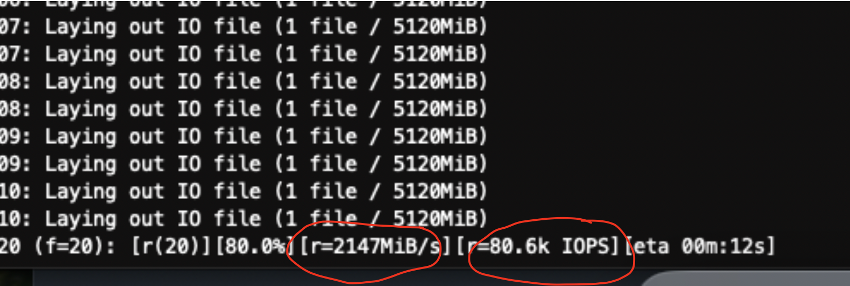
You should see output values close to the expected IOPS and throughput.
Summary
This tutorial illustrated an analytical method to calculate the optimal block storage configuration for a VSI in IBM Cloud VPC, based on storage size, IOPS, and throughput. It focuses on standard (tiers 3, 5, 10) and custom tiers, using a striping approach to meet performance targets. A Python implementation and real-world example are provided to show how to apply this method in practice.