
About cookies on this site Our websites require some cookies to function properly (required). In addition, other cookies may be used with your consent to analyze site usage, improve the user experience and for advertising. For more information, please review your options. By visiting our website, you agree to our processing of information as described in IBM’sprivacy statement. To provide a smooth navigation, your cookie preferences will be shared across the IBM web domains listed here.
Article
OpenShift API for Data Protection in IBM Cloud
Learn how to leverage OADP for efficient backup and restore of Kubernetes clusters on IBM Cloud, ensuring data resilience and business continuity
In a cloud environment, backing up and restoring applications on Kubernetes clusters involves replicating data and later retrieving it to respond to events such as data corruption, environment migration, or archiving for cost reduction. These processes ensure data resilience, business continuity, and readiness for recovery scenarios. Regular application backups enable organizations to mitigate risks like inadvertent data deletion, hardware malfunctions, and unnecessary recurring costs. Thus, orchestrating backup and restore procedures becomes an integral aspect of cloud application management.
Scenarios for backup and restore
Common scenarios for backup and restore follow:
Archive demo or unused environments: Use backup and restore capabilities to effectively archive demo environments. By capturing backups of these applications, organizations ensure the preservation of critical configurations, data, and settings. This proactive approach facilitates easy retrieval for future use, enhancing operational efficiency, agility, and reducing cloud consumption costs.
Degrading application: In the event of an application entering a degraded state or experiencing performance issues, using previous backups becomes important. By maintaining backups, organizations can mitigate the impact of unforeseen disruptions by restoring the application to a known, stable state. Reverting applications to previous versions from backups provides a reliable mechanism to troubleshoot issues, isolate root causes, and ensure seamless continuity of business operations.
Migrating application: During the process of migrating applications to other environments, transferring configurations, data, and dependencies can pose challenges. However, by leveraging backup and restore functionalities, organizations can simplify the migration process. Restoring backups in the new environment expedites setup, reduces migration complexities, and accelerates time-to-deployment.
Planning for backup and restore
To effectively plan for backup and restore solutions, consider the following steps:
Resource identification: Begin by identifying critical components and resources within your application that require backup, such as configuration files and persistent volumes.
Architecture decisions: Determine whether the cluster will be restored within the same account or a different region to align with your architectural needs.
Backup schedule: Establish a backup schedule that meets your operational requirements. Decide on the frequency of backups to ensure data is adequately protected.
Regular testing: Test your backup and restore processes regularly to validate their functionality. Conducting test restores allows you to verify the integrity of backups and its effectiveness in restoring the cluster to the desired state.
Documentation: Document backup and restore procedures comprehensively. Include step-by-step instructions, configuration files, and troubleshooting tips. Comprehensive documentation ensures consistency in backup operations and facilitates knowledge sharing among team members.
IBM Cloud backup and restore options
Various technology options are available for backing up and restoring Kubernetes clusters on IBM Cloud. It's important to evaluate these options based on factors such as cost, reliability, and compatibility with your environment. Here are some options to consider:
IBM Cloud Block Storage snapshots: This option offers native backup and restore functionality for Kubernetes clusters using Block Storage snapshots.
Portworx: Portworx is a cloud-native persistent storage and data management solution designed for Kubernetes and OpenShift clusters.
OADP: OADP allows backup of Kubernetes objects and internal images by saving them as an archive file on object storage.
OADP overview
Let's explore the OpenShift API for Data Protection (OADP) and its capabilities on IBM Cloud. Learn how to perform backup and restore operations for applications running on an IBM Cloud RedHat OpenShift cluster.
Backup with OADP
OADP facilitates backup of Kubernetes objects and internal images by saving them as an archive file on object storage. Additionally, it backs up persistent volumes (PVs) by creating snapshots using either the native cloud snapshot API or the Container Storage Interface (CSI).
Restore with OADP
With OADP, you can restore both resources and PVs from a backup. You can choose to restore all objects in a backup or filter them based on namespace, PV, or label for a more granular restoration process.
OADP architecture
The following figure shows the high-level backup and restore architecture:

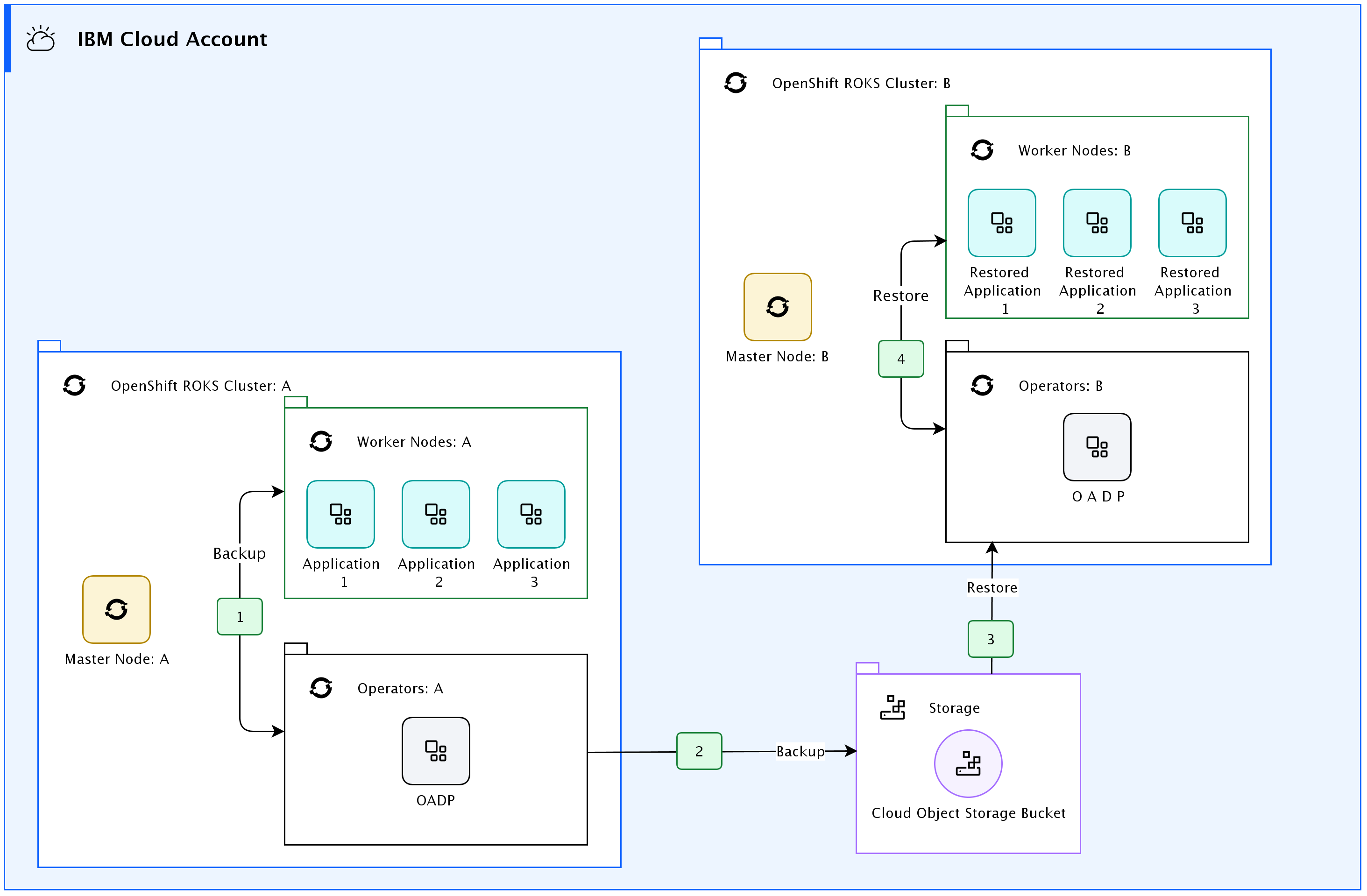
Cluster A: The origin cluster where backups are initiated.
Cluster B: The destination cluster where restoration takes place.
The architecture shows the following steps:
Backup initiation: Configuration files are backed up and snapshots of PVs are created on Cluster A.
Upload to Cloud Object Storage (COS) bucket: Backups and snapshots are uploaded to the Cloud Object Storage (COS) bucket.
Restore initiation: Restoration is initiated on Cluster B, retrieving configuration files and snapshots from the COS bucket. Restoration can be done either all at once or incrementally.
Configuration and PV restoration: Finally, configuration files and persistent volumes are restored on Cluster B.
Summary
The article explores the importance of backup and restore procedures in cloud environments, focusing on Kubernetes clusters. It outlines common scenarios where backup and restore functionalities are crucial, such as archiving demo environments, handling degrading applications, and simplifying application migration. Additionally, it discusses key considerations for planning backup and restore solutions and highlights various IBM Cloud options available for these tasks, including the OpenShift API for Data Protection (OADP). The article emphasizes the importance of robust backup and restore strategies in ensuring data resilience, business continuity, and efficient cloud management.