
About cookies on this site Our websites require some cookies to function properly (required). In addition, other cookies may be used with your consent to analyze site usage, improve the user experience and for advertising. For more information, please review your options. By visiting our website, you agree to our processing of information as described in IBM’sprivacy statement. To provide a smooth navigation, your cookie preferences will be shared across the IBM web domains listed here.
Article
Optimizing LLMs with cache augmented generation
Explore cache augmented generation (CAG) and its advantages over retrieval augmented generation (RAG) for efficient knowledge retrieval in language models.
Large language models (LLMs) have transformed natural language processing with capabilities such as text generation, summarization, and question answering. While techniques such as retrieval-augmented generation (RAG) dynamically fetch external knowledge, they often introduce higher latency and system complexity.
Cache-augmented generation (CAG) offers an alternative by using expanded context windows and enhanced processing power in modern LLMs. By embedding and reusing precomputed knowledge within the model’s operational context, CAG enables faster and more efficient performance for static, knowledge-intensive tasks.
This article explores CAG and its integration with Granite language models, demonstrating how Granite’s extended context windows and processing power enhance efficiency by directly utilizing precomputed information.
How cache-augmented generation (CAG) works
Modern large language models (LLMs) can process up to 128K tokens—equivalent to 90-100 pages of an English document—without needing chunking or retrieval. Typically, the attention layer computes key-value (KV) representations for all knowledge with each query. Cache-augmented generation (CAG) optimizes this by precomputing KV representations once and reusing them, reducing redundant computations. This enhances retrieval efficiency and speeds up question-answering processes.
Preloading external knowledge
Relevant documents or datasets are preprocessed and loaded into the model’s extended context window.
- Goal: Consolidate knowledge for answering queries.
- Process:
- Curate a static dataset.
- Tokenize and format it for the model’s extended context.
- Inject the dataset into the model’s inference pipeline.
Precomputing the key-value (KV) cache
The model processes the preloaded knowledge to generate a KV cache, storing intermediate states used in attention mechanisms.
- Goal: Minimize redundant computations by storing reusable context.
- Process: Encode documents into a KV cache using the model’s encoder, capturing its understanding of the preloaded knowledge.
Storing the KV cache
The precomputed KV cache is saved in memory or on disk for later use.
- Goal: Enable multiple queries to access the cached knowledge without recomputation.
- Benefit: The cache is computed once, allowing for rapid reuse during inference.
Inference with cached context
During inference, the model loads the cached context alongside user queries to generate responses.
- Goal: Eliminate real-time retrieval and maintain contextual relevance.
- Process:
- Combine cached knowledge with the query.
- Generate responses using the preloaded KV cache for efficiency and accuracy.
Cache reset (optional)
To optimize memory usage, the KV cache can be reset when needed.
- Goal: Prevent overflow and manage memory efficiently.
- Process: Remove unnecessary tokens or truncate the cache. Reinitialize the cache for new inference sessions.
Implementing CAG with Granite models
This section covers the practical implementation of cache-augmented generation (CAG) using Granite models. We compare the performance of four different Granite models based on accuracy and response time by using the key-value cache for knowledge retrieval.
Importing dependencies: We start by importing the necessary libraries.
import os import platform from time import time from tqdm import tqdm import pandas as pd import matplotlib.pyplot as plt import torch from sklearn.metrics.pairwise import cosine_similarity from transformers import AutoTokenizer, AutoModelForCausalLM from transformers.cache_utils import DynamicCache from sentence_transformers import SentenceTransformer from helpers import get_env, generate_graphsEnvironment setup: This function reads environment variables from a
.envfile and stores them in a dictionary. It loads the Hugging Face token (HF_TOKEN) required for authenticating API calls to Hugging Face’s model hub.def get_env() -> dict: env_dict = {} with open(file=".env", mode="r") as f: for line in f: key, value = line.strip().split("=") env_dict[key] = value.strip('"') return env_dictCAGModule Class: This class manages the core logic of preprocessing knowledge, generating responses, and interacting with the model.
__init__()methodInitializes the tokenizer and loads the model using the specified model name and Hugging Face token.
def __init__(self, model_name: str, hf_token: str): self.model_name = model_name self.hf_token = hf_token self.tokenizer = AutoTokenizer.from_pretrained(model_name, token=hf_token) self.model = AutoModelForCausalLM.from_pretrained( model_name, torch_dtype=torch.float16, device_map="auto", token=hf_token )preprocess_knowledge()methodEncodes the input prompt and feeds it into the model. Returns
past_key_values, which store cached computations for efficient reuse in future queries.def preprocess_knowledge(self, prompt: str) -> DynamicCache: embed_device = self.model.model.embed_tokens.weight.device input_ids = self.tokenizer.encode(prompt, return_tensors="pt").to(embed_device) past_key_values = DynamicCache() with torch.no_grad(): outputs = self.model( input_ids = input_ids, past_key_values = past_key_values, use_cache = True, output_attentions = False, output_hidden_states = False ) return outputs.past_key_valueswrite_kv_cache()methodSaves the knowledge cache to a specified file path.
def write_kv_cache(self, kv: DynamicCache, path: str) -> None: torch.save(kv, path)clean_up()methodTruncates the key and value caches to their original length, freeing up memory.
def clean_up(self, kv: DynamicCache, origin_len: int) -> None: for i in range(len(kv.key_cache)): kv.key_cache[i] = kv.key_cache[i][:, :, :origin_len, :] kv.value_cache[i] = kv.value_cache[i][:, :, :origin_len, :]prepare_kvcache()methodFormats and preprocesses input documents, generates a knowledge prompt, and calls
preprocess_knowledge()to create a key-value cache for efficient retrieval.def prepare_kvcache(self, documents: str|list, kvcache_path: str, answer_instruction: str = None): if answer_instruction is None: answer_instruction = "Answer the question in a concise and precise way." if isinstance(documents, list): documents = '\n\n\n\n\n'.join(documents) elif isinstance(documents, str): pass else: raise ValueError("The `documents` parameter must be either a string or a list of strings.") knowledges = f""" <|start_of_role|>system<|end_of_role|> You are an assistant for giving precise answers based on given context.<|end_of_text|> <|start_of_role|>user<|end_of_role|> Context information is below. ------------------------------------------------ {documents} ------------------------------------------------ {answer_instruction} Question: """ t1 = time() kv = self.preprocess_knowledge(knowledges) self.write_kv_cache(kv, kvcache_path) t2 = time() return kv, t2 - t1generate()methodGenerates new tokens using
input_idsandpast_key_values. Uses a greedy search (argmax) to select the next token and appends it to the generated output.def generate(self, input_ids: torch.Tensor, past_key_values, max_new_tokens: int = 300): embed_device = self.model.model.embed_tokens.weight.device origin_ids = input_ids input_ids = input_ids.to(embed_device) output_ids = input_ids.clone() next_token = input_ids with torch.no_grad(): for _ in range(max_new_tokens): outputs = self.model( input_ids=next_token, past_key_values=past_key_values, use_cache=True ) next_token_logits = outputs.logits[:, -1, :] next_token = next_token_logits.argmax(dim=-1).unsqueeze(-1).to(embed_device) past_key_values = outputs.past_key_values output_ids = torch.cat([output_ids, next_token], dim=1) if next_token.item() == self.model.config.eos_token_id: break return output_ids[:, origin_ids.shape[-1]:]run_qna()methodFormats an input question, retrieves relevant knowledge from the cache, and generates a response, which is then decoded into readable text.
def run_qna(self, question, knowledge_cache): prompt = f""" {question}<|end_of_text|> <|start_of_role|>assistant<|end_of_role|> """ input_ids = self.tokenizer.encode(prompt, return_tensors="pt").to(self.model.device) output = self.generate(input_ids, knowledge_cache) generated_text = self.tokenizer.decode(output[0], skip_special_tokens=True) return generated_textrun()functionThe main function that orchestrates the entire workflow, from setting up the model to running question-answering tasks with cached knowledge.
def run():
  HF_TOKEN = get_env()["HF_TOKEN"]
  datapath = "../datasets/rag_sample_qas_from_kis.csv"

  def get_kis_dataset(filepath):
      df = pd.read_csv(filepath)
      dataset = zip(df['sample_question'], df['sample_ground_truth'])
      text_list = df["ki_text"].to_list()
      return text_list, list(dataset)

  text_list, dataset = get_kis_dataset(datapath)

  model_names = [
      "ibm-granite/granite-3.0-2b-instruct",
      "ibm-granite/granite-3.1-2b-instruct"
  ]

  qa_details_per_model = {}
  model_summary_stats = {}

  bert_model = SentenceTransformer('all-MiniLM-L6-v2')

  for model_name in model_names:
      print(f"Processing model: {model_name}")
      model_id = model_name.replace("/", "_").replace(" ", "_")

      qa_details_per_model[model_id] = []
      model_summary_stats[model_id] = {}

      qna_module = CAGModule(model_name, HF_TOKEN)

      kv_cache_path = f"./data_cache/{model_id}_cache_knowledges.pt"
      knowledge_cache, prepare_time = qna_module.prepare_kvcache(text_list, kvcache_path=kv_cache_path)
      kv_len = knowledge_cache.key_cache[0].shape[-2]
      print("Length of the Key-Value (KV) Cache: ", kv_len)
      print(f"KV-Cache prepared in {prepare_time} seconds")

      total_similarity = 0
      total_inference_time = 0
      num_samples = len(dataset)

      for question, ground_truth in tqdm(dataset):
          torch.cuda.empty_cache()
          qna_module.clean_up(knowledge_cache, kv_len)

          generate_t1 = time()
          response = qna_module.run_qna(question=question, knowledge_cache=knowledge_cache)
          generate_t2 = time()

          response_time = generate_t2 - generate_t1
          total_inference_time += response_time

          ground_truth_emb = bert_model.encode(ground_truth, convert_to_tensor=True).cpu().numpy()
          response_emb = bert_model.encode(response, convert_to_tensor=True).cpu().numpy()
          similarity = cosine_similarity([ground_truth_emb], [response_emb])[0][0]
          total_similarity += similarity

          qa_details_per_model[model_id].append({
              "question": question,
              "ground_truth": ground_truth,
              "generated_text": response,
              "response_time": response_time,
              "similarity": similarity
          })

      avg_similarity = total_similarity / num_samples
      avg_inference_time = total_inference_time / num_samples

      model_summary_stats[model_id].append({
          "avg_similarity": avg_similarity,
          "avg_inference_time": avg_inference_time,
          "kv_len": kv_len,
          "prepare_time": prepare_time
      })

      del knowledge_cache
      del qna_module
      torch.cuda.empty_cache()

  print("Model Summary Stats:\n", model_summary_stats)
  return qa_details_per_model, model_summary_stats
After running the script, we obtained the following results for the Granite-3.0-2B and Granite-3.1-2B models:
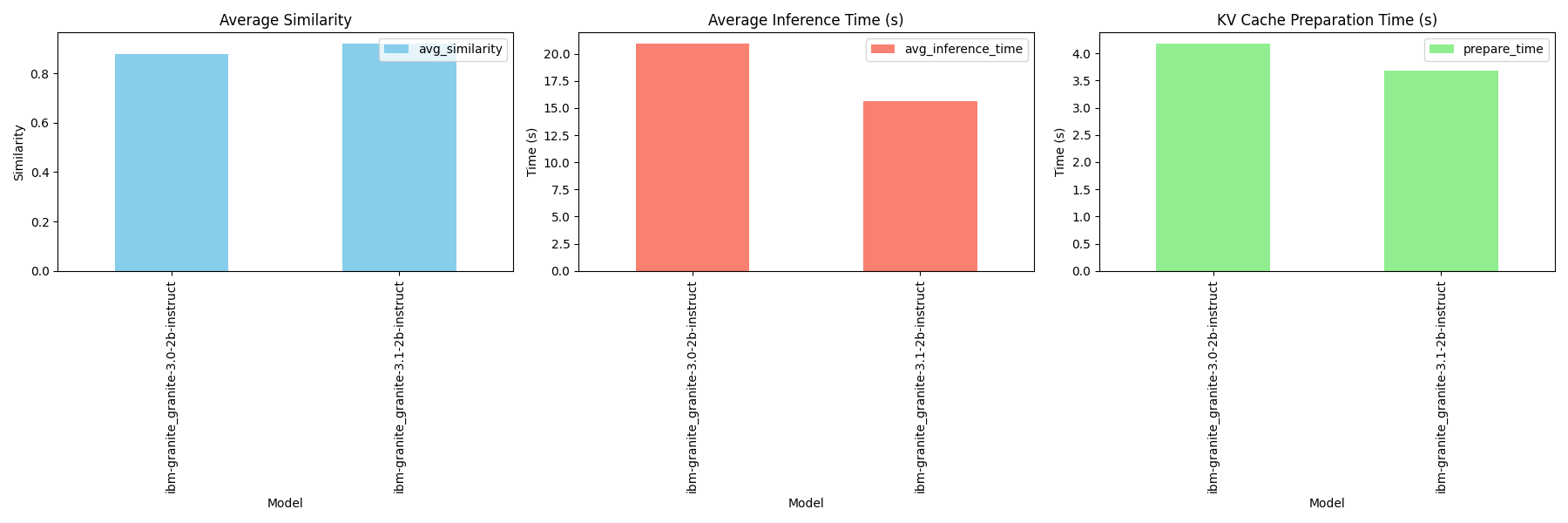
For the complete code, refer to the CAG Script.
CAG vs. RAG: Key differences
Retrieval-augmented generation (RAG) works like a web search engine, dynamically fetching information from external sources for each query. It offers flexibility but depends on retrieval speed and accuracy.
Cache-augmented generation (CAG) is more like a content delivery network (CDN), preloading and caching knowledge for faster and more reliable responses. However, its effectiveness is limited by the freshness and size of the preloaded data.

Benefits of CAG
- Faster responses – Eliminates real-time retrieval, reducing latency and speeding up query handling.
- Comprehensive insights – Preloaded knowledge ensures accuracy and coherence, making it ideal for summarization, FAQ management, and document analysis.
- Simplified system – Removes retrieval components, streamlining architecture and improving maintainability.
- Consistent output quality – Avoids errors from document selection or ranking, ensuring reliable and high-quality responses.
Challenges of CAG
- Scalability limits – Limited by the model’s fixed context window, making it unsuitable for large datasets.
- High memory usage – Preloading data into the KV cache increases resource demands.
- Limited adaptability – Cannot quickly update with new or real-time data without full reprocessing.
- Query matching issues – Less effective for complex or highly specific queries compared to dynamic retrieval methods such as RAG.
Conclusion
CAG optimizes LLM workflows by preloading knowledge and precomputing states, making it ideal for static dataset applications with fast response needs. Looking ahead, advancements such as extended context windows, improved context management, and hybrid RAG + CAG architectures could offer the best of both worlds—efficient preloaded contexts with selective real-time retrieval for greater adaptability.