
About cookies on this site Our websites require some cookies to function properly (required). In addition, other cookies may be used with your consent to analyze site usage, improve the user experience and for advertising. For more information, please review your options. By visiting our website, you agree to our processing of information as described in IBM’sprivacy statement. To provide a smooth navigation, your cookie preferences will be shared across the IBM web domains listed here.
Article
Overview of IBM Enterprise Build of Quarkus
Supercharge your modern, cloud-native and AI-infused apps with a high performance Java framework, IBM Enterprise Build of Quarkus
On this page
IBM Enterprise Build of Quarkus is a production-ready distribution that is based on the popular open source project at quarkus.io. Quarkus has become a leading Java platform for building modern, cloud-native, and AI-infused enterprise applications, and IBM is now bringing its enterprise-grade capabilities and support to organizations that depend on Java at scale.
Quarkus delivers superior throughput, extremely fast startup times, and a remarkably small resource footprint. These characteristics translate directly into lower infrastructure consumption and reduced operational costs. The result is a high-performance Java stack designed for microservices, serverless workloads, data streaming, and AI-driven applications. It also provides a practical and forward-looking path for modernizing existing enterprise systems.
Why you should choose Quarkus for modern Java apps
These core capabilities make Quarkus an excellent choice for modern, cloud-native and AI-infused applications:
- Developer speed
- Cloud-native high-performance runtime
- Enterprise-grade AI apps
- Cloud-efficient Java stack
- Open standards and extensions
Developer speed
Quarkus accelerates developer workflows with live coding, continuous testing, and a unified configuration system. Live coding updates applications instantly as developers make changes, eliminating manual restarts and dramatically shortening build–test cycles. Continuous testing provides immediate feedback on every modification. Unified configuration simplifies the management of application settings across development, test, and production environments.
Check out the following quick start guide demo of IBM Enterprise Build of Quarkus:
Cloud-native high-performance runtime
Quarkus is engineered for high performance, combining strong throughput, blazing fast startup times, and low memory usage even when running on a traditional JVM. Its build-time optimizations shift work out of the runtime path, reducing overhead and improving responsiveness.
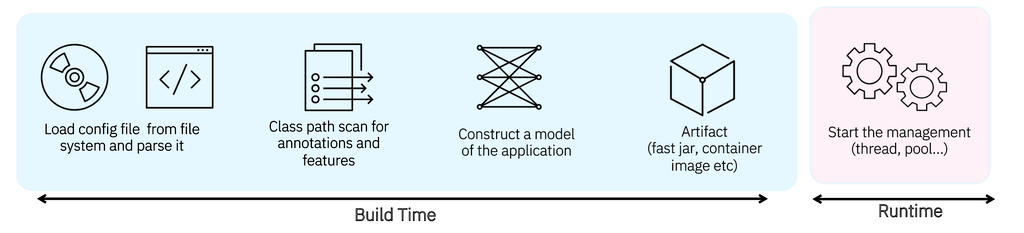
The graphic below illustrates Quarkus' build-time optimizations. Based on the application's configuration and annotations, it constructs the application's model upfront - removing unnecessary components and computing the exact instructions required. This result is faster startup, lower memory consumption, better latency and and higher throughput during runtime.
For workloads that demand an even smaller footprint or near-instant startup, GraalVM native builds unlock more aggressive optimizations. This flexibility lets teams choose the most cost-efficient and operationally effective runtime model for their environment.
Enterprise-grade AI apps
Quarkus simplifies the introduction of AI into enterprise applications through built-in support for LangChain4j. Developers can use familiar Java APIs to integrate with large language models and AI workflows. This lowers the barrier to entry and empowers teams to build intelligent, AI-enhanced features without adopting new languages or frameworks.
Check out this demo of building AI-infused apps and workflows with IBM Enterprise Build of Quarkus:
Cloud-efficient Java stack
Quarkus provides a reliable and efficient Java foundation designed to run consistently across any cloud. Built-in authentication, distributed metrics, and tracing support through OpenTelemetry give teams the observability and security they expect from an enterprise platform. Quarkus’ lightweight runtime consumes fewer resources, offering a more sustainable and cost-efficient way to operate Java applications at scale.
Open standards and extensions
Quarkus is deeply aligned with open standards, including MicroProfile and Jakarta EE, and offers over 800 extensions for AI, integration, messaging, databases, and cloud services. This ecosystem allows teams to assemble application capabilities quickly while preserving compatibility with widely adopted industry standards. It provides a flexible foundation for building the next generation of enterprise applications.
Check out a demo of the Quarkus extensions:
Get started
The Application Configurator https://code.quarkus.ibm.com/ helps you to quickly bootstrap your Quarkus application, discover its extension ecosystem, and start coding right away.
To generate your first Quarkus application:
- Download the getting started application zip package from https://code.quarkus.ibm.com/d
- Extract and open it in your terminal or IDE.
- Use the maven wrapper
./mvnw quarkus:devcommand to start the application in dev mode. - When you view a welcome message, select key
wto view your running application atlocalhost:8080.
Then, check out the Quarkus Basics learning path, which is designed to help developers, architects, and teams build skills step by step. The learning path covers core concepts, development fundamentals, and the ecosystem that makes Quarkus (and IBM Enterprise Build for Quarkus) so powerful.